guides
How to Evaluate AI Security Operations Assistants Before You Pilot
A documentation-based guide to piloting a SOC assistant with a mandatory human approval path. Official Security Copilot docs say queries run as the user and data sharing is on by default. Official Cisco AI Defense pages describe an AI-application security platform, so it is a boundary rather than a second SOC core tool. No detections were tested, and no attack or bypass guidance is included.
A security operations assistant is useful when it drafts a summary an analyst still has to accept, reject, or rewrite. It is not useful — and it is not this purchase — if the product’s official job is to inventory AI apps, red-team models, and put guardrails on prompts. Those are both “AI plus security,” and they are not interchangeable.
This documentation-based guide was reviewed on November 10, 2026 (Asia/Shanghai). We did not connect a SOC tenant, run detections, or measure dwell time. Descriptions come from official Microsoft Security Copilot and Cisco AI Defense pages opened that day. Detection-rate, “minutes rather than hours,” and similar claims are vendor language, not AINav tests. This is a defensive buying guide only. It does not include attack techniques, exploit steps, evasion, or bypass guidance.
SOC assistant, AI-application defense, and incident observability are different jobs
The catalog core for a SOC or security-IT assistant in this review is Microsoft Security Copilot. Official Microsoft documentation describes a generative assistant and agents that help with incident investigation, threat intelligence, alert triage, hunting queries, and posture tasks, in a standalone portal and inside Microsoft security products, with human oversight.
Cisco AI Defense is in the same industry-tools catalog, but official Cisco pages describe a different product: discovery of AI assets and third-party AI apps, validation and algorithmic red teaming of models, supply-chain scanning, and runtime guardrails against threats to AI applications such as prompt injection and data leakage. That is an AI security platform, not a SOC-summary assistant. It is treated here as a boundary, not as a second core row, and it is not scored as if it triaged SIEM alerts.
Observability incident assistants are another adjacent job and are not linked from this unpublished draft series. Employee ITSM ticket bots are also out of scope.
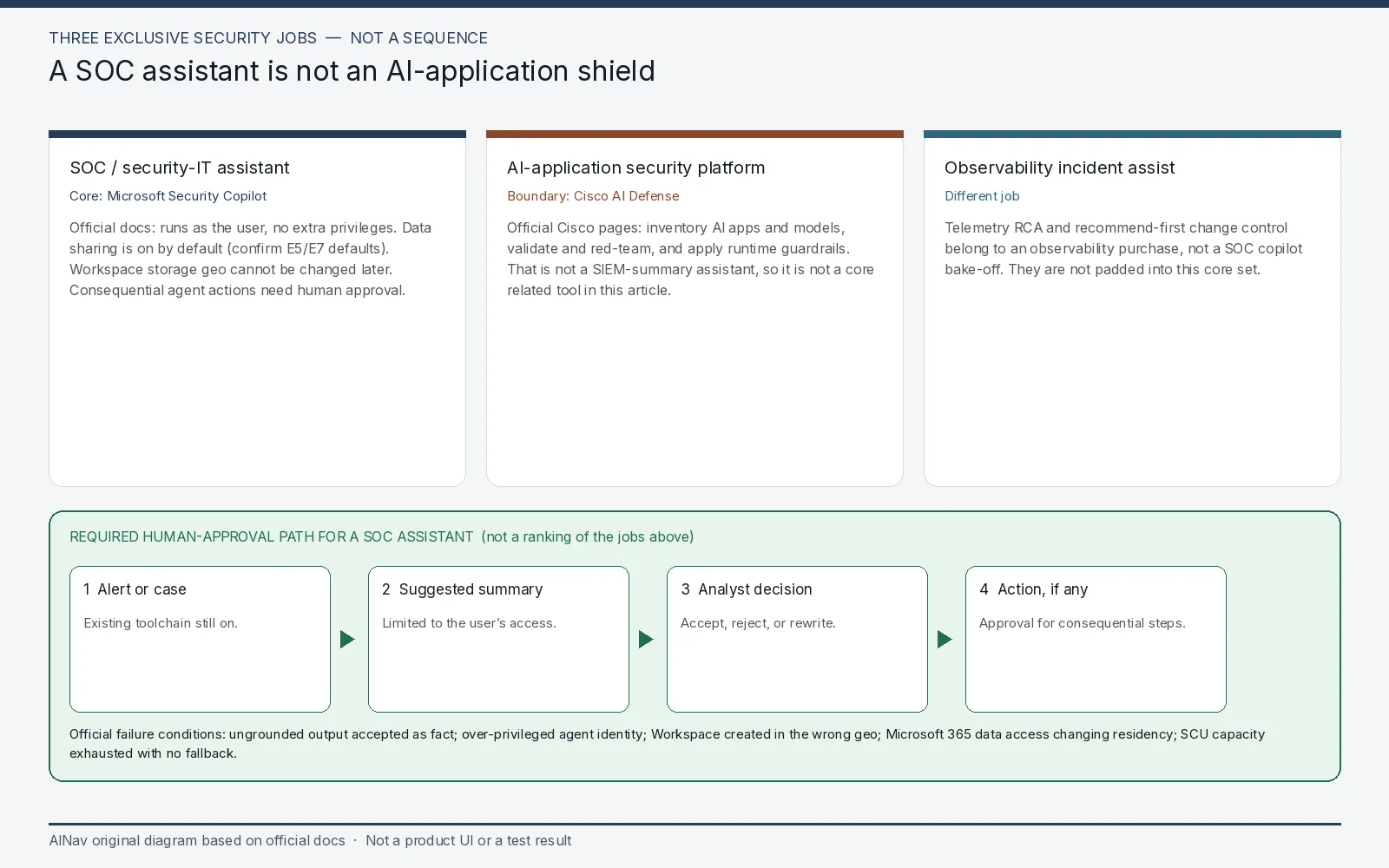
AINav original diagram based on official docs. Sources: Privacy and data security in Microsoft Security Copilot, Microsoft Security Copilot application card, Cisco AI Defense. Not an official screenshot or a test result.
Security Copilot: permissions follow the user, and several defaults need a named owner
Official Microsoft Learn documentation says Security Copilot “runs queries as the user, so it never has elevated privileges beyond what the user has.” Responses are limited to data the user is authorized to access. Official application-card language adds that misconfigured permissions in underlying systems can still affect completeness. Least privilege for users and for agents is therefore a rollout control, not a later hardening task. Official agent guidance says agents may perform scoped actions only within configured permissions, and that consequential or irreversible actions require human oversight and approval.
Data-sharing defaults are easy to miss, and the official uses are specific. Official privacy documentation states that data sharing is turned on by default for the settings described on that page, with a note that Microsoft 365 E5 and E7 customers may see different default settings, which you must confirm on the linked article. The two official Owner settings are not a generic “share with Microsoft” switch. One allows Microsoft to capture Customer Data and use human review to validate product performance — official examples include whether Security Copilot can answer requests and where capability gaps appear, the types of tasks customers run, usability and quality metrics, and improving responses from plugins and Microsoft Security Copilot agents. The other allows Microsoft to capture and human-review data to build and validate Microsoft’s security-specific models built on top of Azure OpenAI foundational models or Microsoft-built models, including data from Microsoft plugins and agents you use. Official text says shared data is not shared with OpenAI, is not used to train Azure OpenAI foundational models, is not used for sales, and is not shared with third parties. While sharing remains on (the documented default unless you turn it off, subject to the E5/E7 caveat), official language says some Customer Data may be stored outside the tenant’s chosen Workspace geography; uploaded files stay in the Workspace, but content retrieved from them during a session can be stored outside it. Shared evaluation data and opt-out windows should be left as the official page states them, not collapsed into one number. On the page reviewed here, shared data used for evaluation is retained for 90 days. The same page says that if you opt out, Security Copilot deletes previously shared Customer Data within 30 days, and also says previously shared data is retained for not more than 180 days. Treat those as official statements on one page, and confirm the live article rather than picking a single deletion window. Session data and data after you delete all provisioned capacity have separate official 180-day windows; those are not the sharing-evaluation period. Set the switches before analysts paste incident text into the product.
Storage and evaluation locations are also different controls. Official docs say Customer Data is stored in the location selected when a Workspace is created, and that location cannot be changed later. Prompt evaluation can be pinned to documented regions (Australia, Europe, the United Kingdom, or the United States) or allowed to run “anywhere” for capacity. Official guidance recommends evaluating prompts where GPU capacity is available, which may not be the storage geo. If you also enable access to Microsoft 365 services data (for example certain Purview-derived alerts), official privacy docs say that data is then processed and stored under Security Copilot’s policies and locations, “regardless of the location in which the data was processed or stored” under prior EU Data Boundary or core-online-services residency terms. That sentence is a buying condition. Turn the Microsoft 365 access setting off unless counsel has accepted the new path. Official text also notes that agent communications through email or Teams may traverse global Microsoft network infrastructure in transit.
Capacity is metered in Security Compute Units (SCUs), with provisioned and overage models described in official product documentation. Exact list prices are omitted here; confirm current official billing, and note official application-card language that usage limits and latency can affect the experience. Official limitations also include inaccurate or incomplete outputs, preview features, token and context limits, and a statement that Security Copilot “isn’t currently designed for use in certain government cloud environments.” Generated code or KQL is not for production use without validation.
Failure conditions to write into the pilot plan: an analyst accepts an ungrounded summary; an agent identity is over-privileged; data sharing stays on by default without a decision; a Workspace is created in the wrong geo and cannot be moved; Microsoft 365 data access quietly changes residency; SCU capacity throttles an incident; a preview agent is treated as generally available.
Cisco AI Defense stays a boundary — do not pilot it as a SOC copilot
Official Cisco AI Defense pages describe inventory of AI workloads, access policy for third-party AI apps, model and application validation, and runtime protection for AI traffic. Official language is about securing the use and development of AI, not about summarizing a SIEM queue. If your actual gap is “protect our own models and block unsafe prompts,” evaluate AI Defense on its official docs as that product. If your gap is “help analysts triage detections,” it is the wrong core tool for this article. This review does not describe how to test or evade those guardrails.
A pilot that starts on a non-production workspace
Use a sandbox or non-production workspace, a reduced-privilege analyst role, and already-public or fictional alert text. Do not upload live case files until data-sharing, storage geo, and plugin scope are set. Then check six things:
- Job fit. SOC assistant, AI-application defense, or observability incident assist — pick one official job.
- Permission boundary. Confirm the assistant cannot see or do more than the signed-in user, and that agent identities are least-privilege.
- Human approval. Require a named analyst to accept summaries and to approve any consequential agent action. Official application-card language says users should review outputs before acting.
- Data path. Set sharing, Workspace storage geo, prompt-evaluation region, and Microsoft 365 access deliberately. Record the official retention windows.
- Capacity and fallback. Know what happens when SCU capacity is exhausted, and keep the existing SOC toolchain as the fallback.
- Scope of plugins and preview agents. Disable what you have not reviewed.
Stop the pilot, or keep the product off, if actions can complete without approval, if residency or sharing terms are still the default you did not accept, or if the vendor you invited is an AI-app guardrail platform you mistook for a SOC assistant.
Who this purchase is for, and who should look elsewhere
This evaluation is for SOC leads and CISO staff who want a documented, assistive copilot with a human approval path.
It is not an AI-application security bake-off, not an observability-assistant review, and not a detection-accuracy claim.
Frequently asked questions
Why is Cisco AI Defense not in Related tools? Official Cisco pages describe an AI-application and model security platform. That is a different job from a SOC assistant, so it is a boundary in this article rather than a padded core competitor.
Does Security Copilot get extra privileges so it can investigate? Official privacy docs say it runs queries as the user and does not gain elevated privileges beyond that user.
Is data sharing off until we opt in? Official documentation says data sharing is on by default for the settings described on that page, with a possible different default for some Microsoft 365 E5 and E7 customers. Review Owner settings before the first real case.
Can we change the Workspace storage country later? Official docs say the storage location is chosen at Workspace creation and cannot be changed afterward.