guides
How to Evaluate Vector Databases for RAG Before You Pilot
A documentation-based architecture guide to piloting a vector or hybrid-search data layer for RAG. Official MongoDB, Redis, and Pinecone docs treat permission filters and namespaces as query-time or design-time controls the application must send — an omitted filter is an unfiltered search, not a default-secure index. Azure AI Search is a managed-search boundary, not a remake of the published knowledge-search guide. No latency or recall was tested.
A vector database for retrieval-augmented generation is useful when it is the data layer under an application you control: embeddings, metadata, tenancy, filters, and a generate step that still requires a citation or a human review. It is not an end-user knowledge-search product, and it is not “secure by default” just because vectors live in a managed service. Permission filtering is something the application (or an authorization service) must apply at a documented moment — before retrieval, inside the query, or after candidates return. If that step is missing, similar chunks can surface for the wrong user.
This documentation-based guide was reviewed on November 10, 2026 (Asia/Shanghai). We did not load company documents into an index, measure latency or recall, or test a production access-control system. Descriptions come from official MongoDB Atlas Vector Search, Redis, Pinecone, and Azure AI Search pages opened that day. Official recall, cost, or “ultra-low-latency” language is vendor documentation, not an AINav benchmark. This is an architecture buying guide. It is not a tutorial for putting proprietary data into a public or shared index.
A RAG data layer is not an employee search assistant
The catalog cores for this review are MongoDB Atlas Vector Search and Redis Vector Search. Official MongoDB documentation describes $vectorSearch as an aggregation stage that can pre-filter on indexed metadata fields and, separately, post-filter results with later pipeline stages such as $match. Official Redis documentation describes vector search that can be “augment[ed] … with filtering over text, numerical, geospatial, and tag metadata,” with the filter expressed in the query before the KNN clause.
Dedicated vector databases such as Pinecone are a common class in this architecture, and official Pinecone documentation is cited below for tenancy and filter timing. A live AINav catalog page exists under the official directory name Pinecone, so Pinecone is included in Related tools on that real catalog ID. This review still does not invent features or prices beyond the official pages opened. Azure AI Search is in the catalog, but it is treated as a boundary: official Microsoft documentation describes a managed cloud search service that can run classic index search and agentic retrieval, including enterprise access-control features you still have to configure. If the job is an employee-facing knowledge assistant, start with the published guide How to Evaluate Enterprise AI Knowledge Search Before You Buy rather than remaking that purchase here.
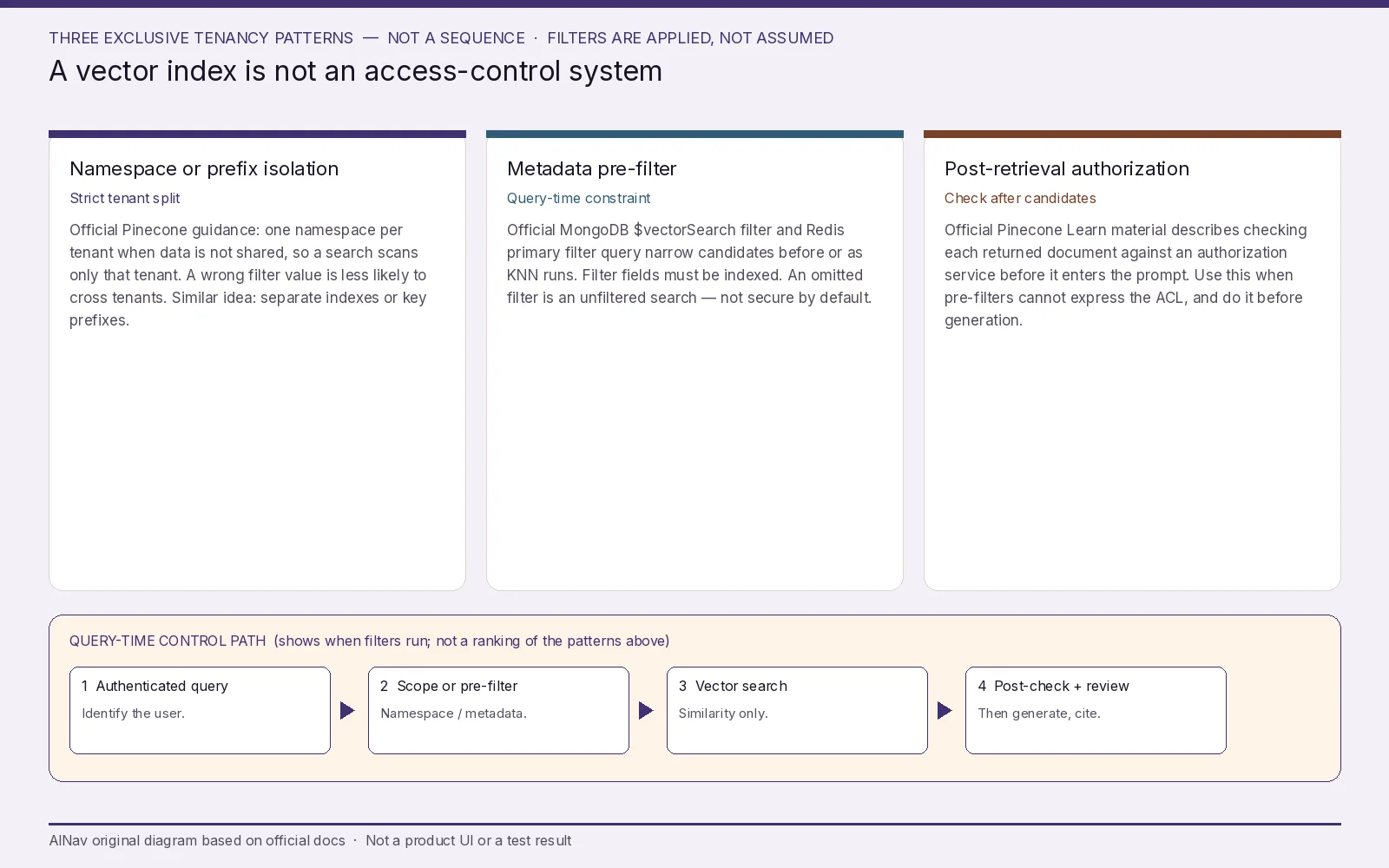
AINav original diagram based on official docs. Sources: MongoDB $vectorSearch filtering, Redis vector search filters, Pinecone: Design for multitenancy, RAG with Access Control. Not an official screenshot or a test result.
Filters run when you send them — the index does not invent your ACL
Official vendor docs agree on a point that is easy to miss in a demo: similarity search and authorization are different steps.
Official MongoDB documentation says you can pre-filter by supplying a filter expression on fields that were indexed as the filter type, and that pre-filtering “ensures that documents are eliminated before MongoDB Vector Search traverses the HNSW graph.” You can also post-filter after $vectorSearch with supported pipeline stages. Official text notes that filtered queries are typically slower than an equivalent unfiltered query, that a pre-filter can be too restrictive, and that if you omit the filter, the search is not limited to a tenant or a permission set. Automated Embedding is documented as a Preview feature that official docs say should not be used in production. Official guidance also warns that returnStoredSource can return stale data because of replication lag. None of that is a default security guarantee; it is a query contract you have to design, index, and test.
Official Redis documentation places a primary filter query before the KNN clause, for example a tag or numeric range, and uses * when no filters are required. If you query with *, official syntax is doing an unfiltered nearest-neighbor search. Redis documents hybrid execution modes (batches versus ad-hoc brute force) as latency and accuracy trade-offs for filtered search, not as access-control systems. Prefixes on keys can limit which records are indexed, but that is still an application design choice.
Official Pinecone documentation recommends one namespace per tenant when each tenant’s data is completely separate, because searches then scan only that namespace, and because isolation “reduces the risk of application bugs that could search the wrong tenant’s data (for example, by passing an incorrect filter value).” Official docs also describe metadata filters when data is shared, and they warn against large $in lists of individual user IDs (including a documented operator limit). A Pinecone Learn article walked through pre-filter and post-filter authorization with an external permission system: look up allowed IDs and pass them as a metadata filter, or check each returned document after retrieval. The same article states the risk plainly: if users have different access to data, the RAG pipeline must enforce those boundaries; you should not trust the system to “just do the right thing.” Official Pinecone RBAC, where documented, governs access to organizations, projects, and data-plane resources — it is not a substitute for per-document authorization in the query.
Official Azure AI Search documentation lists Microsoft Entra ID, Private Link, document-level access control, and role-based access among enterprise features, and it also documents a “security filter workaround” for some sources. “Permission-aware” in official product language is a capability to configure, including inheritance from supported sources, not a reason to skip a design review.
Failure conditions: embeddings are upserted without tenant or ACL metadata; a query is issued with no filter and no namespace; a metadata typo searches the wrong tenant; post-filters run after the model has already seen unauthorized chunks; deletion or retention is undocumented; or a managed search service is assumed to enforce your file-share permissions without a documented setting.
Choose a tenancy pattern on official behavior, not on a latency claim
Official Pinecone guidance is a useful class map even when you implement the same idea in MongoDB or Redis: isolate tenants in separate namespaces (or equivalent index/key prefixes) when data is not shared; use group-level metadata filters when it is; do not ship a filter that enumerates thousands of user IDs if official limits and cost models punish that pattern. Official MongoDB docs add that pre-filters must be indexed as filter fields, and that ANN versus exact nearest-neighbor search is a recall and latency trade-off you tune (for example with numCandidates) rather than a security control. Official Redis docs similarly distinguish FLAT, HNSW, and other index types as accuracy-versus-scale choices.
Do not invent a queries-per-second or millisecond figure for any of these products. Confirm current official pricing and regional options on the vendor’s own pages; cluster, search-node, and token charges (including MongoDB Automated Embedding, where billed per token) vary by deployment and region, so hard prices are omitted here.
Keep the generate step boring on purpose. Official knowledge-search and RAG write-ups, including Azure’s grounding language and the Pinecone Learn authorization walk-through, assume retrieved text is only context. Require citations or a human review before the answer is shown as a business fact. That requirement belongs in the application, not in the index logo.
A pilot that never starts on the production corpus
Use a non-production project, a throwaway index or namespace, and already-public or fictional documents. Do not upsert export-controlled, personal, or customer data until tenant keys, filter fields, and deletion behavior are written down. Then check six things:
- Job fit. RAG data layer, employee knowledge assistant, or application search you already operate — pick one official job.
- Filter timing. Show, in a trace or query log, whether authorization happens as a pre-filter, a metadata or namespace constraint, a post-filter, or some combination. If none of those fire, the query is not permission-aware.
- Tenancy. Prefer namespace or index isolation for strict separation; use group metadata when sharing is required; test a wrong-tenant query on purpose.
- Index contract. Confirm filter fields are actually indexed, and that unfiltered queries are denied in the application for end-user traffic.
- Lifecycle. Document update lag, delete or tombstone behavior, and retention. Official MongoDB stored-source language about lag is a reminder to test freshness.
- Generate-step review. Require a citation or a human check before anyone acts on an answer. This is not a license to dump private files into a shared or public index.
Stop the pilot, or keep the corpus out, if unauthorized documents can reach the prompt, if deletion is unclear, or if the product you invited is an end-user search assistant you mistook for a vector data layer.
Who this purchase is for, and who should look elsewhere
This evaluation is for platform engineers and applied-AI leads who must choose a vector or hybrid-search data layer before they put company documents behind an app.
It is not an employee knowledge-search bake-off, not a latency benchmark, and not instructions for loading proprietary data into a public service.
If users need a permission-aware company search assistant, use the published enterprise knowledge-search guide, including Azure AI Search where that is already the organizational standard.
Frequently asked questions
Why is Pinecone in Related tools? A live AINav catalog page for Pinecone was confirmed in this review (directory H1: Pinecone). Official Pinecone docs were already opened first-hand for namespace and filter patterns, so that real catalog ID is used. Features still come from those official pages, not from the directory FAQ.
If we pass a metadata filter, are we secure by default? No. Official docs describe filters and namespaces as query-time (or design-time) controls the application must send correctly. An omitted filter is an unfiltered search.
Should we filter before or after retrieval? Official MongoDB, Redis, and Pinecone material document both pre-filters (or namespace scoping) and post-filters or post-retrieval checks. The safer buying question is whether some documented authorization step happens before unauthorized text can enter the prompt, not whether one vendor “is secure.”
Can we use the cloud search service we already have instead of a dedicated vector store? Sometimes. Official Azure AI Search pages describe vector, hybrid, and permission-related features. Evaluate that path as the managed search service it is, and do not remake the knowledge-search article unless that is the actual job.