tutorials
Slite: connect sources, then use Ask or the Agent and check the citations
Ask is on Basic; Pro, or Enterprise with the Slite Agent, replaces Ask with the Agent. Official help returns source documents with the answer. Outdated docs are ranked lower in Ask and excluded from the Agent. Question and credit limits below are dated 29 November 2026.
Slite can answer a question from your workspace, but Ask and the Slite Agent are not the same product path. Official help says Ask is on the Basic plan. On Pro, or on Enterprise with the Slite Agent, Ask is replaced by the Agent, which can also search connected tools. Enterprise without the Agent still gets Ask. In every case, the useful next step is the same: open the source documents, and notice whether a doc is verified or marked outdated.
Official help on Ask, Connect your data sources, Manage sources and their permissions, and Doc Verification, plus the public pricing page, were reviewed on November 29, 2026 (Asia/Shanghai). We did not connect a live Slack or Drive source, and we did not run Ask or the Agent against an internal policy. Prices, question limits, and Agent credits below are what those pages showed that day. They are not evergreen, and they are not the same on every plan.
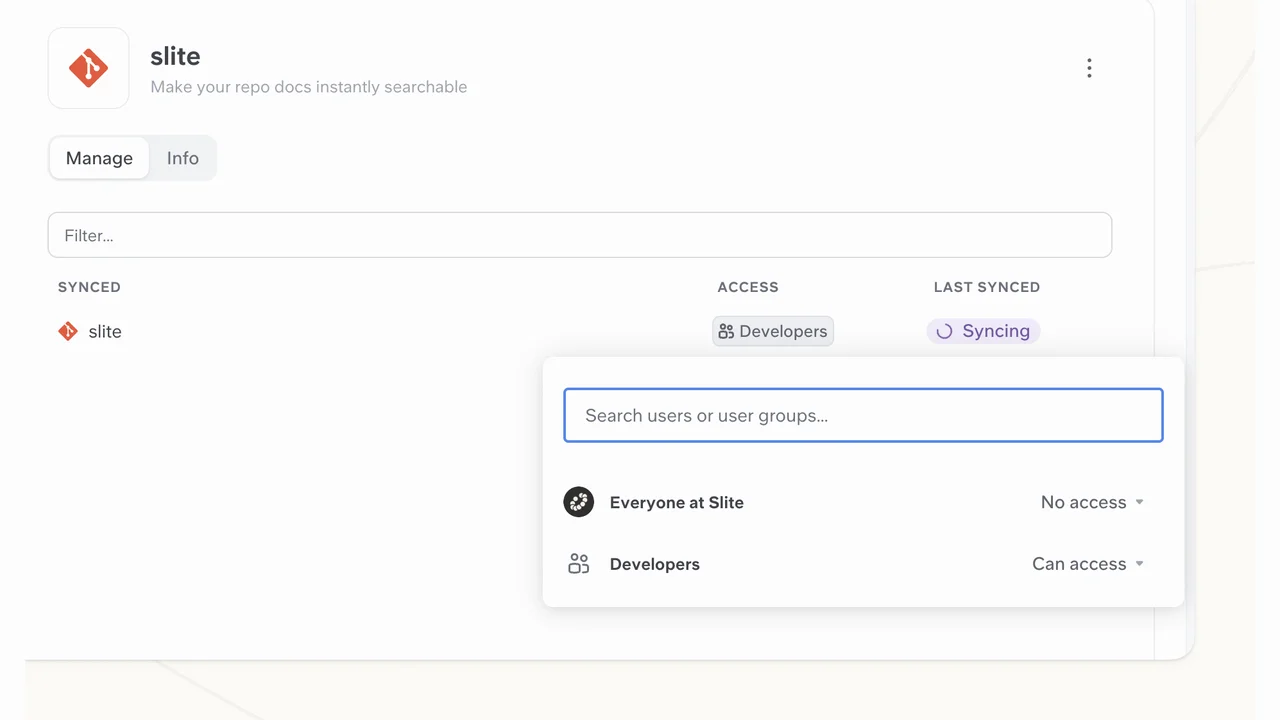
Cover source: Slite’s official help article Manage sources and their permissions, acquired November 29, 2026 (Asia/Shanghai). The cover is Slite’s official help screenshot of source access controls, showing a sample connection named “slite,” a “Developers” access grant, and “Everyone at Slite” set to “No access.” The workspace name, groups, and access labels are official documentation examples, not a workspace we joined and not a policy answer we generated. No interface values were rewritten. Underlying vendor copyright is retained; no blanket reuse licence was established.
Ask and the Agent are not interchangeable
Official Ask help says Ask lets you ask questions in plain language and get a summarized answer drawn from your workspace docs. It returns a direct response alongside the source documents it used.
The same article is explicit about plan shape:
- Basic: Ask searches within your Slite docs, limited to 30 questions per seat per month. The allowance is pooled across the workspace (30 × the number of non-guest seats). Once the limit is reached, Ask is unavailable until the quota resets on the 1st of the following month.
- Pro, and Enterprise with the Slite Agent: Ask is replaced by the Slite Agent, which searches across connected tools (the help text lists examples such as Slack, Linear, HubSpot, and Google Drive) as well as your docs.
- Enterprise without the Agent: the workspace still gets Ask.
Guests cannot use Ask. Official FAQ text says Ask searches the same documents you can access via general search, filtered by your permissions, and that it will not include docs from your private channel, content from comments, or Collection attributes such as tags.
New or edited content is indexed approximately 10 minutes after the last edit session ends. Official privacy text on the Ask page says your content is not used to train Ask’s language or AI models, and that only the most relevant passages are sent to model providers, named there as Anthropic and Google.
This is a how-to for a workspace that already uses Slite. It is not a buyer’s guide to enterprise knowledge search, and it is not a hard comparison with Notion or Superhuman Docs (formerly Coda). Those are different tasks; see How to Evaluate Enterprise AI Knowledge Search Before You Buy if you are still choosing a product.
Connect sources, then read Shared versus Mirrored
The Agent is only as useful as the sources it can see. Official Connect your data sources says to open Settings, go to Agent sources, choose + New source (the permissions article also says + Connect a source), and connect the tool you need. You can also add public websites such as a help center.
Official Manage sources and their permissions then asks you to distinguish two access models:
- Shared: members who have been given access can query the source even without an account in the connected tool. By default, a new Shared source is only accessible to workspace admins and the person who added it. “Everyone at {workspace}” starts at No access. To open it up, change access in Settings → Agent sources. Roles on each row are Can access, Can manage, and No access. Workspace admins and owners can always query a Shared source and manage its permissions, even when an item is set to No access.
- Mirrored: the Agent matches each member to their account in the connected tool by email. Members can only query content they already have access to in that tool. Official exception: for Slack public channels, once a channel is synced, any workspace member linked to Slack by email can get answers from it, even if they have not joined the channel. Private Slack channels only return answers to their members. No matching email account means no results from that source.
The permissions article also notes that removing a connection permanently deletes all indexed content from that source, and that being allowed to manage a source is not the same as being able to query what is inside it.
Verified docs rise; outdated docs are treated differently in Ask and in the Agent
Official Doc Verification and the Ask article do not use one rule for every surface.
Ask help says verified docs are prioritized in Ask results, and docs flagged as outdated are ranked lower. The Doc Verification article is more specific once the Agent is in the picture: verified docs are ranked higher in Slite Ask, the Slite Agent, and Search, while outdated docs are deprioritized in Ask and excluded from the Slite Agent. Do not write “sorted lower” as if it applied to both.
Verification can expire on a date you set, moving a doc to “Verification expired.” Official help also describes “Verification requested” and a default “No status.” Those labels are signals for owners and teammates. They are not a certificate that an answer is approved policy.
When Ask or the Agent returns a response with source documents, open those sources. If a cited doc is unverified, expired, or outdated, treat the answer as a pointer, not as a rule you can send on unchanged. Generated answers are not verified facts, and they are not an approved policy.
Credits and list prices, as shown today
The public pricing page on November 29, 2026 (Asia/Shanghai) showed Basic at $10 and Pro at $20 per user per month, billed yearly, with Enterprise as custom pricing. Those figures are what the page showed that day. They are not evergreen, and they are not described here as monthly-billed prices.
On the same page, Pro includes 50 monthly credits per seat, pooled in the workspace. Official FAQ text says each Pro seat adds 50 credits per month to a shared allowance, so a team of 20 gets 1,000 credits, and adding seats raises the allowance right away. Enterprise allowances are tailored. The 14-day free trial is described as including 500 shared credits.
Credits power the Slite Agent. Official FAQ text says every Agent request uses credits, wherever it runs: in Slite, in Slack, through the API or MCP, and in scheduled work such as digests and doc maintenance. Inline AI writing, translation, and grammar tools do not use credits.
The credit allowance resets on your billing date every month, including on yearly plans. That is not the same rule as Ask’s reset on the 1st of the following month. Do not treat “30 questions” or “50 credits” as universal across plans.
If the workspace runs out of credits, official FAQ text says workspace admins can buy top-ups under Settings > AI usage > Purchase additional credits, at $10 per 100 credits on that day’s page. Top-ups start after the monthly allowance is used, and each one stays valid for a year after purchase. Recheck that top-up price before you rely on it.
What we did not test
We did not connect a production source, grant Shared access, or ask a live Agent question. Plan prices, the 30-question Ask cap, the 50-credit Agent allowance, reset rules, and the top-up figure are official public-page wording from November 29, 2026 (Asia/Shanghai). Recheck the live pricing and help pages for your plan. And when an answer arrives with citations, open the cited docs — especially any that are unverified or outdated — before you treat the text as something the organization has already approved.