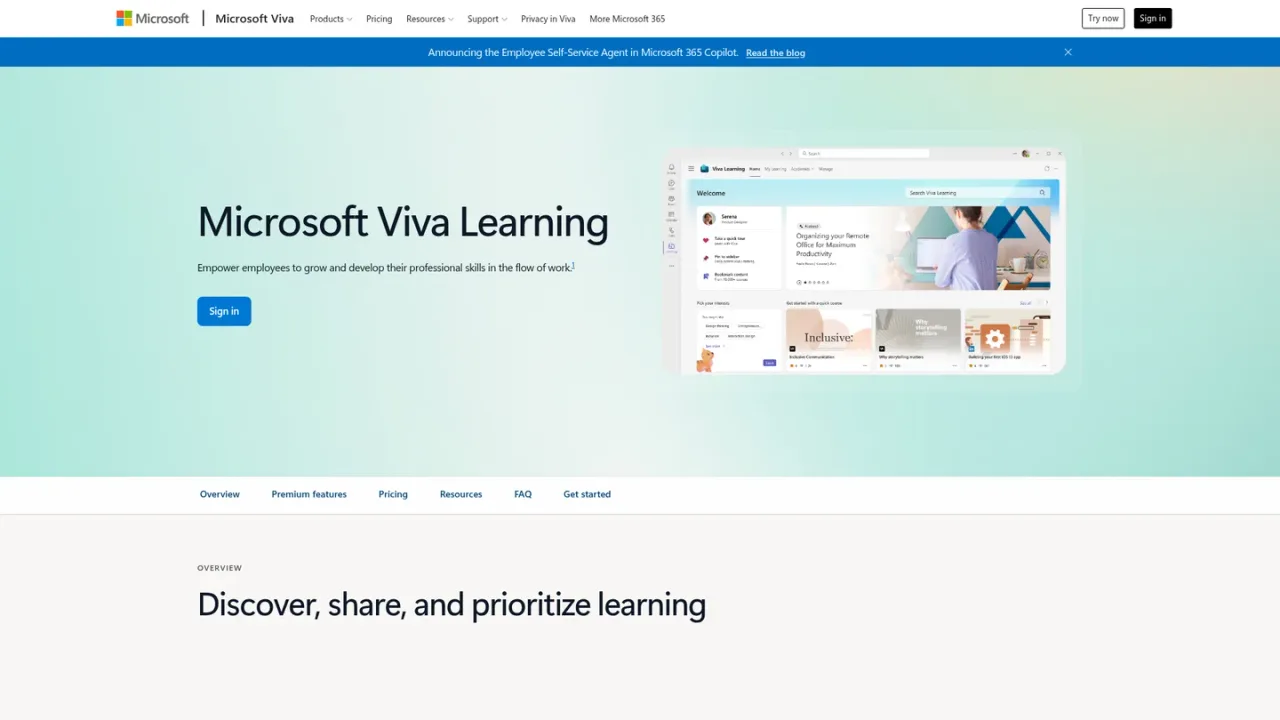
Microsoft Viva Learning is an enterprise learning experience that brings professional development into the flow of work, primarily through a hub in Microsoft Teams and learning items across Microsoft 365. It aggregates content from Microsoft Learn, Microsoft 365 Training, LinkedIn Learning, SharePoint, learning management systems, and other providers into a single front door. Employees can track assignments, recommendations, completions, and collections in My Learning, book learning time in Outlook, follow learning paths and academies, and discuss content in Teams. Organizations can curate academies by role or topic, sync LMS assignments, feature content, and review adoption reports. Access is included in Microsoft 365 enterprise plans, with premium capabilities available through Viva Suite or a standalone Viva Learning premium license.
How to use Microsoft Viva Learning
1
Open Viva Learning in Teams
Sign in with your organizational account and open the Viva Learning app or a Viva Learning tab in a Teams channel to browse learning content.
2
Track learning in My Learning
Use the My Learning view to see assignments, recommendations, completions, and bookmarked learning collections.
3
Schedule learning time
Use the Add to Calendar feature to book dedicated learning time directly in Outlook.
4
Follow structured paths
Create, discover, and share learning paths and collections, or join curated academies organized by role, group, or topic.
5
Connect an LMS for assignments
With a premium license, connect a learning management system to sync assignments and aggregate internal and external content.
Microsoft Viva Learning Features
Personalized My Learning view for assignments, recommendations, completions, and collections
Add to Calendar to book learning time in Outlook
Learning paths, collections, and custom academies by role, group, or topic
System-generated suggestions based on learner interests and trending content
Viva Learning tabs and learning discussions in Microsoft Teams
Aggregation of content from Microsoft, SharePoint, LMS providers, and other sources
Search across Microsoft 365 to surface learning results in Bing, Microsoft365.com, and SharePoint
LMS assignment syncing and adoption reports with premium licensing
Copilot in Viva Learning (preview) as a virtual learning companion
Admin controls to feature content and manage access and providers
Microsoft Viva Learning Use Cases
Help employees discover and complete professional development courses without leaving Teams
Centralize learning content from Microsoft Learn, LinkedIn Learning, SharePoint, and LMS providers
Assign and track required training through LMS assignment syncing
Curate role-based or topic-based learning academies for teams
Encourage social learning through shared content and discussions in Teams channels
Measure learning adoption with analytics reports for administrators
Microsoft Viva Learning FAQs
Contact your Microsoft representative to add Viva to your existing enterprise subscription. If you are not an existing customer, see Microsoft 365 pricing.
Yes. Access to learning content in Microsoft Teams is included in Microsoft 365 enterprise plans, while premium features require Viva Suite or a standalone Viva Learning premium license.
Viva Learning provides the full Microsoft Learn and Microsoft 365 Training libraries plus 300+ LinkedIn Learning courses. Active LinkedIn Learning or other partner subscriptions can make their full libraries available.
Viva Learning aggregates content from LMS providers and other sources into a single hub in Teams and across Microsoft 365, adding social learning features in the flow of work.
Upgrading unlocks LMS connection for assignment syncing, aggregation of internal and external content, learning adoption reports, content featuring, and learning academy curation.
The central hub is in Microsoft Teams, and learning items also appear in Microsoft Search across SharePoint, Bing, and Microsoft365.com.
Yes. The Add to Calendar feature lets employees book dedicated learning time directly in Outlook.
Viva Learning is designed for workplace employees and is not intended for children or students; licenses should only be assigned to individuals at least 18 years of age.
Prices are in USD per user per month, paid yearly with an annual commitment. A Microsoft Teams license is required. Viva Learning is not intended for children or students; licenses should only be assigned to individuals at least 18 years of age. A one-month free trial is available and converts to a 12-month paid subscription unless canceled.
Standalone Viva Learning license to connect learning providers and LMS, recommend learning and track completion, discover learning content across Microsoft Search, and curate content in learning paths and academies.