guides
AWS App Studio pricing: budget user-hours, not just headcount
Reproduce AWS App Studio’s published user-hour examples, preserve 15-minute billing units and separate connected-service costs from the free builder.
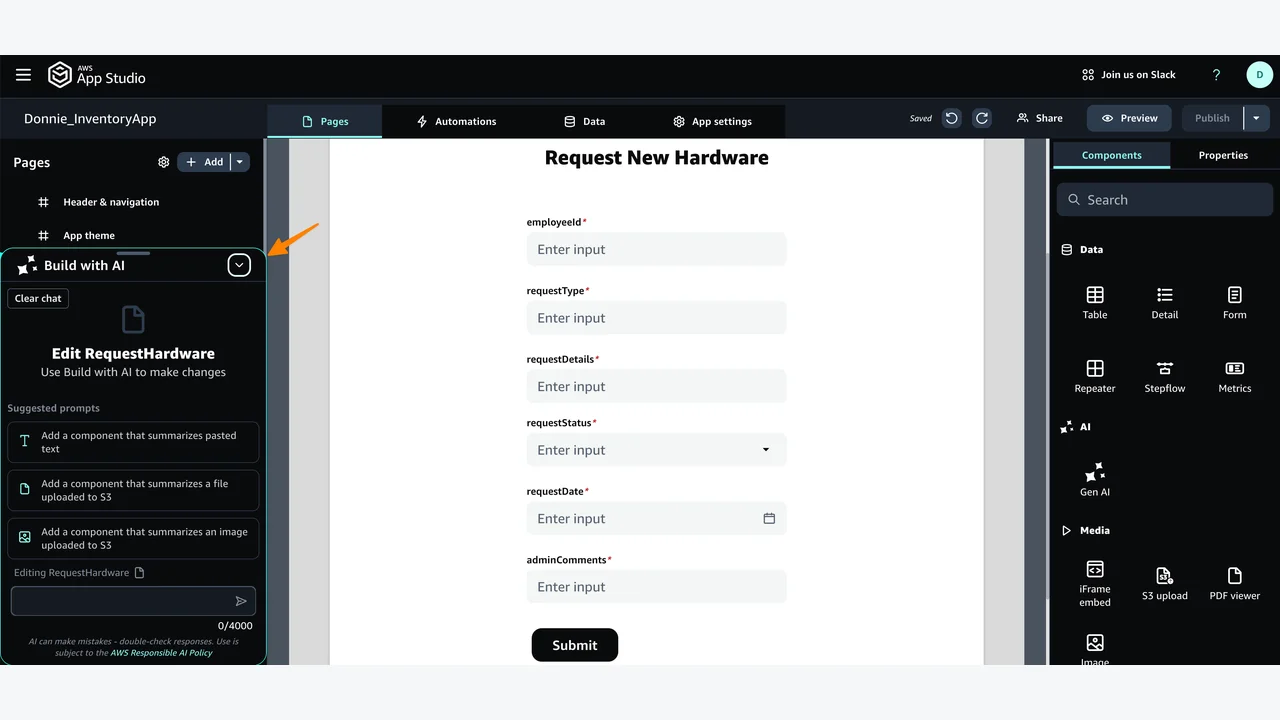
“Free to build” and “free for everyone to use” are different budget claims. AWS App Studio separates its builder environment from consumption of published applications. If an internal app will be opened by many employees, the important variable is not simply how many people have access; it is how much billable usage those people generate.
This guide explains the current public pricing unit for AWS App Studio, reproduces AWS's own arithmetic, and turns it into a cost-planning worksheet. Official pricing and FAQs were reviewed on November 25, 2026. The examples are published vendor examples or explicitly hypothetical calculations, not bills from an AINav deployment.
Cover source: AWS News Blog’s November 2024 general-availability walkthrough, image retrieved November 25, 2026 (Asia/Shanghai), showing the App Studio builder and an IT hardware request form. The visible builder and separate Publish control illustrate the build-versus-published-use distinction; the screenshot does not establish a price. This is an official historical interface example, not today's billing console or an AINav application.
The three numbers to keep separate
The AWS pricing page lists the visual environment for creating, testing and managing applications as free. For published applications it lists $0.25 per user-hour, charged at $0.0625 per 15 minutes. It also advertises a 60-day free trial or 250 free user-hours.
Do not combine those statements into a permanent free tier for production users. A free builder does not make published consumption free. A trial is not a monthly recurring allowance. And the page's “or” wording should not be rewritten as a guarantee of two independent benefits that can be stacked. Confirm the applicable trial conditions in the account before scheduling a rollout around them.
The published price is in US dollars. This guide does not establish taxes, currency conversion, negotiated terms or eligibility in a particular account. It also does not establish a billing policy for every idle-tab or session edge case; use AWS's current metering documentation and actual account usage before relying on assumptions about inactivity.
| Budget line | Public pricing description | Planning implication |
|---|---|---|
| Builder environment | Free to create, test and manage apps | Do not multiply builder headcount by a made-up seat price |
| Published app use | $0.25 per user-hour; $0.0625 per 15 minutes | Model usage, not just invited users |
| Trial | 60 days or 250 free user-hours | Keep trial treatment separate from steady-state cost |
| Connected services | Not covered by App Studio pricing | Add the resources and actions your app actually uses |
Reproduce a simple AWS example before building your own
AWS's first example is an insurance company with one claims application. Three operations managers use it for two hours per day on 12 days of the month. After the trial, the App Studio arithmetic is:
1 app × 3 users × 2 hours/day × 12 days × $0.25 = $18/month
This number comes from AWS's published example, not a prediction that your claims workflow will cost $18. It omits any extra service charges outside the App Studio line. It also assumes the stated usage pattern rather than estimating it from the number of employees in the company.
The second AWS example has two applications used by the same five product managers for ten days: one hour a day in app A and two hours in app B. The stated App Studio total is $37.50. That example is useful because it prevents a common planning shortcut: treating access to a second application as if the usage were automatically included in a single seat fee.
Use the examples to check your worksheet, then substitute your own assumptions. If your spreadsheet cannot reproduce the vendor's published result, resolve that discrepancy before presenting a budget to a manager.
Quarter-hour units can change a rough estimate
AWS's third example is more instructive than multiplying a neat hourly total. Two quality managers use an inspection-record application for 40 minutes per day and another application for two hours ten minutes, on 15 days. AWS expresses those periods as three and nine 15-minute increments respectively.
The published calculation is:
App A: 1 × 2 users × 3 increments × 15 days × $0.0625
App B: 1 × 2 users × 9 increments × 15 days × $0.0625
Total: $22.50/month
That is why an estimate made from fractional hours can understate the example's published charge. Preserve the billing unit instead of rounding it away to make the worksheet easier to read.
For a separate, hypothetical planning scenario, suppose ten employees each generate four billable 15-minute units on each of 20 working days in one application. The App Studio line would be 10 × 4 × 20 × $0.0625 = $50. If the billable units double, that line becomes $100. These are arithmetic scenarios, not measured usage or a guarantee about how AWS will group real sessions.
The practical next step is to observe a limited approved rollout and reconcile assumptions with actual usage. Do not turn this planning example into an undocumented claim about the treatment of multiple browser tabs, reconnects or shared devices.
Add what sits behind the application
AWS explicitly excludes charges for connected services provisioned in your account, giving Amazon S3 and Amazon Aurora as examples, and services invoked by an application action step, such as AWS Lambda. A low App Studio usage estimate is therefore not a complete solution budget.
Write a separate line for each dependency your proposed application will use. A file-upload workflow may need storage. A record-management workflow may depend on a database. An action that calls another AWS service can introduce that service's charges. If you add an AI integration, identify its own billing dimensions rather than assuming that an App Studio user-hour buys unlimited model inference.
Do not invent a flat percentage for those dependencies. Their cost can follow different drivers: stored data, requests, compute time, model usage or other service-specific units. Use the selected service's own current pricing and the application's expected behavior. Keep unknowns visible instead of hiding them in an unexplained “AI overhead” allowance.
The general-availability walkthrough demonstrates adding generative AI functionality to an inventory app. It is evidence of a documented use case, not evidence that every connected operation is included in the App Studio usage price.
Check identity, region and data movement before treating the budget as approved
The App Studio FAQs distinguish the organization's AWS account from individual builders. An organization needs an AWS account to enable the service; a user invited into an enabled organizational instance does not need a separate AWS account to build. That is an access distinction, not permission to connect any corporate data source.
The same FAQ currently lists US West (Oregon) and Europe (Ireland), and says App Studio supports cross-region calls to connect with data in other regions. The FAQ separately says generative AI features may transfer data across regions and that you can opt out of cross-region data movement after onboarding. Cross-region connectivity is not a promise that all processing stays in your data's original region. If residency matters, document the application region, source region and each connected service before moving real records.
Use least-privilege connections and synthetic records for the first exercise. The public FAQ does not establish a universal retention or model-training rule for every possible connected service. Follow the terms and configuration of the actual services involved; do not paste confidential records into a generation prompt based on a cost calculation alone.
Our low-code internal app builder guide addresses the wider operational decision. This article's narrower question is what belongs in the budget once App Studio is a candidate.
The worksheet worth taking to an owner
For each app, record the audience, expected working days, expected billable quarter-hour units per user, connected-service costs, trial treatment and the person responsible for checking the first bill. Add a low-use and a high-use scenario without pretending either is a forecast supported by telemetry.
Then name the controls: who can publish, who can change connections, who reviews usage and who can pause a rollout. Free building makes experimentation easier; it does not remove ownership of production spending or data access.
A defensible estimate has a reproducible App Studio line, separate dependency lines and clearly labeled uncertainties. That is more useful than either “it is free” or a confident monthly number derived only from headcount.