guides
Brevo Aura: from generated draft to an approved campaign
Separate Aura’s editable content from factual review, recipient approval and sending. Current plan boundaries, beta availability and no invented AI credits.
A generated email is not a reviewed offer, and a reviewed offer is not permission to contact a list. Brevo's Aura can help with several stages of campaign creation, but those stages should not collapse into one automatic “make and send” instruction.
This workflow is for a small team already considering Brevo AI for a permission-based newsletter. It separates the source brief, generated design, factual review and final sending decision. Official Brevo pages were reviewed on November 25, 2026. No account was connected, campaign generated, contact imported or email sent for this guide.
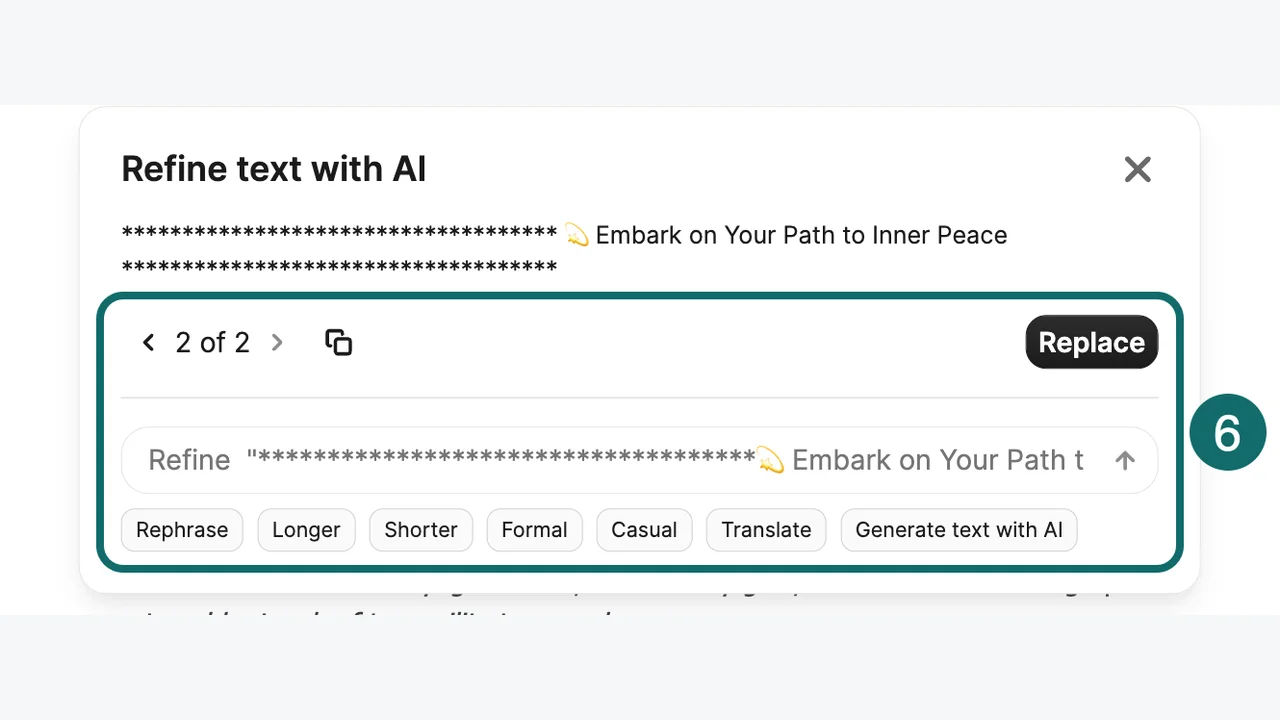
Cover source: Brevo’s official Aura content-generation help article, retrieved November 25, 2026 (Asia/Shanghai). This cropped, officially annotated editor screenshot shows the Refine text with AI dialog, Copy icon, Replace button and refinement options. Replace inserts generated text into the design; it does not approve recipients or send a campaign. This is Brevo’s documentation example, not an AINav capture or test.
Know which Aura task you are actually using
Brevo's content-generation help article describes full email design generation, subject lines, text refinement, translation, images and SMS content. These are distinct tasks, not evidence that every feature is available in every account.
The same article labels full email campaign design generation as a beta released to some users first. It describes generated layout, copy, subject line and preview text as editable. If that entry point is missing, do not assume your account is broken or buy a higher plan based on a screenshot alone. Confirm availability and use the editing tools your account actually provides.
For a narrow task, generating or refining one text block can be more controllable than regenerating the whole design. The documented editor flow places the cursor in the relevant text, opens the AI action, accepts a description and offers Replace or Copy after generation. Those buttons are a content-selection checkpoint, not approval of claims, recipients or scheduling.
The official help article is also more specific than a generic “AI included” label: it lists full campaign translation availability on Professional and Enterprise. Do not turn availability of text generation into a blanket claim that every translation or optimization feature is included for free.
Start with a brief that contains only approved facts
Before opening a generator, assemble a short source packet: campaign purpose, the actual offer, eligible audience, working destination URL, applicable dates and required qualifications. Keep an owner next to each fact. If a discount expires at a particular time, supply the approved time zone; do not let the model invent urgency.
A hypothetical prompt could be:
Draft a newsletter announcing our published beginner workshop. Use only the facts below. Do not invent seats remaining, testimonials, discounts or outcome guarantees. Leave any missing date or price as a question for the reviewer. Keep the main call to action pointed at the approved workshop page.
That is a prompt example, not a campaign we ran. It demonstrates a useful boundary: the model can reorganize supplied facts, but missing facts remain missing. A fluent paragraph claiming “last chance” is not acceptable merely because it sounds like familiar marketing copy.
Do not include a customer export or support conversation just to supply tone. A small, approved brand example can be enough for a drafting task. If personal data is genuinely required, settle its processing permissions and relevant data terms before supplying it. This article does not establish a universal no-training or no-retention promise for Aura.
Treat generated design as a first draft, especially across brands
The full-design instructions describe retrieving a brand profile from a website and reviewing it before saving. Brevo recommends a single-brand account for best results and warns that campaigns from multiple brands may cause styles or voices to mix. That is a practical reason to inspect the proposed logo, colors and voice rather than assuming an imported profile is authoritative.
The instructions also describe campaign-generation preferences, including whether to use prior campaign context and whether to allow AI-generated visuals. Decide those options deliberately. An illustration generated for an offer is not a photograph of the actual product, and a model-generated customer quote is not a testimonial you are entitled to publish.
After generation, review the complete design in the editor. Check that the call-to-action wording matches the destination and that a visual does not imply an included feature that the offer excludes. If the design cannot be corrected reliably, return to a simpler approved template rather than repeatedly regenerating until something looks persuasive.
The output of this stage is an editable draft with known sources. It should still be clearly distinguishable from approved campaign material.
Separate factual review from copy polish
A useful reviewer first checks whether the message is true, then whether it is readable. Reversing that order makes it easy to polish an invented claim until it looks intentional.
| Checkpoint | What the reviewer compares | What counts as a stop |
|---|---|---|
| Offer | Copy against the approved offer page | Unverified price, discount or eligibility |
| Timing | Dates and time zones against the source brief | A fabricated deadline or scarcity claim |
| Destination | Every button and text link against its intended page | Broken or unrelated destination |
| Personalization | Variables and fallback text against the intended audience | A field that could expose or misstate personal information |
| Presentation | Subject, preview text, body and visuals together | Contradictory promises across those surfaces |
A generated subject line should not make a stronger promise than the body can support. Brevo recommends generating subject suggestions after the email design so the design can provide context. Even then, the human reviewer should compare the suggestion with the approved facts, not just select the most attention-grabbing option.
Preview personalized content with permitted test data. Check the empty-value case as well as a normal record. This is a recommended QA step, not a claim that this guide has tested Brevo's rendering across all clients. A clean editor preview is also not a guarantee of delivery or inbox placement.
Read the feature matrix without inventing an AI credit allowance
Brevo's current feature-comparison page says Aura is included in Free, Starter, Standard, Professional and Enterprise, while explicitly distinguishing capabilities by plan. It places AI content generation on all plans, AI send-time optimization from Standard, and AI segmentation and AI Data Analyst from Professional.
The same page lists Free email sending at 300 per day. That is an email-send allowance, not an Aura generation-credit allowance. The reviewed feature page does not establish a universal number of AI generations, and this guide does not label Aura “unlimited.” Check account-specific limits before designing a production process around repeated generation.
Public base-price fields in the fetched comparison page were dynamically loading, so this article does not quote a monthly subscription price or a promotional checkout amount. A plan name and a feature row are not enough to establish your final bill, selected sending tier, taxes or add-ons.
For broader lifecycle-platform selection, see our HubSpot AI and Adobe Journey Optimizer guide. This workflow is not a claim that a content assistant replaces the audience, consent and data work involved in lifecycle marketing.
Keep recipients and sending behind a separate approval
Brevo's documented full-design workflow returns to campaign configuration before sending, including sender and recipient selection and adjustments to subject and preview text. That separation is useful: a satisfactory generated design does not identify the right recipients by itself.
Confirm that the audience has an appropriate permission basis, that suppression and unsubscribe handling are respected, and that the chosen sender represents the organization correctly. Do not import a purchased list as a shortcut to testing a draft. If a campaign is translated, have a competent reviewer check the language, offer and localized destination rather than assuming translation is legal or commercial approval.
Brevo's feature page notes that user permissions are available from Standard upward. Do not assume every plan can enforce the same multi-person approval process in software. If your account cannot separate roles as needed, establish an explicit manual gate or choose an appropriate setup before delegating sending access.
The final record should name who approved content, which audience was approved, when the send or schedule was authorized, and what changed afterward. This is a recommended operating record, not a claim about a built-in Brevo audit feature.
The safe endpoint for an AI drafting task is a reviewed draft. Sending begins only when the authorized person approves the actual message, audience and timing—not when Aura finishes generating text.