guides
How to Evaluate AI Localization TMS Platforms Before You Roll Them Out
A documentation-based guide to rolling out a translation management system: keys, translation memory, and linguist review are a different purchase from an MT engine. Official RWS Language Weaver pages describe models, Cloud, Edge, and connectors — a boundary, not a third TMS. Auto-confirmed memory matches and engine fallbacks are written into official help. No quality tests were run.
A localization manager who needs a system of record for software strings is not buying a paste-in translation box. The job is keys, projects, translation memory, vendor or linguist workflows, and a path back into a repo or CMS. A machine-translation engine, even an enterprise one, sits beside that system. Mixing the two purchases usually shows up as files that never re-enter the product, or as “AI translated” copy that shipped because a 100% memory match was auto-confirmed.
This documentation-based guide was reviewed on November 10, 2026 (Asia/Shanghai). We did not run a localization project, score translation quality, or test connectors. Descriptions come from official Lokalise, Smartcat, and RWS Language Weaver pages opened that day. Acceptance-rate, benchmark, and time-saved figures are vendor claims, not AINav tests.
Name the job: TMS, MT engine, or a media workflow
A translation management system holds source keys or segments, applies translation memory and glossaries, routes work, and exports. That is the core set here: Lokalise AI and Smartcat.
A machine-translation engine translates text through an API, a portal, or an on-premises appliance. Official RWS pages present Language Weaver as enterprise AI translation: Language Weaver Pro and Fast models, a Cloud API and portal, and Language Weaver Edge behind a firewall, plus a Connector Hub into existing systems. That is a useful engine to attach to a TMS. It is not itself a key-and-workflow TMS, so Language Weaver is a boundary in this article, not a third TMS in the related-tools list.
Paste-in or document MT, including DeepL-class tools, is already covered in how to evaluate AI translation tools before you subscribe. Subtitle workflows are a different deliverable again; see how to evaluate AI subtitle translation tools. Spoken soundtrack or dubbing is yet another job and is not scored here.
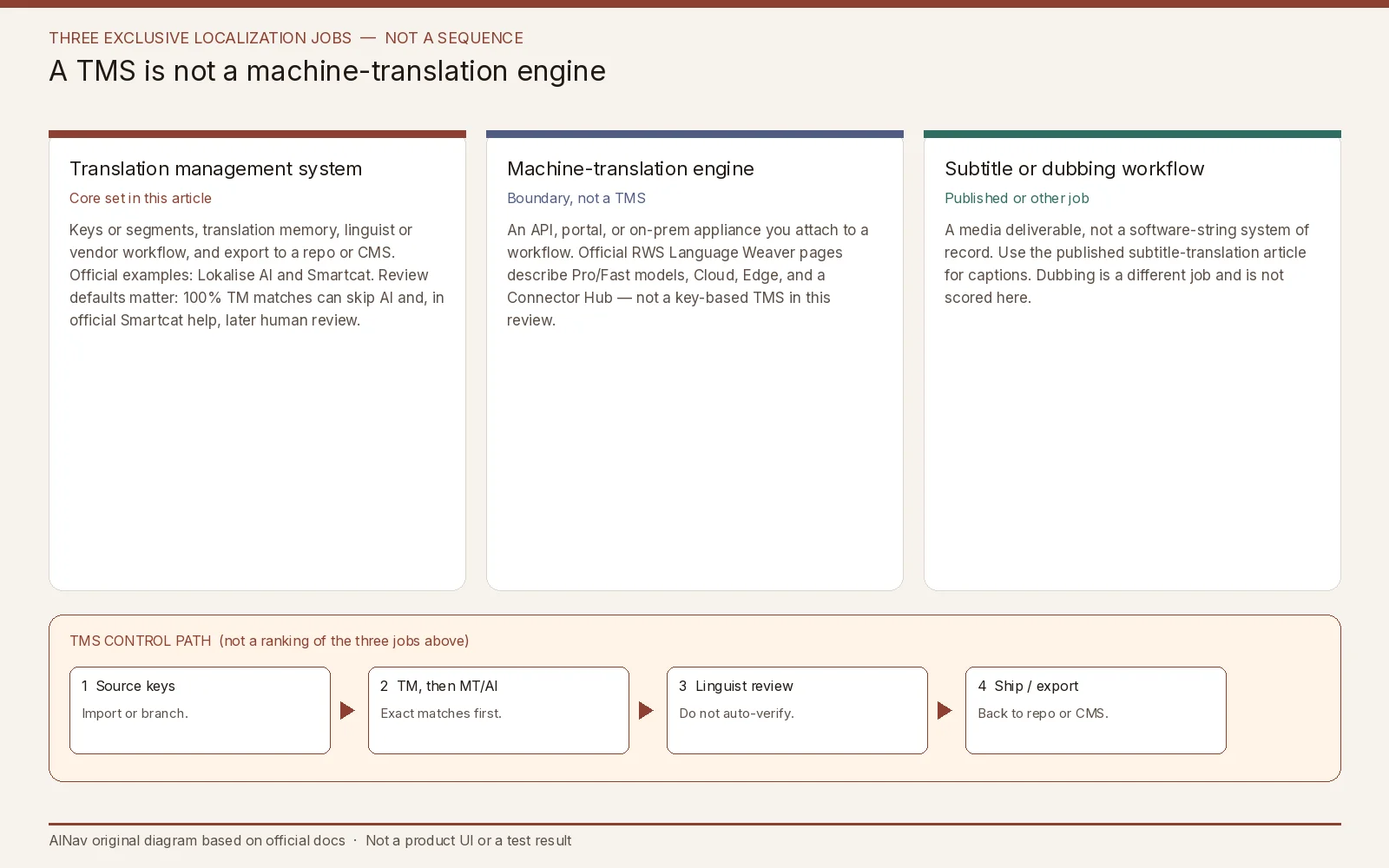
AINav original diagram based on official docs. Sources: Lokalise AI Translations, Lokalise AI FAQ, Lokalise AI and ML Statement, Smartcat AI Translation Overview, RWS Language Weaver. Not an official screenshot or a test result.
Lokalise: keys, tasks, and two different word meters
Official Lokalise help describes AI Translations as an automatic-translation task inside the TMS, not a standalone chat box. Keys can be locked until the task finishes. A key that is already in another ongoing task cannot be added to a new one until you wait or remove it, and a completed key cannot be pulled back out. If the team has no remaining Pro AI words, official docs say you cannot create the AI Translations task. Those are rollout failures, not footnotes.
Official options on the task itself are specific. “Apply 100% translation memory matches,” enabled by default in the help reviewed here, fills exact TM hits automatically, does not send those segments to AI, and does not consume AI words. If you cancel a task, AI words are not consumed for translations that came from memory. “Mark translations as verified” will stamp AI output as verified if you turn it on — that is a setting, not a quality test, and it is a poor default for customer-facing UI. “Save translations performed by AI to Translation memory” decides whether tomorrow’s matches will be yesterday’s machine output. For segmented projects, the default is to translate empty segments only; retranslating existing copy requires an explicit option, and 100% TM matches still win.
Lokalise measures more than one entitlement. Official FAQ language separates Standard AI/MT translated words, Pro AI translated words, and processed words. A first-time fill of an empty target can consume both an AI allowance and processed words; retranslating existing target content without a base-language change can still count against the AI allowance without consuming processed words. Standalone AI LQA consumes Pro AI words but not processed words. Those are different SKUs, not an official price conflict. Hard list prices are omitted here; read the current official plan table for your cycle and region.
Context and review have documented limits. Official help tells you not to use the 2,000-character task-instruction field as a substitute for a style guide or glossary. Character limits on a key trigger automatic retries with an alternative model, up to two attempts, to fit the limit. Locale codes matter: official examples say a generic “Portuguese” may come out Brazilian unless the project language is pt_PT. Quality scoring and AI checks differ by product line (Lokalise Expert can assign a 0–100 score; Vantage uses severity labels without a number). Official docs still recommend human review for important or specialized content. Vendor figures such as reviewer “acceptance rates” or exact-match rates against references are claims, not tests we ran.
Data path is documented in Lokalise’s AI and Machine Learning Statement, last updated September 2026, and in the AI FAQ. Customer content is passed to third-party LLMs at inference and is not used to train those providers; Lokalise may use content to improve its own internal models unless the customer opts out through the AI Addendum. Custom AI profiles retrieve the customer’s own TM at inference and are not shared across customers. Official provider notes in the FAQ include a 30-day OpenAI retention for abuse monitoring and Anthropic zero retention — re-check the live sub-processor list, because those policies can change.
Smartcat: auto-confirmed memory, then a documented fallback
Official Smartcat help, updated October 13, 2026, describes a six-step AI translation path inside the platform: segment the file, look up reviewed translations, send unmatched segments to a configured AI engine, run QA checks, optionally fix glossary errors, and fall back if a critical error remains. That path is a TMS workflow with an engine inside it, which is why Smartcat belongs in this core set. It is also why the same vendor appears as an MT example in the published translation-tools article: this evaluation is about the system of record and the review defaults, not a remake of that five-pillar MT checklist.
The failure conditions are written down. By default, exact reviewed-translation matches are applied automatically, confirmed, and kept out of scope when you later assign a human reviewer. That saves rework when the memory is trustworthy, and it will quietly ship a bad memory entry if it is not. Segments without those matches go through configurable engine routing. Official QA checks look for missing tags, wrong numbers, punctuation, capitalization, and large length swings. Glossary-term fixes via an OpenAI-based correction apply to non-LLM engines; official text says LLM engines are “trusted” to handle glossary terms, which is a vendor assumption, not a test. If a segment still has critical errors such as missing formatting or a failed engine response, Smartcat “automatically reruns translation using Google NMT as a reliable backup.” Official help says a future profile setting may let you choose or disable that fallback — confirm the live control before you rely on it.
Official context limits also matter. AI translation agents receive a closed prompt: languages, source text, glossary and forbidden terms, and TM fuzzy matches. Segment comments, content-type metadata, and reference images are shown to human editors but are not passed into the AI prompt. Character limits are enforced after generation by sending the output back to be shortened. Segments are batched into the model’s context window, so wording can stay consistent inside a batch and still drift between batches on a long file.
A rollout check that starts with disposable keys
Use a fictional product and a small set of keys or a redacted file, not a production string freeze. Then check six things:
- Job fit. If you only needed a paste-in MT box, you are in the published translation-tools article. If you needed an engine to sit behind an existing TMS, Language Weaver’s official Cloud, Edge, and connector path is that job, not a Lokalise or Smartcat replacement by default.
- Memory defaults. Who can write AI output into TM? Does a 100% match skip both AI and human review?
- Entitlements. Separate Pro AI or Smartcat word meters from processed words or seats, and from monthly versus annual billing.
- Locale and limits. Confirm regional codes and what happens when a string exceeds a character limit or an engine fails (Lokalise retries; Smartcat’s documented fallback is Google NMT).
- Human review. Do not enable “mark as verified” or skip review on customer-facing or regulated copy just because a vendor score looks high.
- Data path. Know which LLM providers see inference content, whether you have opted out of internal-model training, and where Edge or on-prem is actually required.
Stop the rollout if AI output can publish without a named reviewer, if auto-confirmed memory cannot be audited, if quotas make a normal release unpredictable, or if the product you actually needed was an MT API.
Who this purchase is for, and who should look elsewhere
This evaluation is for localization and product-ops teams that need a TMS with documented AI tasks, memory, and review.
It is not a DeepL remake, not a subtitle or dubbing bake-off, and not a Language Weaver quality contest. Official Language Weaver benchmark language against other MT systems is vendor or sponsored evaluation, not an AINav result.
Frequently asked questions
Is Language Weaver a TMS because it is in the same catalog category? Official RWS pages describe models, a Cloud API and portal, Edge behind a firewall, and connectors into existing systems. Treat it as an MT engine unless a current official page documents key-level TMS workflows comparable to Lokalise or Smartcat.
Will a 100% translation-memory match still be reviewed? In official Smartcat help, exact reviewed matches are auto-confirmed and left out of the later review assignment by default. In official Lokalise help, 100% matches are applied without consuming AI words. Review that default before you roll out.
Are Pro AI words the same as processed words? Official Lokalise documentation says they are related but not the same. Count both before you forecast a release.
Can we skip linguist review after an AI quality score? Official Lokalise docs still recommend human review for important content. A score or a QA check is a routing signal, not a ship decision.