growth
IBM Planning Analytics: review the AI forecast and driver explanation before you lock the plan
Official 3.1 documentation says forecast preview does not change actual data. Review values, accuracy, and any Agent insights, then let a person lock the plan. No public list price was found; confirm packaging and licensing with IBM.
A forecast can look ready to publish while it is still only a preview. IBM Planning Analytics can generate an AI forecast, and, with the right licence, natural-language insights that explain accuracy and the factors that influence the values. Official 3.1 documentation says you use forecast preview to review projected values, accuracy, and statistical details before you commit the forecast, and that the preview operation does not change your actual data. A person still locks or publishes the plan under governed permissions. The forecast does not become the official budget by itself.
The IBM Planning Analytics AI product page, versioned official documentation, and a historical announcement were reviewed on November 28, 2026 (Asia/Shanghai). Direct requests to some IBM documentation URLs returned HTTP 403 without a browser-class fetch; the 3.1 forecasting-preview and 2.0 forecast-insights pages were read through a separate fetch that returned the article text. The 2.1 "what's new in Planning Analytics Agent" page returned only a stub. We did not sign in to a customer environment, generate a forecast, or lock a plan. This article does not invent list prices, and it does not treat an older announcement as current product specification.
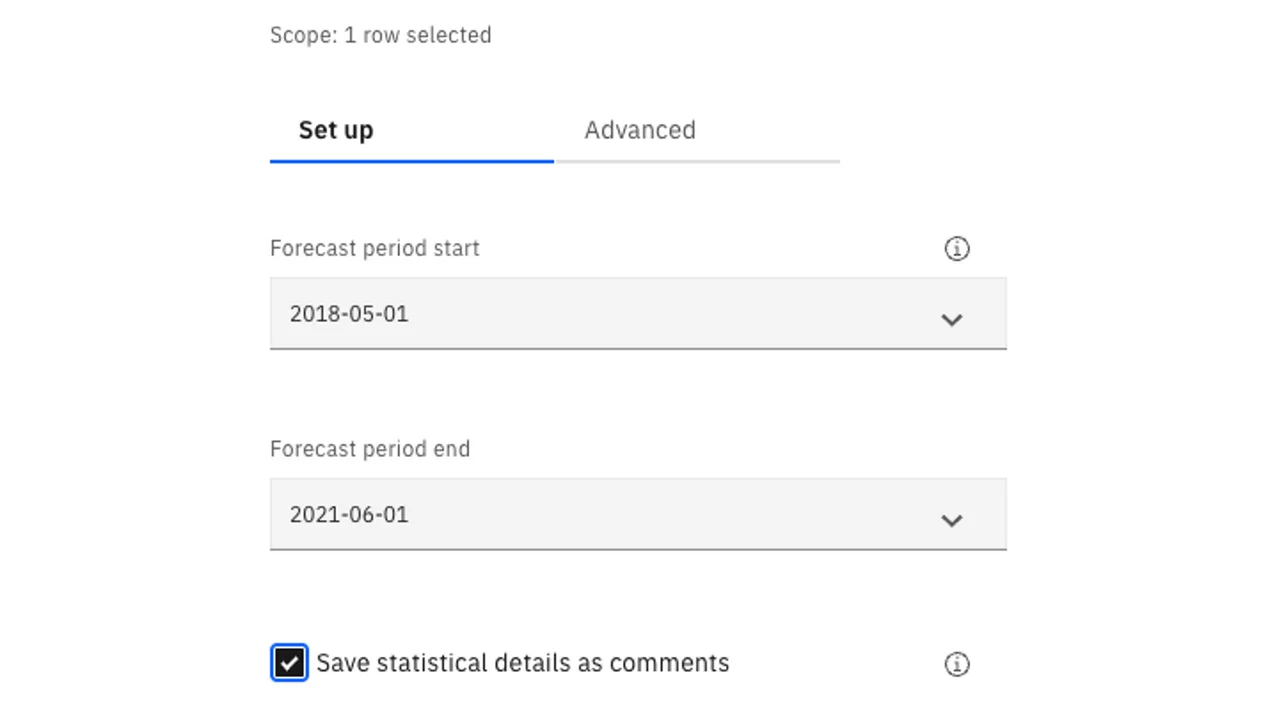
Cover source: IBM's official documentation Forecasting preview for Planning Analytics 3.1.0, acquired November 28, 2026 (Asia/Shanghai). The unaltered official screenshot, pa_forecast_options.jpg, shows the forecast Set up panel with a scope of 1 row selected, a forecast period start of 2018-05-01, a forecast period end of 2021-06-01, and Save statistical details as comments selected. The dates, scope, and checkbox are IBM's official documentation example, not a cube we opened and not a forecast we ran. Official docs today published this forecast-options image; they did not publish a Forecast summary screenshot on the same page in the assets we could retrieve. No interface values were rewritten. Underlying vendor copyright is retained; no blanket reuse licence was established.
Review the preview, then let a person lock the plan
Official 3.1 documentation, Forecasting preview, tells you to review projected forecast values, forecast accuracy, and statistical details before you commit the forecast. Preview is not active by default; official text says you select a maximum of 25 rows and then you can click Preview. You can preview only one time series at a time. The preview does not change actual data.
The same page describes what the preview shows. A univariate forecast includes predicted values and a confidence envelope with high and low bounds. A multivariate forecast shows predicted values without that envelope, and it includes separate tabs for each variable in the forecast. Prediction accuracy is shown as low, medium, or high. You can open the Statistical details tab, and, if you have a Planning Analytics Agent licence, you can generate natural-language insights that official text says appear with the forecast results on the Forecast summary tab. You can also download preview data as CSV. None of those steps writes the forecast into the cube by itself.
This is the lock-the-plan review, not a tool-selection exercise. If you are still deciding whether to pilot an AI financial planning assistant, see How to Evaluate AI Financial Planning Assistants Before You Pilot. This article does not repeat that evaluation, and it does not compare Planning Analytics with another planning product.
Keep the native Planning Analytics Agent separate from watsonx Orchestrate extensions
The official product page, Planning Analytics AI, describes a native IBM Planning Analytics Agent: natural-language questions grounded in TM1 logic, visibility into drivers and assumptions with explainable AI, and action through governed workflows, recommendations, and controlled updates. A separate "AI forecasting" section describes baseline statistical forecasting, on-demand forecasting and scenario updates, and explainable summaries and anomalies.
Custom watsonx Orchestrate agents are an extension, not the out-of-the-box native Agent. The same product page says you can use IBM watsonx Orchestrate to build and coordinate advanced, multi-step planning workflows, and that custom-managed agents built in watsonx Orchestrate can support multi-step automation, human-in-the-loop approvals, and deeper integrations. Official 2.1 documentation on connecting the Planning Analytics Agent to a custom watsonx Orchestrate instance describes replacing or extending the default instance so the chat can start your own skills and intents. That human-in-the-loop path is documented for the custom extension. Do not write it as a built-in behaviour of the native Agent.
The Agent was formerly called the Planning Analytics AI assistant, or Planning Analytics Assistant. Official 2.1 "what's new" text, which was only a stub in this writing-day fetch, still confirms that former name. Use the current name, Planning Analytics Agent, unless you are citing a historical announcement, and do not treat that announcement as a spec. An older IBM announcement that still uses the Assistant name, and that quotes a Gartner "By 2025" line, is background only.
Name the version and the licence; do not mix 2.0, 2.1, and 3.1 into one interface
Capabilities depend on the product version, the deployment (Local or as a Service), and whether you have a Planning Analytics Agent licence. Official 3.1 preview documentation says you must have that licence to generate AI forecast insights. Confirm packaging, deployment, and licensing with IBM or a customer success manager. The product AI page reviewed today did not publish a list price, and this article does not invent one.
Do not describe 2.0, 2.1, and 3.1 as if they were one screen. In the 2.0 documentation we could read, Get insights generated for your forecasts, forecast insights are powered by watsonx, you set up a univariate forecast and click Preview, and the insights "are currently available only for univariate forecasts and do not support on-demand multivariate forecasting." The 3.1 preview page, by contrast, discusses both univariate forecasts (with a confidence envelope) and multivariate forecasts (without that envelope), and it places Agent-licence insights on the Forecast summary tab. If you are on 2.0, do not assume the 3.1 multivariate path or the same summary tab is in front of you. If a documentation page for your version is blocked or incomplete, verify the behaviour on the official doc for that version rather than filling the gap from memory or from the announcement.
The cover image is the official 3.1 forecast-options panel—the setup you complete before preview—not a Forecast summary screenshot. Official docs today did not yield a summary-tab image in the assets we could retrieve.
What to check before the plan is locked
Before anyone treats the forecast as the plan:
- You are looking at a preview, and you know official 3.1 documentation says that preview does not change actual data.
- You have reviewed projected values, the accuracy indicator, and statistical details. For a 3.1 univariate forecast, you have also looked at the confidence envelope; for a multivariate forecast, you have used the variable tabs and have not expected an envelope that official 3.1 text says is not there.
- If AI insights are present, you have a Planning Analytics Agent licence, you have read the driver and accuracy explanation as an input, and you have not treated it as the official narrative of the plan.
- You have not mixed a 2.0 univariate-only insights limit with a 3.1 preview, and you have not written a custom watsonx Orchestrate approval flow as a native Agent feature.
- Packaging, deployment, and Agent licensing have been confirmed with IBM or a customer success manager. This article has no list price to offer.
- A person with the right permissions will commit, lock, or publish the plan. The forecast is not the official budget until that happens.
The safe endpoint is a preview you have inspected, on the version and licence you actually have, locked by a person under governed access. A Forecast summary that reads confidently is not that lock.