guides
How to Evaluate AI Financial Planning Assistants Before You Pilot
A documentation-based guide to piloting AI inside a versioned planning cycle. Official SAP help says a Business Intelligence license does not include planning features. Official Oracle Analytics pages describe a BI and visualization platform, so it is a boundary rather than an FP&A core tool. Official Workday Planning Agent docs require review of numbers before acting. No forecast accuracy was tested, and this is not financial advice.
A financial planning assistant is useful when it works inside a versioned plan: a forecast cycle, a named version, and actuals that planners are not free to overwrite by accident. It is a different purchase from a business-intelligence assistant that answers questions about last month’s actuals, and from a spreadsheet copilot that edits formulas on an extract. Those three jobs are easy to confuse because all of them can “talk about numbers.” They are not interchangeable.
This documentation-based guide was reviewed on November 10, 2026 (Asia/Shanghai). We did not connect a planning tenant, run a forecast cycle, or measure forecast accuracy. Descriptions come from official Workday Adaptive Planning, SAP Analytics Cloud, and Oracle Analytics pages opened that day. Any accuracy, speed, or “single source of truth” language on a vendor page is the vendor’s claim, not an AINav test. This is not financial advice, and it is not a forecast-quality benchmark.
Planning, actuals Q&A, and spreadsheet copilots are different jobs
The catalog cores for a planning-cycle evaluation in this review are Workday Adaptive Planning and SAP Analytics Cloud. Official Workday documentation describes Adaptive Planning as a planning application with multidimensional models, versions, and (for eligible customers) a Planning Agent that queries live model data. Official SAP product pages describe SAP Analytics Cloud as a product that unifies analytics and planning, including budgets, forecasts, scenario simulation, and, through Joule, “planning cycle management.” That last phrase only matters if the users in the pilot actually hold a planning license, which official SAP help treats as a separate SKU from business intelligence.
Oracle Analytics is in the same visualization catalog, but official Oracle Analytics pages describe a business-intelligence and visualization platform: dashboards, semantic models, data preparation, and natural-language exploration. Official Oracle documentation also shows that Oracle Analytics can connect to Oracle Fusion Cloud Enterprise Performance Management, including Planning and Planning Modules, as a data source. That is integration with a planning system, not the planning application itself. Oracle Cloud EPM Planning is a different SKU and is not a live AINav catalog page in this review, so Oracle Analytics is treated here as a BI boundary, not as an FP&A core tool.
Spreadsheet copilots and BI assistants already have published buying guides. If the job is formula help or an ad-hoc actuals question, start with How to Evaluate AI Spreadsheet Copilots Before You Commit or How to Evaluate AI Analytics Assistants Before You Buy, including tools such as Copilot in Excel, Gemini in Google Sheets, Looker, and Microsoft Fabric AI. Do not score those products as if they ran a locked forecast cycle.
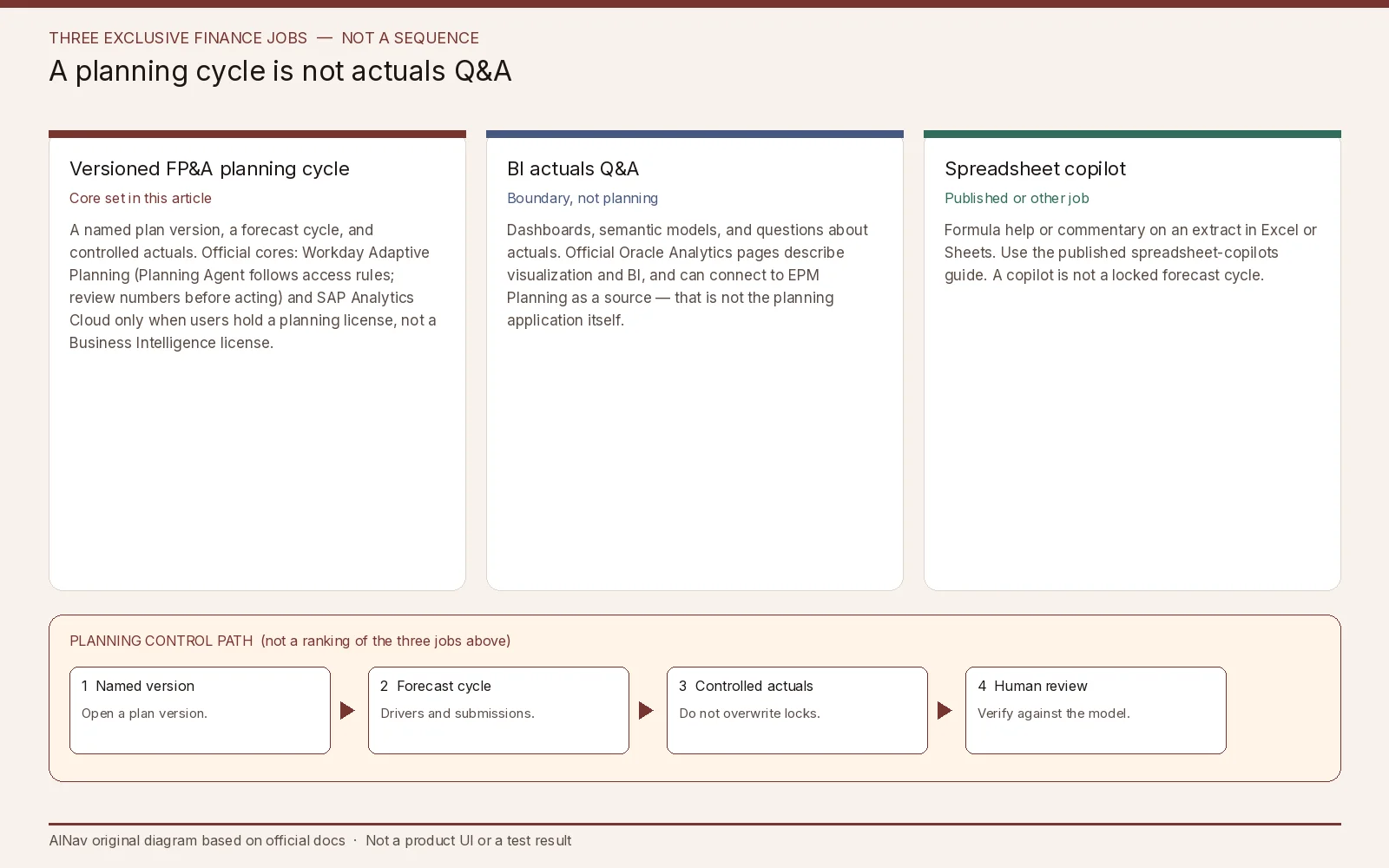
AINav original diagram based on official docs. Sources: Concept: Planning Agent, Understand Licenses, Roles, and Permissions (SAP Analytics Cloud), Oracle Analytics. Not an official screenshot or a test result.
SAP Analytics Cloud: confirm the planning license before you call it FP&A
Official SAP Analytics Cloud pages present one cloud product that can do both analytics and planning, including more than 100 prebuilt business content packages and Joule capabilities that official FAQ language lists as story generation, model creation, and planning cycle management. Official help is more precise about who can actually plan.
Official SAP help, “Understand Licenses, Roles, and Permissions,” states that licenses determine which features are available, and gives a direct example: a user with a Business Intelligence license “may be able to create stories in SAP Analytics Cloud, but will not have access to any planning features.” The documented license types include Business Intelligence, Business Intelligence Restricted, Concurrent Business Intelligence, Planning Standard, and Planning Professional. Official text says only Business Intelligence licenses can be concurrent, and that a user can hold one license plus purchased add-ons. Roles consume a license type; changing a role can change the license a user consumes.
Do not treat “we already have SAP Analytics Cloud” as proof that planners can write versions, run data actions, or manage a forecast calendar. Ask which license types are on the tenant, which roles consume Planning Standard or Planning Professional, and whether the models in the pilot are planning models (write-back, with the version and date dimensions official learning material requires) or read-only analytic models. Official product packaging also now sits inside SAP Business Data Cloud for some buying paths; confirm the current official contract, including any usage-based capacity terms, rather than assuming a standalone historical SKU still applies. Exact list prices are omitted here because official commercial terms vary by contract and packaging.
Failure conditions to write into the pilot plan: users were provisioned with a BI license and cannot plan; a planning model is treated as a dashboard dataset; Joule is asked to “manage the planning cycle” for people who cannot publish versions; or a BI-only rollout is scored as an FP&A win.
Workday Adaptive Planning: the assistant follows access rules, and several limits are explicit
Official Workday documentation describes the Planning Agent as a conversational assistant that sits inside Ask Workday for Adaptive Planning and queries live model data — including the latest entries, imports, and formula adjustments — while “strictly respect[ing] existing access rules and permissions.” Users can retrieve or analyze only data they are explicitly authorized to view. Official text also says the agent can occasionally misinterpret questions or present unexpected results, and that you should “always review the output including numbers, commentary, and visualizations” and “verify them against the source of truth” before acting. That is a required human review step, not a slogan.
Availability and behavior are narrower than a generic chatbot. Official documentation says the Planning Agent is available only to Planning Agent customers in the United States, Canada, Europe, and Singapore; contact a Workday account executive for more information. It currently treats each prompt as a new query and does not yet support multi-turn follow-up. It only understands and responds in US English. The conversation is erased when you navigate away or the session ends. Suggested questions are based on the last refresh, which official docs note can lag what is now visible on a report until you refresh. Using agents in a sandbox Adaptive Planning instance does not consume flex credits, according to the same page.
Setup depends on how the instance is connected. Official docs say that for Workday-enabled Adaptive Planning instances, users must have the Planning Agent set up in Agent System of Record; for standalone instances, admins must assign the “Access Ask Workday for Adaptive Planning” permission, which includes child permissions for the Planning Agent and its Data Exploration skill. Official text also says Workday collects operational telemetry and agent execution traces to monitor behavior and improve the product, does not use that data to retrain or fine-tune the pre-trained foundation model, and lets you disable collection of that trace data. Record that setting before planners paste commentary about unreleased numbers into the assistant.
Public list prices were not used in this review; official Adaptive Planning commercial terms are obtained through Workday. Do not treat a free-trial request or a catalog blurb as a price.
Failure conditions: a region outside the documented Planning Agent countries is treated as generally available; a planner trusts an unreviewed variance narrative; a user without model access is assumed to be blocked without a permission test; trace collection is left on without a decision; or a multi-turn “keep going” interview is expected from a product that officially does not support it yet.
A pilot that starts on a sandbox plan version
Use a sandbox or non-production planning instance, a reduced-privilege planner role, and already-published or fictional actuals. Do not load live forecast commentary until access rules, license types, and telemetry settings are recorded. Then check six things:
- Job fit. Versioned planning cycle, BI actuals Q&A, or spreadsheet copilot — pick one official job.
- License and SKU. For SAP Analytics Cloud, confirm Planning Standard or Planning Professional for anyone who must write a plan. Do not use Oracle Analytics as the planning system of record.
- Version control. Create a named plan version, keep actuals controlled, and confirm the assistant cannot publish or overwrite a locked version beyond the user’s rights.
- Human review. Require a named planner to verify every material number and narrative against the model, following official Workday review language even if you use a different vendor.
- Regional and language limits. If you evaluate Workday’s Planning Agent, stay inside documented countries and US English, and do not assume multi-turn memory.
- Fallback. Keep the current planning workbook or planning application as the system of record if the assistant is wrong or unavailable.
Stop the pilot, or keep the assistant off, if a BI license is being sold as planning, if numbers can be acted on without verification, or if the product you invited is an analytics platform you mistook for a planning application.
Who this purchase is for, and who should look elsewhere
This evaluation is for FP&A leads and finance-systems owners who need AI inside a governed planning cycle.
It is not a BI-assistant bake-off, not a spreadsheet-copilot review, and not a forecast-accuracy claim or investment recommendation.
If you only need actuals Q&A, use the published analytics-assistants guide. If you only need help inside Excel or Sheets, use the published spreadsheet-copilots guide.
Frequently asked questions
Why is Oracle Analytics not in Related tools? Official Oracle Analytics pages describe visualization, semantic modeling, and business intelligence. Official docs let it connect to EPM Planning as a source, but that does not make Oracle Analytics itself a planning application. It is a boundary in this article.
If we already own SAP Analytics Cloud, do we already own planning? Not necessarily. Official SAP help says a Business Intelligence license does not include planning features. Confirm whether users consume Planning Standard or Planning Professional, and whether the models in use are planning models.
Does the Workday Planning Agent ignore row-level access if a prompt is clever? Official documentation says it strictly respects existing access rules and permissions, and that users can only retrieve or analyze data they are authorized to view. Still test that claim in the sandbox with a reduced-privilege user.
Can we treat the assistant’s variance write-up as the official forecast commentary? No. Official Workday language says to review numbers, commentary, and visualizations and to verify them against the source of truth before acting. This article is not financial advice.