workflows
Labelbox: set up consensus and review workflows for training labels
Official Labelbox docs enable consensus in a Queue batch, and those coverage and label-count settings cannot be changed after submission. The default workflow is labeling, review, rework, and done. Recursion Managed Agent is an optional review node, not the default.
Labelbox can measure agreement when more than one person labels the same data row, and it can route those rows through a review and rework pipeline. Official documentation puts both of those controls in the Annotate project: consensus is turned on in a Queue batch, and the default workflow is a four-step path from initial labeling to done. This article is about configuring those official workflows for training labels. It is not a buyer’s guide to MLOps or model-governance platforms; if that is the job, see How to Evaluate MLOps and Model Governance Platforms Before You Commit.
Official Labelbox documentation on Consensus and Workflows, with Quality analysis opened as background, was reviewed on November 29, 2026 (Asia/Shanghai). We did not run a live labeling project, set consensus on real data rows, or add a Recursion Managed Agent. This article does not invent an accuracy number, and it does not treat a finished label as a guarantee of production model quality.
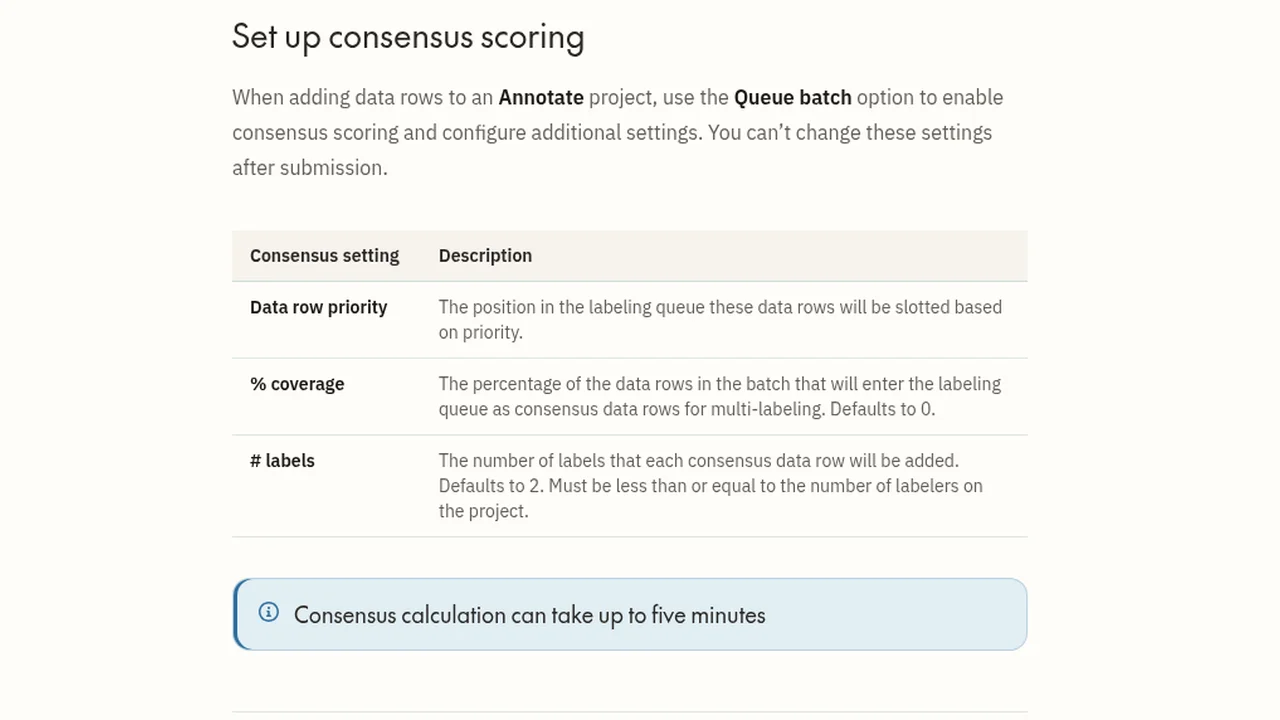
Cover source: Labelbox’s official documentation Consensus, captured November 29, 2026 (Asia/Shanghai). The cover is a screenshot of the official “Set up consensus scoring” section, including the settings table for data row priority, % coverage, and # labels, plus the official note that calculation can take up to five minutes. It is vendor documentation, not a real annotation project and not a labeler roster we operated. No interface values were rewritten. Underlying vendor copyright is retained; no blanket reuse licence was established.
Enable consensus in a Queue batch, then leave the settings alone
Official Consensus documentation says consensus represents agreement in your labeling workforce. Consensus agreement scores are calculated in real time for features and labels that have multiple annotations by different labelers. Whenever an annotation is created, updated, or deleted, the score is recalculated for data rows with two or more labels. Official note text says that calculation can take up to five minutes.
You enable it when adding data rows to an Annotate project, using the Queue batch option. Official docs list three settings, and they are explicit that you can’t change these settings after submission:
- Data row priority: where these rows sit in the labeling queue.
- % coverage: the percentage of data rows in the batch that enter the queue as consensus rows for multi-labeling. Defaults to 0.
- # labels: how many labels each consensus data row will receive. Defaults to 2. It must be less than or equal to the number of labelers on the project.
If coverage is left at the default 0, official wording means none of the batch is set up as consensus multi-labeling unless you change that figure before you submit. Set the coverage and label count while the batch is still being queued. After submission, those settings are fixed.
Official support is a matrix, not “all types”
The same consensus page publishes a table of supported asset and annotation types. Consensus scoring is not documented as available for every combination.
The official matrix uses check marks, dashes, and N/A by asset type (image, video, text, chat, audio, geospatial, documents, HTML, and human-generated responses) and by annotation type (bounding box, polygon, polyline, point, segmentation mask, entity, relationship, radio, checklist, and free-form text). Some cells are supported, some are not, and some are not applicable. Free-form text, for example, is not shown as supported in the official matrix we reviewed today.
Do not assume a project can use consensus just because it is an Annotate project. Check the official matrix for the asset and annotation types you actually use.
After labels exist, reviewers can change the consensus winner
Official docs say that once a data row has been labeled and enters the review stage, the first set of annotations is treated as consensus by default. If the row has more than one label, reviewers see the label sets in the data row browser. A trophy icon marks the current consensus set. Reviewers can click the trophy next to a different set to reassign consensus.
Official warning text is that changing the winning label might lead to a recalculation of the agreement score. That is expected: the score measures agreement against the current consensus. Official notes also say a consensus winner can later be designated as a benchmark, which is a separate setup and is not covered in depth here.
You can also search and filter on consensus scores. Official docs say the Consensus agreement filter is available in the Data Rows tab, the Workflow tab, and Catalog. When you use it, you choose a scope (feature-level or label-level), a calculation (absolute or average), and a range from 0 to 1, where 0 is no agreement and 1 is complete agreement. Those filters help you send low-agreement rows to review. They do not, by themselves, certify the labels as ready for training.
The default workflow is labeling, review, rework, then done
Official Workflows documentation says every project comes with a simple four-step workflow:
- Initial labeling task: the starting point for data rows that need to be labeled.
- Initial review task: after a row is labeled, it moves here.
- Rework: if a label is rejected in a review step, the row is sent here to be corrected.
- Done: once a row has passed the required steps, it is marked done.
Data rows move to the next task only when the previous step is completed. Official text says status updates automatically and cannot be changed manually. A row with the To Label status must be labeled before it can proceed to review or rework.
You can add Logic nodes to control which rows go to which task. Official filters include sample probability, consensus average, and feature consensus, among others. Sample probability is processed after the other filters, and official note text says it is a probability, not a guarantee: it is possible that few or no rows are included even when many rows meet the other filters.
Rejected labels go to Rework. Official docs describe rejecting a single row during review, or moving up to 10,000 selected rows to Rework from the Data rows tab. That is the official rework path, not a substitute for checking consensus settings before you submit a batch.
Recursion Managed Agent is optional, not the default
Official workflows documentation now allows an AI agent as a review step. The Recursion Managed Agent node sends each data row to an agent you build in Recursion, which scores the work and routes the row based on that score. Official text presents this as something you add: it is not part of the default four-step workflow, and it is not written here as a replacement for human review or as a required out-of-the-box node.
If you do add it, official setup runs through a Recursion connection, a node in the workflow editor, and scoring and routing settings. Those steps are documented on the same page. They are optional configuration, not the starting workflow for a new project.
What we did not test
We did not create an Annotate project, submit a Queue batch, change a trophy icon, or add a Recursion node. Default values, the support matrix, and the four-step workflow are what official Labelbox documentation showed on November 29, 2026 (Asia/Shanghai). Recheck those pages for the asset types and ontology you use. Consensus scores and a completed Done state are quality-control signals in the labeling project. They are not a measured accuracy figure, and they are not a guarantee of how a model will perform in production.