guides
Microsoft Translator practice: check recognition before learning a phrase
A two-person practice routine that separates speech recognition from translation, checks meaning, and saves only reviewed phrases—without invented speaking scores.
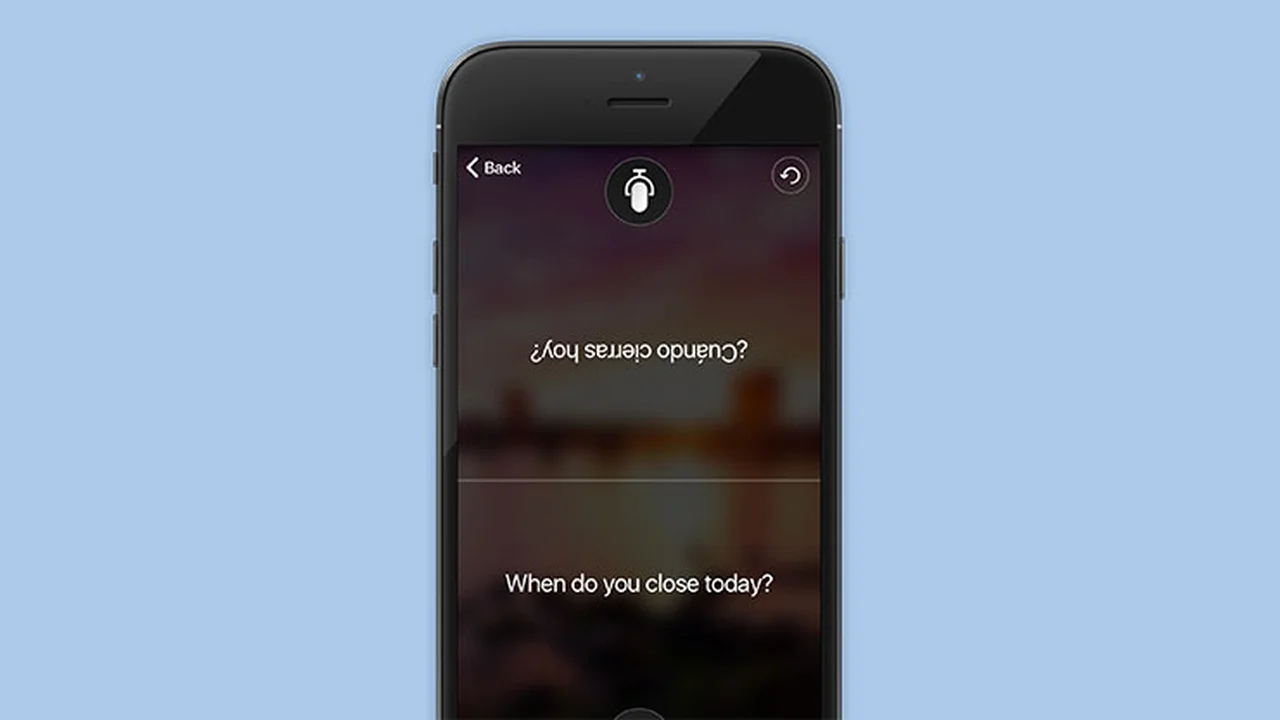
A translation can sound fluent while carrying the wrong day, an omitted “not,” or a word the microphone never recognized. For language practice, that makes the translated sentence a starting point—not a mark out of ten.
Microsoft Translator documents text, speech, and split-screen translation. This guide uses those capabilities for a small bilingual exercise: say one sentence, inspect what was understood, check its meaning, and keep only a reviewed phrase. The routine is an editorial suggestion, not a Microsoft course or a tested learning intervention. We did not run an app session, record participants, or measure improvement. Documentation was checked on November 25, 2026.
1. Agree on what the exercise can show
Choose one everyday task: arranging a meeting, asking when a shop closes, or clarifying a delivery time. A willing adult partner should know that translation is being used and whether you intend to keep notes. Avoid confidential work, medical histories, or immigration interviews.
Define success narrowly. Can the partner identify the intended time, person, and request? Can you explain why a wording fits? Those are questions for the people involved. A translation appearing on screen is not evidence of correct pronunciation, grammatical mastery, or appropriate politeness.
Keep three things separate: your intended message, the recognized source text when displayed, and the translated output. An error in recognition can create a plausible but wrong translation. Conversely, accurate recognition does not guarantee that the translation preserves context. Neither failure alone proves that your language ability is poor. This workflow does not provide a documented pronunciation score, CEFR assessment, or personalized curriculum.
2. Prepare the language pair before the microphone
Microsoft’s feature page describes split-screen translation as two languages using one device for a one-to-one conversation. It distinguishes this from multi-device conversations. You do not need a group session simply to practice across a table.
Check the official language matrix for the functions you need. Text translation, speech input, and spoken playback are different capabilities; a language appearing in the app does not establish all three. The iOS FAQ says an unavailable microphone can indicate that speech translation is unsupported for that language.
Select the languages and use the available speech or two-person view. Android documentation describes entering through the microphone and choosing the two-microphone option; iOS describes different microphone layouts depending on the languages. Follow your actual version rather than expecting identical buttons. If speech is unavailable, use typed text instead.
Plan on internet access for speech translation: the iOS FAQ says it works online. Downloadable text packs do not promise offline spoken conversation. Choose a quiet place, grant microphone permission only when needed, and take turns. Microsoft’s FAQ calls the consumer app free of charge; that does not establish unlimited usage, an enterprise agreement, or free Azure Translator API access.
3. Diagnose recognition before judging translation
Start with one complete, short sentence. Read the source wording shown by the app before asking whether the target wording sounds natural. Check names, dates, quantities, negation, and the relationship between clauses.
Here is a made-up practice example, not an observed app result. You intend to say “Could we meet after lunch on Friday?” If the recognized text says “before lunch,” stop at that layer. Do not memorize or criticize the resulting translation as though it came from your intended sentence. Repeat clearly, or type the intended wording into text translation to isolate that step.
Use a small private note, not a fabricated assessment report:
| Record | Check |
|---|---|
| Intended sentence | What did I mean to communicate? |
| Recognized wording, if shown | Did the device hear the key words? |
| Translation under review | Did time, negation, and intent survive? |
| Human correction and reason | What wording can a competent speaker or reliable reference support? |
If recognition remains unreliable, switch to typing. You can still compare meanings without pretending that the microphone assessed pronunciation. If the screen exposes too little source text to diagnose the issue, record uncertainty rather than inventing a transcript.
4. Repeat one exchange, changing one variable
In the first round, one person makes a request and the other answers. Before continuing, each explains the understood meaning in their own words. The goal is to notice misunderstandings while the exchange is still small enough to inspect.
For a second illustrative round, change only the day, time, or whether the request is possible. Compare “Friday after lunch” with “Friday before lunch,” then add “I can’t meet on Friday.” These are suggested prompts, not sentences we submitted to Microsoft or outputs we verified. A bilingual partner or suitable reference should check the actual wording you decide to learn.
Watch communicative function, not just individual words. Is a question still a question? Did a tentative request become a command? Is a pronoun’s referent clear? Give the translator the complete sentence when context matters, rather than a string of disconnected words.
Back-translation can expose an obvious discrepancy, but a matching result is not independent proof of correctness. Related systems can reproduce the same ambiguity in both directions. When two plausible phrasings differ in politeness or regional usage, leave that question open until someone qualified can explain it. Repeated agreement between machine outputs is not a learning score.
5. Keep a reviewed phrase, not an unverified conversation
Once the meaning is checked, retain a few phrases you can explain. Microsoft documents saving individual translations, but controls differ: the Android FAQ describes a pin and Pinned list; the iOS FAQ describes a star and Favorites. Use the control your version provides. This does not establish automatic export of a complete conversation or a cross-device study notebook.
For languages with spoken playback, listen to a reviewed translation and compare its wording with your notes. Microsoft’s feature page describes different playback speeds; availability still depends on language and platform. Playback is a reference to listen to, not an examiner listening to you. Do not report a pronunciation improvement percentage or imply that repeating audio unlocks a supported proficiency assessment.
In your own notes, keep the corrected phrase, its meaning, its appropriate situation, and unresolved questions. Distinguish a machine translation saved in the app from a correction supplied elsewhere by a person. Do not imply that a manually corrected sentence automatically replaced the stored translation. A useful note might say “suitable for an informal request; formal wording still needs checking,” not “correct in every context.”
For the next session, try recalling the meaning before revealing the saved wording. Ask your partner to explain any difference that matters. This is a suggested human-led exercise, not a claim that Translator schedules spaced repetition, tracks retention, or gives feedback on your recall. Keep the learning record outside the product if your version does not provide it.
6. Finish with a privacy check and an honest output
Review the current settings before speaking. The iOS FAQ says speech-translation data collection for contributing voice clips is off by default and can be enabled or disabled in settings. Read that in context: an optional contribution setting is not a blanket promise of no online processing, no logs, or compliance with an employer’s confidential-data policy. We did not independently verify retention, network traffic, or all platforms’ settings.
Exclude names and sensitive details, do not publicly circulate conversation codes if you later use multi-device mode, and stop microphone capture when finished. Confidential material requires applicable product terms and organizational approval first; a free consumer app does not supply those protections automatically.
The output should be modest: a few reviewed phrases, a note about recognition failures, and questions for a teacher or fluent speaker. For the separate purchasing decision, see our translation-tool buying guide. Choosing a service does not replace checking the sentence in front of you. If neither you nor a reliable reviewer can establish its meaning, leave it unlearned rather than turning a polished translation into false certainty.
Cover: Microsoft’s official split-screen product example, showing an English question and Spanish counterpart oriented toward two people. Source: app features, acquired November 25, 2026 (Asia/Shanghai). The asset URL dates to 2019; it illustrates the mechanism, not a newly captured 2026 interface or our own test. Current labels may differ.