reviews
Map a literature neighborhood with ResearchRabbit or Semantic Scholar
You already have a seed paper. ResearchRabbit is for citation-neighborhood maps and collections; Semantic Scholar is for search, Semantic Reader, and the Academic Graph API. Official ResearchRabbit+ prices are billed annually at $10*/month or monthly at $12.5*/month on the current pricing page; confirm checkout for your country. No live searches were run.
Map a literature neighborhood with ResearchRabbit or Semantic Scholar
You already have a paper you trust. The next job is usually narrower than “find me a literature AI”: you want the citation neighborhood around that seed, a way to collect what you keep, and a path into reading or exporting. ResearchRabbit and Semantic Scholar both help with that work, but they are not interchangeable products. One is built around seed-driven discovery and visual citation maps. The other is a free search-and-reading corpus, with a Semantic Reader and a public Academic Graph API.
This is not a remake of Elicit vs Consensus vs Connected Papers: Which Fits Literature Research?. That earlier article splits paper-level question answering, consensus-style evidence, and a different kind of related-paper graph. Use it when those are the jobs. Use this one when the task is mapping a neighborhood from a seed you already have, then reading or programming against official tools.
How this article was written
Official ResearchRabbit and Semantic Scholar pages were opened first-hand on 10 November 2026 (Asia/Shanghai). No accounts were created, no paid plans were purchased, and no live literature searches were run for this article. Feature descriptions, plan limits, and API rates come only from those official pages. Where two official pages disagree, both statements are left visible. Example queries and workflows below are illustrations, not test results.
Start from a seed, or start from a search
ResearchRabbit’s official help is explicit about the search model: you supply seed articles, and those seeds inform the algorithm. From there, official guides cover Similar Work, Earlier Work, Later Work, and views of citations and references, plus collections, sharing, and a Zotero importer. The product is designed to sit alongside library databases, not to replace them. That is the right first tool when you already know one or two papers and want the neighborhood around them organized into collections you can share.
Semantic Scholar is a different starting point. It is described as a free, AI-powered research tool for searching and reading scientific literature. The useful official surfaces for this job are the search corpus itself, Semantic Reader for supported papers, a library you can save into, and the Academic Graph API if you need to do graph or paper-metadata work in code. Start here when you do not yet have a seed, when you need to open and skim a paper in the official reader, or when a script needs official paper and citation data.
The two can be used in sequence without pretending they are the same product. A common documentation-based path is: grow a neighborhood in ResearchRabbit from seeds, save what you intend to keep, then open individual papers in Semantic Scholar when you want the reader or an API record. That is a hand-off, not a migration.
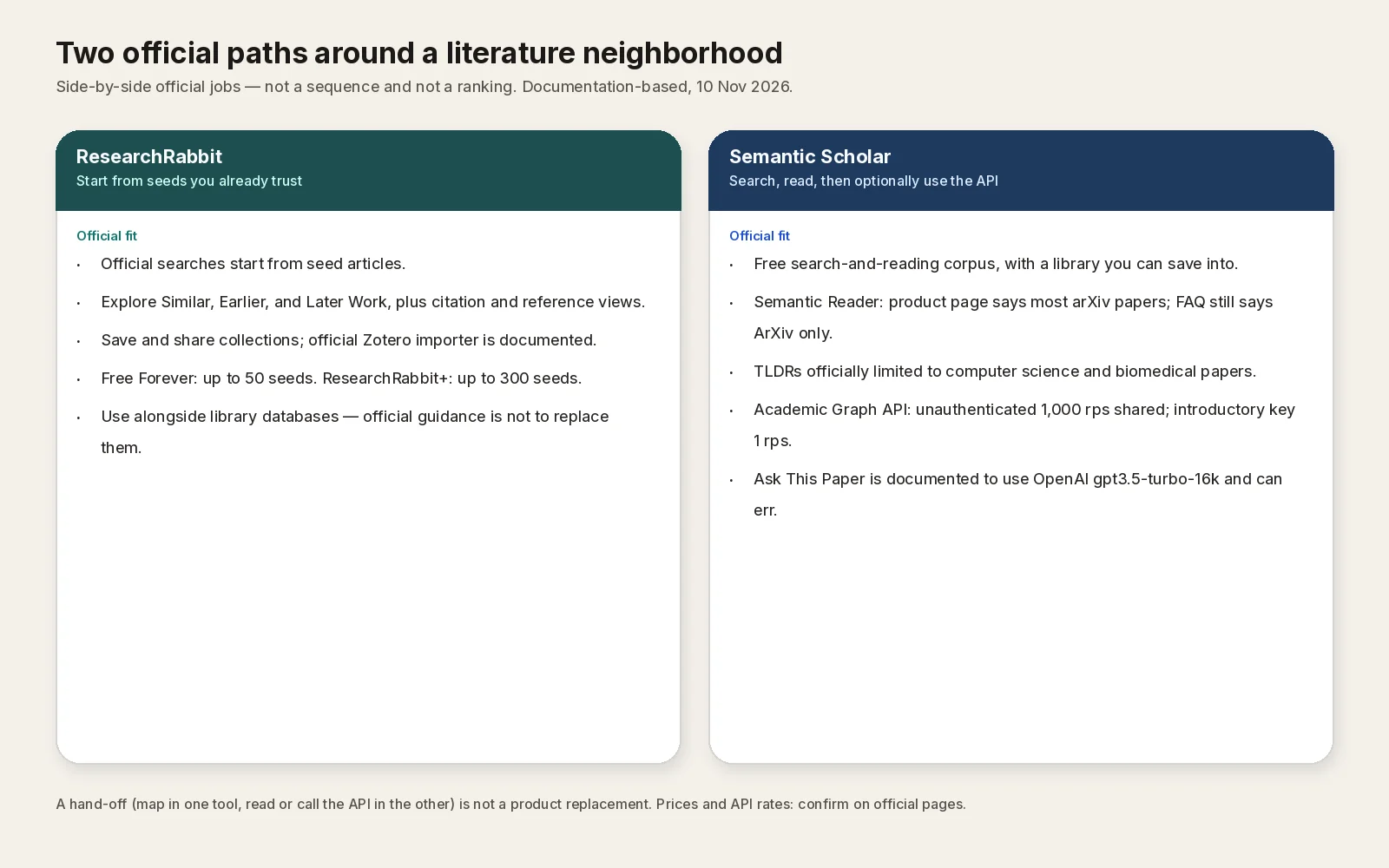
AINav original diagram based on official docs. Sources: ResearchRabbit Guide, ResearchRabbit pricing, What is ResearchRabbit+?, Semantic Scholar FAQ, Semantic Reader, Academic Graph API. Not an official screenshot or a test result.
中文说明:按官方定位把「从种子论文画出引用邻域」与「检索、阅读和Academic Graph API」分成两条路径,不是产品界面,也不是实测结果。
What each product officially covers
The table below is a capability map from official pages opened on 10 November 2026. It is not a scorecard and not a quality ranking.
| Job you actually have | ResearchRabbit (official) | Semantic Scholar (official) |
|---|---|---|
| Start from papers you already trust | Seed articles are required for a search; Free Forever allows up to 50 seeds, ResearchRabbit+ up to 300 | Search the corpus first; save papers to a library. No seed-count tier is described in the same way |
| Walk citation neighborhood | Official guides for Similar Work, Earlier Work, Later Work, plus citation and reference views and visual mapping | Academic Graph data is available through the official API; the consumer site is a search-and-read product, not a ResearchRabbit-style collection mapper |
| Collect and share a working set | Collections, collaboration, and library uploads are listed on the free tier; Zotero import is documented | Library save is documented; Semantic Reader can save a paper to your library. ResearchRabbit-style shared collections are not the documented pitch |
| Read the paper in an official reader | Not the documented core of ResearchRabbit | Semantic Reader: the product page says it is available for most arXiv papers, with citation cards, a table of contents, library save, and skimming highlights on most English-language arXiv CS papers. The FAQ still says Semantic Reader is only available for ArXiv papers and mentions 250,000+ papers — both official statements are left here rather than reconciled |
| Programmatic paper and citation data | No public ResearchRabbit search API was documented on the official pages opened for this article | Academic Graph API. Unauthenticated traffic is listed at 1,000 requests per second from a shared pool. An introductory API key, sent as x-api-key (the header documented in the official API tutorial), is listed at 1 request per second |
| Work with a library database | Official guidance: use ResearchRabbit alongside traditional library resources, not instead of them | Treat Semantic Scholar as a discovery and reading layer; it does not replace a licensed library database |
Two Semantic Scholar details are easy to over-claim and are therefore kept narrow. TLDRs are officially limited to computer science and biomedical papers. “Ask This Paper” is documented as using OpenAI gpt3.5-turbo-16k and can be wrong. The FAQ also records that Hypothesis integration was discontinued by the end of January 2024. Marketing-widget corpus totals on the API page were not clearly labeled in the first-hand fetch, so they are not restated here.
The official ResearchRabbit pricing page, opened on 10 November 2026, also states that searches run across 310+ million articles. A Guide index card still summarizes a help article titled “The ResearchRabbit Database” as 270+ million research articles and three data providers. Those are two official index figures from different official pages, not a measurement made for this article; re-check the full database article and the live pricing page if you need a methods-section number.
Official plans, and how the current prices are billed
ResearchRabbit’s pricing page, opened on 10 November 2026, describes a Free Forever tier with up to 50 seed articles and unlimited search, collections, collaboration, and library uploads. ResearchRabbit+ raises the seed cap to 300 and adds advanced filters, multiple projects, Signals alerts, and faster support. An institution tier that includes LibKey is mentioned; contact sales rather than inventing a list price. Subscriptions can be cancelled at any time, with access lasting through the paid period before returning to free limits.
The same official pricing page presents ResearchRabbit+ with billing-cadence tabs. The default Annual plan tab shows $10* per month. The Monthly plan tab shows $12.5* per month. A FAQ on that page says the default price — which the U.S., UK, Canada, and other countries fit under — is USD$10 per month, and that ResearchRabbit+ is discounted for 100+ countries based on a country parity group. The asterisk and the checkout amount for your country should be confirmed in the official in-app checkout, not assumed from the U.S. default sticker.
A separate official help article, “What is ResearchRabbit+?”, written April 25, 2026 (schema dateModified 2026-04-25T12:10:44Z), already states $12.50 USD per month or $120 USD per year (saving 20%). $120 per year is the annual-plan $10-per-month equivalent; $12.50 × 12 is $150, and 20% off is $120. That April help article is therefore describing the same two billing cadences now shown as tabs on the pricing page, not a second, equally current list price in conflict with it.
Semantic Scholar search is officially free. The Academic Graph API’s documented introductory rate is as above; other products such as Recommendations and Datasets exist on the official API site, but their exact current quotas were not all pulled into this article and are not invented here. If you need a production key or a higher rate, use the official API product page rather than assuming the introductory 1 RPS figure is a negotiated plan.
ResearchRabbit’s full data-responsibility and terms pages were not extracted as complete first-hand policy text in this pass, so retention, training, and licensing claims for ResearchRabbit are not invented here. Open the official Data Responsibility help and terms before you upload a sensitive library. Semantic Scholar’s API license should likewise be read on the official license page if you plan to redistribute data.
A documentation-based neighborhood workflow
The following path is assembled from official feature and help pages. It is an example, not a log of a search we ran.
- In ResearchRabbit, start a new search from one or more seed articles you already know. Stay inside the official free seed cap (50) unless you are on ResearchRabbit+.
- Use the official discovery views — Similar Work, Earlier Work, and Later Work — and the citation or reference views when you want to walk the graph around a specific paper.
- Save keepers into a collection. Share the collection if you are working with collaborators. If your references already live in Zotero, use the official Zotero importer rather than rebuilding the list by hand.
- When you need a library-licensed copy, go to your library database. ResearchRabbit’s own guidance is not to treat the tool as a replacement for that step.
- Open an individual paper in Semantic Scholar when you want the official reader, a library save, a TLDR (only where TLDRs are offered), or a cautious “Ask This Paper” pass that you will fact-check.
- If you are building a reading list or a graph in code, use the Academic Graph API with the documented authentication and rate limits. Treat any sample payload you copy from docs as an example, and do not scrape publisher sites or bypass access controls.
If the real job is instead “ask this PDF a question,” “see whether papers agree,” or “get a Connected Papers-style graph from a single paper,” stop and use the earlier Elicit / Consensus / Connected Papers article. Those are different deliverables.
What this article does not claim
No retrieval quality, “papers found,” or time-saved figures are offered, because no live searches were run. No country-specific ResearchRabbit checkout total is restated beyond the two official list figures above. Semantic Reader’s arXiv coverage is reported as the official product page and FAQ currently phrase it, including the disagreement. If a campus already licenses a discovery layer or a citation index, this article does not tell you to replace it.