growth
Surfer: understand Content Editor credits vs AI Article limits before you scale output
Creating a Content Editor, starting an AI Article, and running Auto-Optimize are not the same official usage unit. Public pricing bills Documents, and AI Article credits are reserved on some plans only. Figures below are dated 29 November 2026 and are not evergreen.
Surfer bills more than one kind of usage, and the names are easy to flatten into one bucket. Creating a Content Editor is one unit. Starting an AI Article can be a different unit, but only on some plans. Auto-Optimize is a third allowance. The public pricing page, checked today, does not show those units side by side. It bills and describes Documents.
Official Content Editor and Surfer AI help, the official MCP documentation Credits and limits, and the public pricing page at https://surfer.ai/pricing/ were reviewed on November 29, 2026 (Asia/Shanghai). The older hostname surferseo.com/pricing redirected to that URL. We did not sign in to a Surfer account, open the in-app Usage page, or create an editor or an AI Article. This article does not invent how many credits a typical article consumes, and it does not treat a content score, SEO score, or AI Search score as a ranking guarantee.
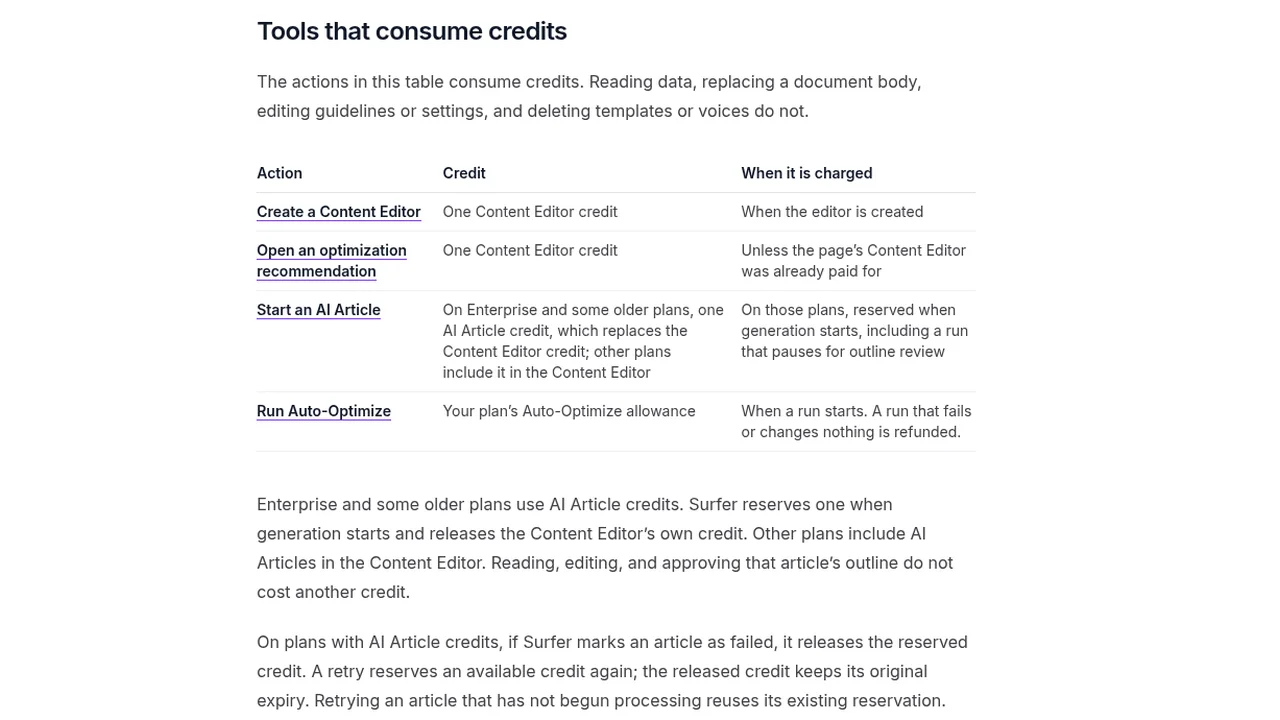
Cover source: Surfer's official MCP documentation Credits and limits, captured November 29, 2026 (Asia/Shanghai). The cover is a screenshot of the official “Tools that consume credits” table and the following official paragraphs on when an AI Article credit is reserved. It is vendor documentation, not a logged-in Usage meter and not a run we started. No interface values were rewritten. Underlying vendor copyright is retained; no blanket reuse licence was established.
Creating a Content Editor is one credit, when the editor is created
Official Content Editor Overview is direct: “Every successfully created Content Editor counts as a single usage against your limit,” depending on your Surfer subscription.
The official MCP Credits and limits page uses the same unit in a table. Creating a Content Editor costs one Content Editor credit, charged when the editor is created. Opening an optimization recommendation also costs one Content Editor credit, unless that page’s Content Editor was already paid for.
That second line matters if you are opening recommendations in bulk. A page you have already paid for does not take another Content Editor credit. A page you have not paid for does.
Official MCP wording also says deleting a Content Editor in the app does not refund its credit, and the deleted editor still counts toward fair usage. Do not plan to recover quota by deleting drafts.
Reading data, replacing a document body, editing guidelines or settings, and deleting templates or voices are listed as actions that do not consume these credits. That is the official table’s scope, including for MCP. It is not a promise that every other button in the app is free.
AI Article credits are plan-specific, and they are reserved
Not every plan uses a separate AI Article credit.
On Enterprise and some older plans, starting an AI Article uses one AI Article credit, which replaces the Content Editor credit. Official wording is “reserved,” not prepaid: Surfer reserves that credit when generation starts, including a run that pauses for outline review. Other plans include AI Articles in the Content Editor credit.
The same official page is explicit about what does not take another credit: reading, editing, and approving that article’s outline do not cost another credit. Reviewing the outline is a product step inside the editor. It is not a second billable event, and it is not a reason to turn this article into a “review the outline, then publish” checklist.
If Surfer marks an article as failed, official MCP docs say it releases the reserved credit. A retry reserves an available credit again, and the released credit keeps its original expiry. Retrying an article that has not begun processing reuses its existing reservation. A timeout is not the same as a failure: official warning text says a timeout does not mean the work failed or its credit was released. Check the job’s status before starting another run.
Surfer AI help says you need an active Surfer subscription to use Surfer AI. In the New Content wizard, Generate content is the writing mode that uses Surfer AI. Official help says the outline and the writing both happen inside the Content Editor, and you can work on the outline with Surfy before you hit Generate content. That is how the product is documented to work. It is not an evaluation of whether you should buy an SEO tool, and it is not a standalone publishing-review playbook. If you are still comparing content-ops tools, see How to Evaluate AI SEO and Content Ops Tools Before You Buy. This article is only about the credit boundary.
The public pricing page bills Documents, not a two-unit meter
The official MCP table is not what a visitor sees first on the marketing pricing page.
On November 29, 2026 (Asia/Shanghai), the current public pricing URL was https://surfer.ai/pricing/. The page was in a Cyber Week state, with promotional first-year yearly prices shown next to regular prices. Those promotional figures are not the normal list price, and none of the figures on that page should be treated as evergreen. Recheck the live page before you buy or change a plan.
The regular (non-promo) prices shown on that day, as labeled on the page, were:
- Discovery: $49 per month billed yearly (the page also exposed a $59 monthly figure in its price data). The card listed Create or Optimize 120 Documents.
- Standard: $119 per month, or $99 per month billed yearly. The card listed Create or Optimize 360 Documents.
- Pro: $219 per month, or $182 per month billed yearly. The card listed Create or Optimize 360 Documents, plus MCP.
- Peace of Mind: $359 per month, or $299 per month billed yearly. The card listed Create or Optimize Unlimited* Documents, plus MCP.
- AI Search Analytics: $95 per month, or $82 per month billed yearly. The card listed MCP and AI visibility tracking; it was not treated here as a confirmed Documents allowance.
- Enterprise: Custom, with custom limits.
A tooltip on “Documents” described generating, writing, and optimizing content with AI search and SERP insights, including guidelines, outline generation, and related editor features. It did not expose a public “Content Editor credits vs AI Article credits” meter. The in-app Usage page is behind login and was not opened. If you need to see remaining credits, official MCP docs point you to that Usage page in the app. Different plans use different units. Say so, and look at the plan you actually have.
An FAQ on the same pricing page asked whether annual-plan credits reset yearly or monthly. The official answer today was: “Your credits reset yearly or after changing your plan (upgrades and downgrades).”
MCP itself is not on every plan. Official MCP docs say MCP is included in the Pro, Peace of Mind, Enterprise, and AI Search Analytics plans, and that some older plans and trials include it as well; the MCP tab in the app shows whether yours does. The Standard and Discovery cards we saw today did not list MCP in their included features. If your organization’s plan stops including MCP, official docs say the connection can stay, but requests for organization data fail with a permission error until the plan includes MCP again.
Auto-Optimize is a separate allowance
Auto-Optimize is not paid with the same unit as creating a Content Editor.
Official MCP docs say running Auto-Optimize uses your plan’s Auto-Optimize allowance, charged when a run starts. A run that fails or changes nothing is refunded. A second Auto-Optimize run on the same editor charges again and cancels the first run, which is not refunded. Check the editor for an existing job before you start another one.
When you run out of one of these credits, official MCP docs say the tool call fails with a quota error until the quota resets or the plan changes. Options listed there are to wait for reset, or, if you have billing access, to open the subscription settings and upgrade, change the plan, contact sales, or request an upgrade from support. Do not invent a typical “articles per month” yield from these limits.
Content Editor help also describes Auto-Optimize as a way to add suggested changes that you can approve, discard, or restore. Those product steps are not a ranking guarantee, and they are not a credit refund if you later dislike the result of a run that did change the document.
What we did not test
We did not log in, create a Content Editor, start an AI Article, run Auto-Optimize, or open a live Usage meter. Plan names, Document allowances, list prices, Cyber Week promotions, MCP inclusion, and credit-reset rules are what the official pages showed on November 29, 2026 (Asia/Shanghai). They can change. Recheck the official pricing page, the MCP Credits and limits documentation, and your in-app Usage view before you scale output or change a plan.
Generated outlines and articles are not verified facts about your topic, and a higher content score is not a promise that a page will rank. This article only maps the official credit boundary so you can tell a new editor, an AI Article, and an Auto-Optimize run apart before you increase volume.