
✳ainav.

AI Data Analysis Tools

Zoho Books

Visit website
Introduction
Cloud accounting platform for growing businesses, with AI features, invoicing, expenses, banking, inventory and financial reporting.
Added on
11/23/2026
Pricing
Freemium
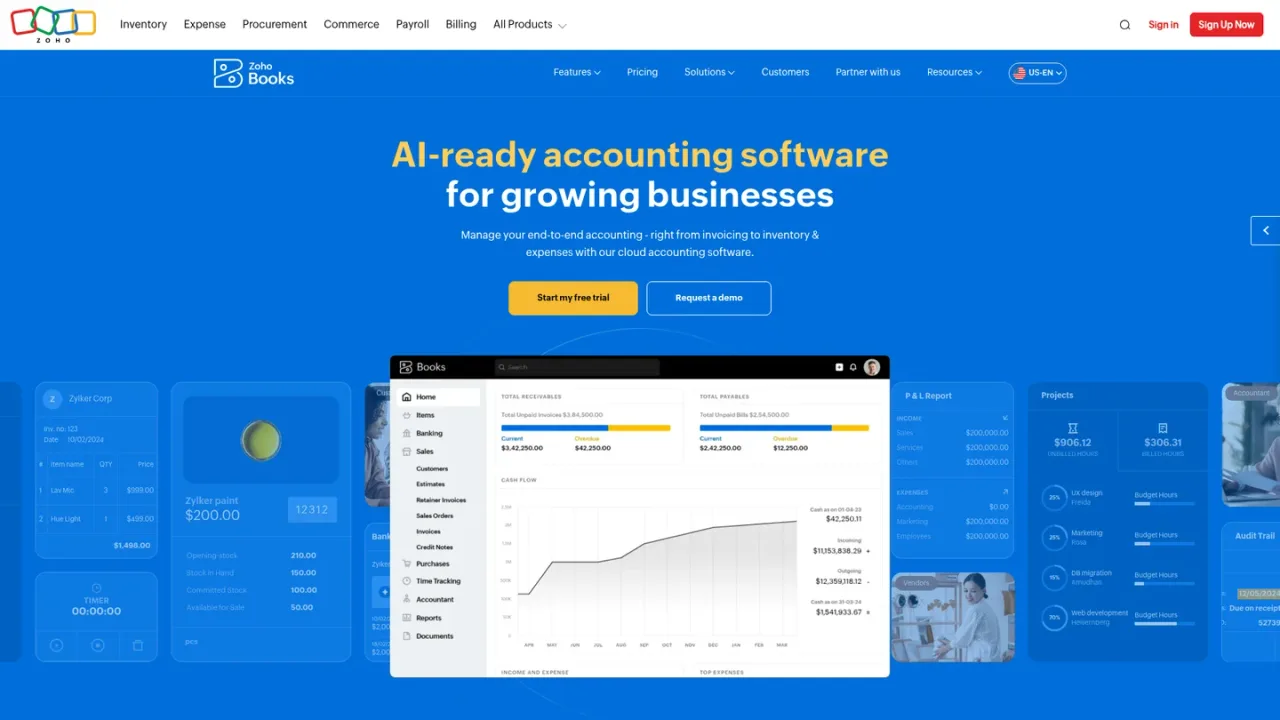
Zoho Books screenshot
Zoho Books website preview

PRODUCT OVERVIEW

What is Zoho Books?

Zoho Books is a cloud accounting platform for growing businesses. It covers quotes, sales orders, invoices, bills, purchase orders, expenses, bank reconciliation, inventory accounting, projects and timesheets, plus financial reports and a customer portal. AI features and accounting automation support day-to-day bookkeeping, while online payments and integrations connect sales and finance workflows. It suits small and midsize businesses, accountants and finance teams that need organized books and reporting. Access is offered through a free plan and several paid tiers, with web, mobile and desktop apps.

How to use Zoho Books

  1. 1

    Create an account

    Sign up for Zoho Books and choose a plan, including the free option, to open your organization.

  2. 2

    Set up your organization

    Configure organization details, currencies, taxes, users and roles before recording transactions.

  3. 3

    Record sales and expenses

    Create quotes, invoices, bills and expenses, then track payments and reconcile bank transactions.

  4. 4

    Use reports and automation

    Review financial reports and dashboards, and set up workflow rules and reminders to automate routine tasks.

Zoho Books Features

Quote, invoice and sales order management

Bills, purchase orders and expense tracking

Bank reconciliation and transaction rules

Inventory accounting with stock tracking

Financial reports, dashboards and custom reports

AI features and accounting automation

Online payments and customer portal

Projects and timesheets

Workflow rules, reminders and approvals

Mobile and desktop apps

Zoho Books Use Cases

  • Small businesses managing invoices, expenses and bank reconciliation

  • Finance teams producing financial reports and dashboards

  • Accountants managing client books and journals

  • Businesses tracking inventory and stock levels

  • Teams automating reminders and approval workflows

Zoho Books FAQs

Yes. The pricing page lists a Free plan alongside paid tiers such as Standard, Professional, Premium, Elite and Ultimate.

It covers quotes, sales orders, invoices, bills, purchase orders, expenses, bank reconciliation, inventory accounting, projects and timesheets, plus financial reports.

Yes. The help documentation includes an AI Features section, and the site describes AI in accounting and accounting automation.

Yes. Banking features include bank feeds, matching and categorizing transactions, transaction rules and reconciliation.

Yes. Inventory accounting is listed, and the pricing comparison shows stock tracking, reorder points and price lists on higher tiers.

Yes. Zoho Books offers mobile apps for iOS and Android, and a Windows app is also listed.

Yes. Workflow rules, email alerts, in-app notifications, field updates, webhooks and schedules are documented.

Customer support can be reached at support.usa@zohobooks.com, and a contact support page is available.

Zoho Books Official Information

Company
Zoho Corporation Pvt. Ltd.
Website
https://zoho.com/us/books
Support
support.usa@zohobooks.com
Documentation
https://www.zoho.com/us/books/help/getting-started/welcome.html
Contact
https://www.zoho.com/us/books/contact-support.html

Zoho Books Pricing

Freemium

Prices are in USD and exclusive of local taxes. Paid plans are shown at the annual-billing rate (per organization per month); monthly billing rates are higher. A 14-day free trial is also offered. Checked 2026-11-19.

Free

$0USD / per organization per month

Free accounting software for solopreneurs and micro businesses.

  • Create invoices, quotes, expenses & journals
  • Receipt and Document Autoscans
  • Sales receipts
  • Manage vendors
  • Mileage tracking
  • Accept online payments
  • Bank reconciliation
  • P&L, Balance Sheet & 50+ Reports
  • 1 User + 1 Accountant
  • Email Support

Standard

$15USD / per organization per month, billed annually

Efficiently organize your transactions, accounts, reports, and books.

  • Everything in Free
  • Progress invoicing
  • Track sales tax and use tax
  • E-File 1099-MISC & 1099-NEC
  • Connect bank feeds
  • Custom fields and custom reports
  • API Access
  • 3 Users
  • Email, Voice, and Chat Support

Professional

$40USD / per organization per month, billed annually

Confidently take on projects, track your inventory, and handle purchases.

  • Everything in Standard
  • Track sales and purchase orders
  • Multi-currency transactions
  • Bill timesheets
  • Project profitability
  • Track inventory
  • Custom user roles
  • 5 Users
  • Email, Voice, and Chat Support

Premium

$60USD / per organization per month, billed annually

Enhanced customization and automation to streamline business processes.

  • Everything in Professional
  • Revenue recognition - Basic
  • Fixed asset management
  • Manage budgets
  • Cashflow forecasting
  • Vendor portal
  • Custom modules and functions
  • 10 Users
  • Email, Voice, and Chat Support

Elite

$120USD / per organization per month, billed annually

Advanced accounting bundled with full-fledged inventory management.

  • Everything in Premium
  • Revenue recognition - Advanced
  • Blueprints
  • Advanced Inventory Control
  • Manage warehouses
  • Composite items
  • Serial and batch tracking
  • Connect online sales channels
  • 10 Users
  • Email, Voice, and Chat Support

Ultimate

$240USD / per organization per month, billed annually

Gain deeper insights with advanced business intelligence capabilities.

  • Everything in Elite
  • Advanced analytics
  • 50+ Pre-built data visualization
  • Track KPIs
  • Embed reports
  • 3 Million records/rows
  • 15 Users
  • Email, Voice, and Chat Support

View official pricing ↗

COMMUNITY REVIEWS

Zoho Books User Reviews

Reader reviews

No reviews yet.

Share your experience with Zoho Books

Sign in to share your experience. Your display name, rating and review will be public after approval. One review per account per tool.

Your rating