guides
Where Apple Intelligence works, and where your data goes
A current official map of Apple Intelligence availability — device, iOS/iPadOS/macOS 27, language, and region, including China mainland and EU Siri AI limits — plus on-device processing, Private Cloud Compute, extensions, and Settings off switches. Not globally available and not a device test. Support page dated 5 November 2026; privacy page dated 14 September 2026.
Where Apple Intelligence works, and where your data goes
Apple Intelligence is a system feature, not a website you sign into. Whether it appears — and whether a request stays on the device or leaves it — depends on the device, the OS version, a matching Siri and device language, and the region and Apple Account in play. It is not globally available, and this article does not treat it as a ChatGPT substitute. For a cross-vendor assistant comparison, use ChatGPT vs Claude vs Gemini for Everyday Work. For a workplace rollout frame, use How to Evaluate Workplace AI Copilots Before You Roll Them Out.
How this article was written
Official Apple Support and legal privacy pages were opened first-hand on 10 November 2026 (Asia/Shanghai). The main availability page, “Get started with the next generation of Apple Intelligence,” is dated 5 November 2026. The legal “Apple Intelligence & Privacy” page is dated 14 September 2026. No Apple Account was used, and no device was tested. Feature lists and region limits are those official pages’ wording on this date. Where two official pages list devices slightly differently, both are left visible.
Device, OS, language — and not “everywhere”
Official system requirements for the next generation of Apple Intelligence are iOS 27, iPadOS 27, macOS 27 Golden Gate, visionOS 27, and watchOS 27, in a supported language and region. The 5 November 2026 Support page lists these devices:
- iPhone Duo, iPhone 16 models or later, iPhone 15 Pro, iPhone 15 Pro Max, and iPhone Air
- iPad mini (A17 Pro and A20 Pro), and iPad models with M1 or later
- MacBook Neo (A18 Pro), and Mac with M1 or later
- Apple Vision Pro
- Apple Watch Series 9 or later, Apple Watch Ultra 2 or later, and Apple Watch SE 3, when paired with an Apple Intelligence-enabled iPhone; some features require iPhone nearby
Storage: official text says up to 14 GB on iPhone Duo, iPhone 17 Pro models and later, iPhone Air, iPad models with M4 and later and at least 12 GB of unified memory, Mac models with M3 and later and at least 12 GB of unified memory, and Apple Vision Pro (M5); up to 8 GB on other Apple Intelligence-enabled iPhone, iPad, Mac, and Vision Pro models; up to 1.5 GB on Apple Watch. Storage may temporarily exceed those figures during and after an update.
Device language and Siri language must be set to the same supported language. If you change Siri language, Apple Intelligence may be unavailable until the new language finishes downloading and matches the device language.
Supported languages on iOS 27, iPadOS 27, and macOS 27, per that page: English, Danish, Dutch, French, German, Italian, Norwegian, Portuguese, Spanish, Swedish, Turkish, Vietnamese, Chinese (simplified), Chinese (traditional), Japanese, and Korean. visionOS 27 lists a shorter set: English, French, German, Italian, Chinese (simplified and traditional), Japanese, Korean, and Spanish. “Some features may not be available in all regions or languages.” The same page says Apple Intelligence will continue to work when you travel to other regions.
China mainland is not treated as available. Official wording: features will not currently work for supported devices purchased in China mainland. For devices purchased outside China mainland, features will not currently work if you are in China mainland and your Apple Account Country or Region is also China mainland. When it becomes available there, previously purchased supported devices “will be able to activate and start using a core set” of features; new features “will not be available in China while Apple works through regulatory requirements.” The iPhone “Turn off and restrict” page, re-opened the same day, states more flatly that “Apple Intelligence and Siri AI are not available in China mainland.” Those are two official wordings; this article does not collapse them into a shorter unofficial rule.
The European Union is not a single on/off switch. The 5 November 2026 page says next-generation features across apps (examples: advanced photo-editing, reimagined Image Playground, intelligent browsing features) are available for users based in the EU with iOS 27, iPadOS 27, macOS 27, and visionOS 27 on supported hardware. A separate official iPhone settings page says Siri AI will not initially be available in the EU on iOS, and the footnote extends that to iPadOS and watchOS. Siri AI is also officially not available for users under 13, and is described as a beta. Do not generalize “available in the EU” from one feature to Siri AI, or the other way around.
The iPhone “Turn off and restrict” page lists Siri AI (beta) starting languages as English, French, Japanese, Korean, Portuguese, and Spanish, and describes hardware more narrowly (iPhone 15 Pro, 15 Pro Max, or iPhone 16 or later) than the 5 November get-started list, which also names iPhone Duo and iPhone Air. This article does not collapse those lists into one unofficial inventory; check the live Support page for your exact model.
On the device, Private Cloud Compute, or an extension
Apple’s legal privacy page (14 September 2026) is the official account of where a request goes.
- Many features run entirely on device. The official example: Priority Notifications are decided by an on-device model.
- When a task needs more compute than the device can provide, Apple Intelligence may send the request to Private Cloud Compute. The official example: Image Playground sends your description to a server-based model. Official wording: data processed in Private Cloud Compute “is not stored or made accessible to Apple,” is processed only to fulfill the request, and is then returned to the device and not retained by Private Cloud Compute.
- Some features may use Search for up-to-date information (official examples: Shortcuts with “Use Broad World Knowledge,” or a Siri question about current events).
- Private Information Retrieval is described as a cryptographic fetch that does not reveal the query or the result to Apple (official example: suggested images and Genmoji).
- Apple may collect limited metadata about PCC or PIR requests (approximate size, which features, how long), not the content, and not linked to your Apple Account.
- If you enable Apple Intelligence Extensions (the privacy page’s term), the PCC report can include requests sent to those extensions, including when used with Siri or Image Playground. The older Support feature list still names a ChatGPT extension, available only in regions where the ChatGPT app and service are available. Those are official product names on different dated pages; this article does not merge them into one unofficial extension list.
You can turn on transparency logging at Settings > Privacy & Security > Apple Intelligence & PCC Report (on Mac: System Settings, same path) and export a file of off-device PCC requests, including those originating from watchOS. Official caveat: if Face ID or Touch ID are temporarily disabled, the report may not reflect recent requests. Sharing Device Analytics, if you opted in, can be turned off under Privacy & Security > Analytics & Improvements.
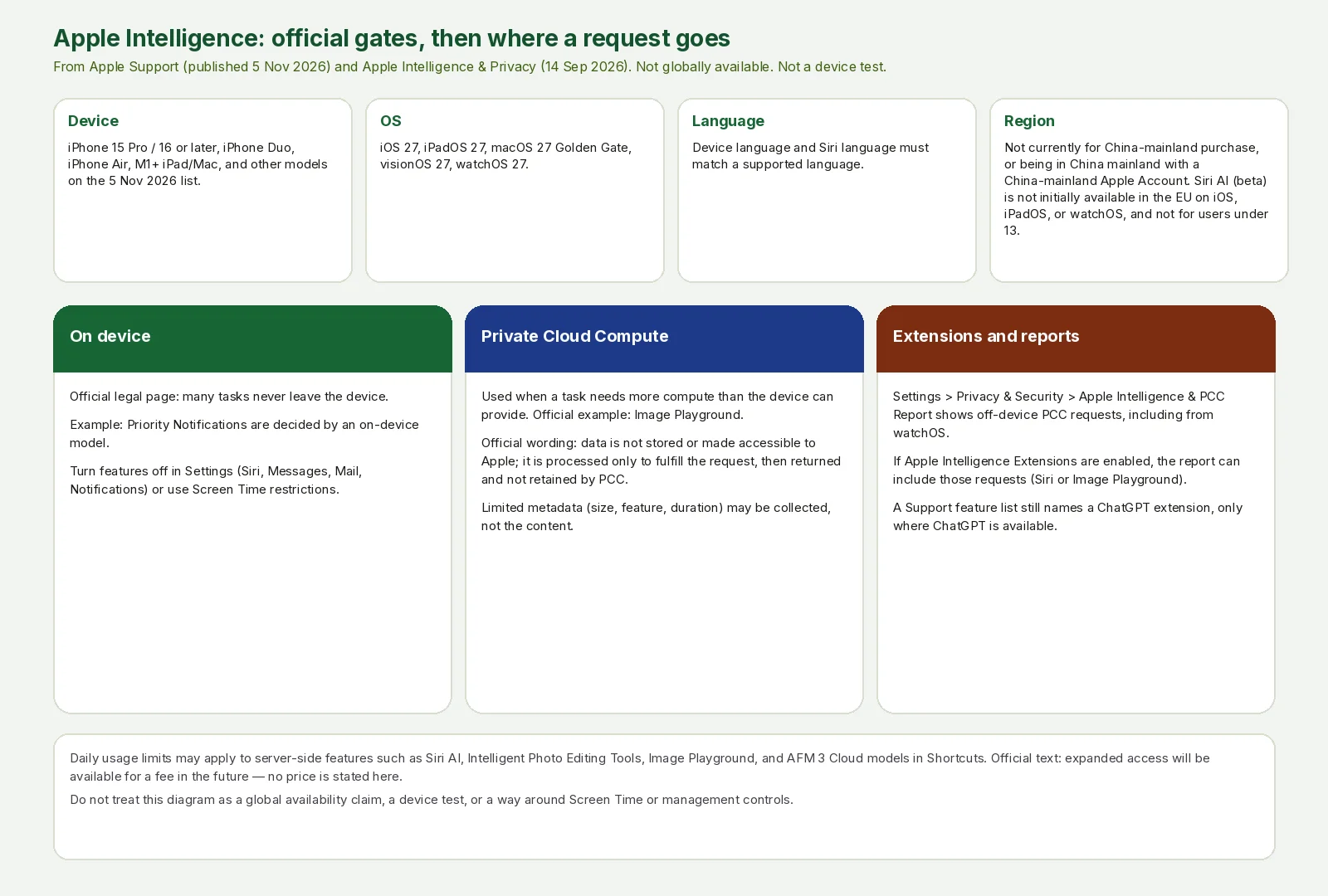
AINav original diagram based on official docs. Sources: Get started with the next generation of Apple Intelligence (published 5 Nov 2026), Turn off and restrict access on iPhone, Apple Intelligence & Privacy (14 Sep 2026). Not an official screenshot and not a device test.
中文说明:按官方当前版本整理设备/系统/语言/地区门槛,以及设备端、Private Cloud Compute 与扩展的数据去向,不能当作全球可用。
Official off switches, and limits that are not a test result
On iPhone, official Settings paths include:
- Siri AI (beta): Settings > Siri > Turn Off Siri, confirm. To use Siri Classic instead, turn Siri off, then Turn on Siri, then Siri Classic.
- Messages summaries, Mail preview summaries, Personalized Smart Replies, Notification summaries, Priority notifications, Journal writing prompts, and Phone voicemail suggestions each have an official per-app or Notifications toggle, listed on the same Support page.
- Screen Time can restrict Siri and Apple Intelligence features; official docs point to the family-device guides rather than a workaround.
Certain features that rely on server-side models are officially subject to daily usage limits, including but not limited to Siri AI, Intelligent Photo Editing Tools, Image Playground, and AFM 3 Cloud models in Shortcuts. Limits “may vary by feature, request complexity, system demand, system policies, and other factors.” Official text also says “Expanded access to such features will be available for a fee in the future.” This article does not invent a price or a remaining-quota number.
A long official table splits features that arrive with the 27.x generation (advanced photo editing, reimagined Image Playground, Mail suggestions in English only, and others) from features already listed with iOS 26, iPadOS 26, macOS Tahoe 26, and visionOS 26 and later (Writing Tools, notification summaries, Genmoji, Live Translation with its own language lists, and more). Use that table on the 5 November 2026 page for a platform-by-platform check; do not assume a Watch or Vision Pro feature exists on every listed phone.
Nothing here is a jailbreak, a bypass of Screen Time or management controls, or a claim that a device missing from Apple’s lists was tested and works.