news
Canva Craft brings layout planning to AI images
What Canva Craft changes for marketing visuals, how to test it, and which features remain on the roadmap.

AINav / Product update
What the October 22 launch means for everyday marketing work
Launched October 22, 2026 · Checked October 27, 2026
Canva launched Craft on October 22, 2026, bringing its first in-house image model to Dream Lab.[2] For small teams, the useful question is whether it reduces the work between an attractive AI image and a usable promotional graphic. Our assessment: try it on layout-heavy concepts, but judge the corrected final asset. This article analyzes official documentation; it is not a hands-on review.
What actually changed
Canva says Craft plans a composition before rendering it: the elements, their positions, relative size and text. Its training emphasizes human-designed Canva templates.[1] The company advertises output up to 2K and image text in 55 languages.[2] It also describes more than 30 aspect ratios across the product, which should not be read as a promise that every interface exposes them all.[1]
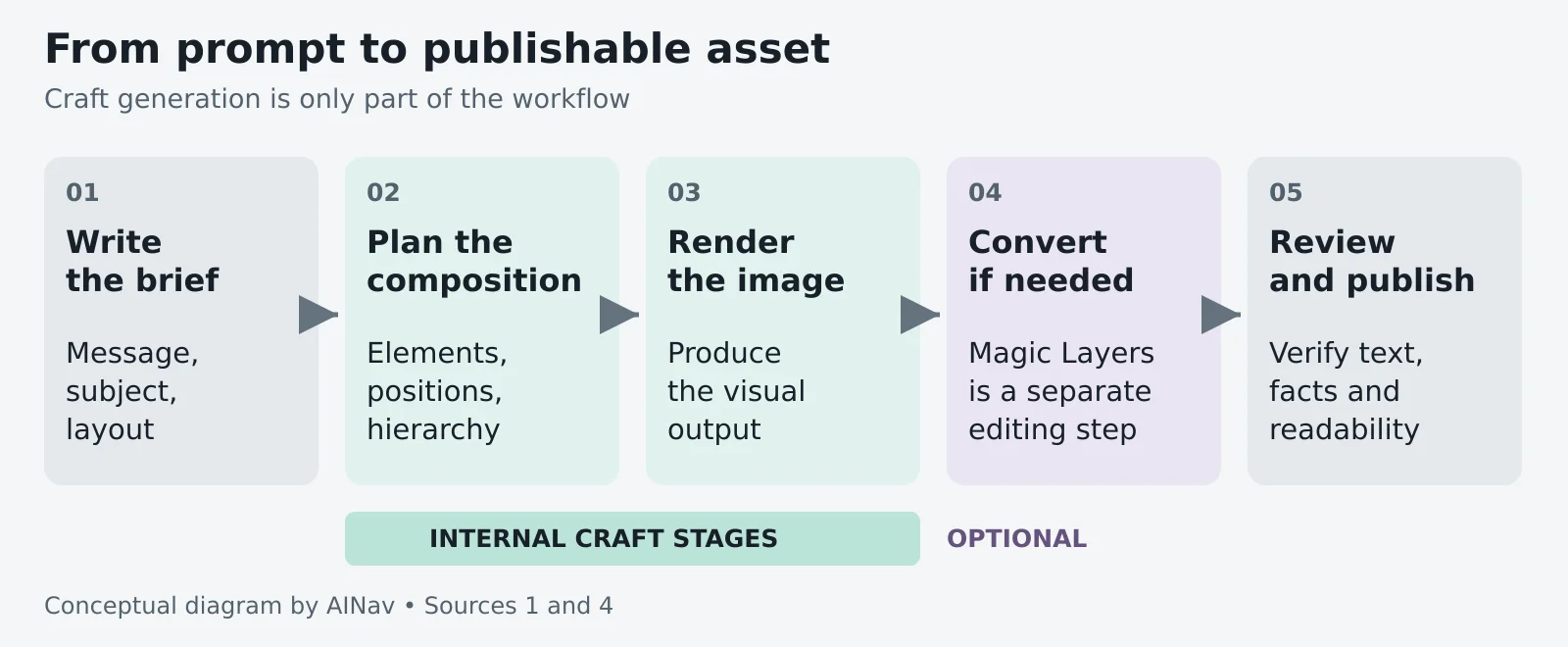
Figure 1 Conceptual workflow, not a screenshot. Planning and rendering are internal model stages. Optional editing remains separate.[1][4]
Why the layout matters
A promotional image has jobs to do: make the offer readable, keep the product recognizable and put the date where people will notice it. Composition-aware generation could produce a better starting point. That is a workflow hypothesis, not a measured time saving; correction effort is the test that matters.
What this could change in everyday marketing
The entry point is Canva's homepage, then More and Dream Lab, rather than the editor. Dream Lab can produce up to four images per prompt.[3] The examples below illustrate possible applications; they are not results we generated.
A café promotion
Create a square poster for a fictional café. Put a takeaway cup on the right, the headline “Morning Special” at the top left, and “Coffee + pastry $6” beneath it. Use a cream background and dark green type.
Check the exact price and wording, then compare whether the headline and offer remain clear at phone size. Reject a beautiful version if its reading order is confusing.
A workshop announcement
Ask for a poster with one headline, a date and a separate registration area. Then change the date. This tests a practical question: can you keep the useful composition while making the routine revision, or must you rebuild it?
For a broader campaign workflow, see our AI product launch content checklist.
Magic Layers is a separate conversion tool for editing individual elements. It works best on graphic designs and illustrations; photographs may separate less cleanly. It accepts single-page PNG or JPG images up to 5,000 pixels on the longest edge, not PDFs or vector files.[4]
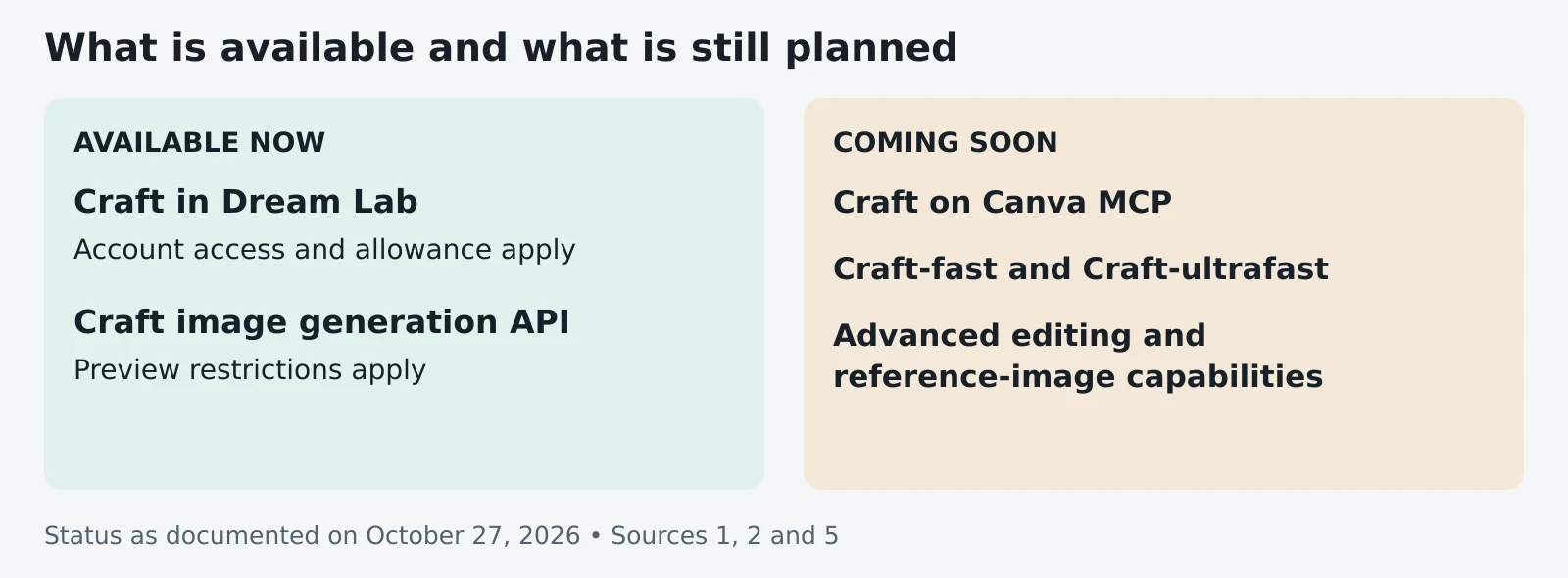
Figure 2 Release boundary checked October 27, 2026. API access is a preview; roadmap items are not current capabilities.[1][2][5]
Access does not mean unlimited use
Canva announces Craft for all users globally,[1] but its Dream Lab help page excludes canva.cn, and administrators or teachers can restrict access.[3] Check your own account before building a workflow around it.
Canva uses a shared monthly AI allowance that varies by plan and task. Magic Layers is a Premium AI feature. The reviewed pages do not establish a fixed Craft-specific price or generation quota, so do not equate account access with unlimited free generation.[6]
For developers, the image-generation API is in preview: breaking changes are possible, and public apps using preview APIs cannot pass Canva's public review.[5] Most creators should start in Dream Lab rather than make automation the first experiment.
Who should pay attention
Social-media managers, small-business marketers and creators who already work in Canva have a sensible reason to try it: they frequently need an image and a message to work together. For a product catalog, technical illustration or anything requiring exact detail, demand stronger evidence before relying on generated output. Canva itself lists fine print and technical drawings as areas for improvement.[1]
AINav's verdict: worth a controlled trial, not an automatic workflow replacement. Use one real brief, check every claim, price and date, and record the revisions needed to make the result usable. If Craft reduces that repair work without exhausting your allowance, it has delivered a practical improvement.
Explore more AI image and design tools in our directory.
Sources
All sources are official Canva pages, checked October 27, 2026. The October 22 launch date is explicit in source 2.
- Canva Craft announcement
- Developer launch announcement dated October 22 2026
- Dream Lab access and limitations
- Magic Layers capabilities and file limits
- Image generation API preview restrictions
- AI allowance and feature eligibility
Original explanatory diagrams by AINav. No Canva screenshots or hands-on results are represented.