growth
Clay: review enrichment results and credit use before you export to the CRM
Actions and Data Credits are separate meters. A CRM export or sync costs an Action; a CSV download does not. Review results before you sync—this is an operational checkpoint, not a Clay product gate.
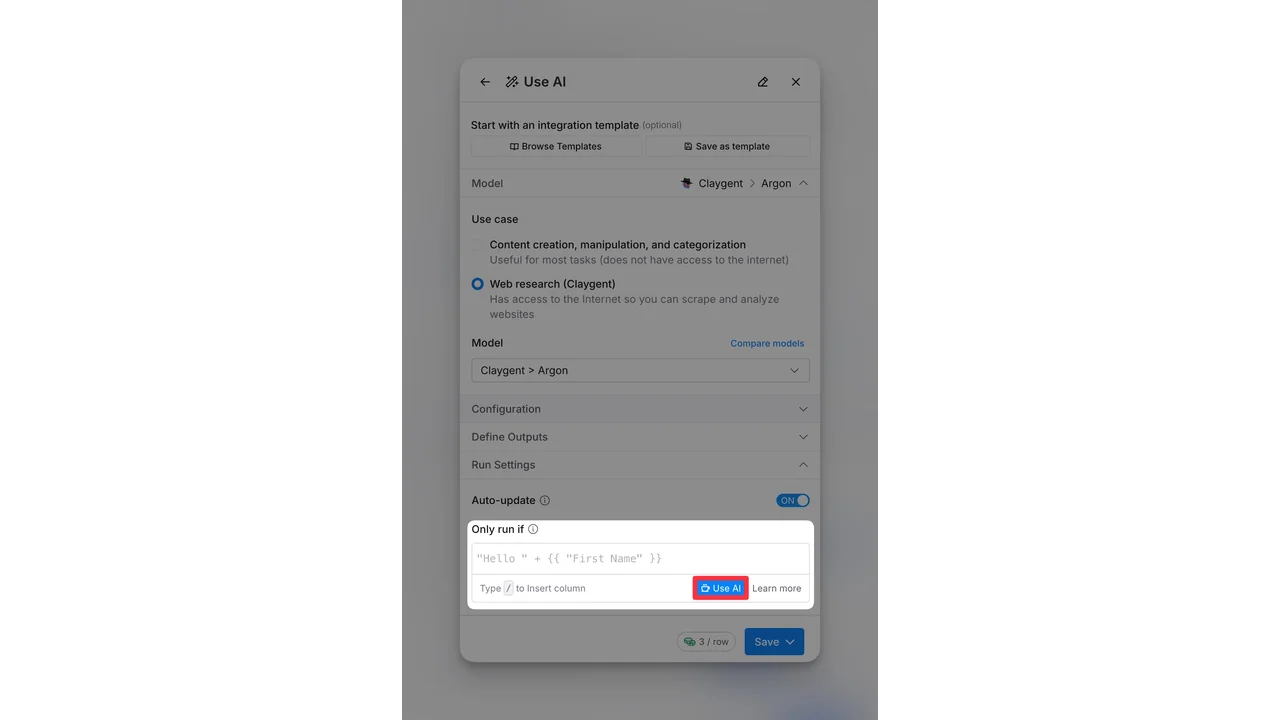
An enrichment can look complete and still be wrong, and a CRM sync can spend an Action even when a CSV download would not. Clay tracks usage on two separate meters, Actions and Data Credits, and official docs list CRM exports and syncs as Action-consuming work. Review the results, and look at those meters, before you push a table into a CRM. That review is an operational checkpoint. Official docs do not describe Clay blocking an unreviewed export.
Official Clay documentation on Actions and Data Credits, AI pricing, enrichments, and credit conservation, plus the public pricing page, were reviewed on November 28, 2026 (Asia/Shanghai). We did not run a paid enrichment, connect a CRM, or export customer records. This article does not treat marketplace data or AI research as a verified identity, email, or company fact, and it does not invent a typical credit cost for a "complete" record.
Cover source: Clay's official documentation Guide: Ways to save Clay credits, acquired November 28, 2026 (Asia/Shanghai). The unaltered official screenshot sits under the Conditional runs heading and shows a Use AI panel with Run Settings open, Auto-update on, and an Only run if condition. The condition uses the official sample expression "Hello " + {{ "First Name" }}, with an official red box around Use AI. The model shown is Claygent Argon, and a cost of 3 / row appears on the official sample. These labels, the sample formula, and the highlighted control are Clay's documentation example, not a table we built and not a run we executed. The official annotation was left unchanged. No interface values were rewritten. Underlying vendor copyright is retained; no blanket reuse licence was established.
Actions and Data Credits are two different meters
Official docs, Actions & Data Credits, open with a clear split: Clay uses two separate metrics to track usage. Actions measure orchestration in Clay, such as enriching data, running AI research, and sending data to other tools. Data Credits buy data or AI from vendors in Clay's marketplace, and costs vary by data type. Official text also says each Action costs a few tenths of a penny, and each Data Credit costs a few pennies. Those are the vendor's descriptions on that page today, not a rate card this article is quoting as a standing price. Re-check the docs and clay.com/pricing for current figures.
The same comparison table is specific about what uses which meter. Enriching accounts or contacts with net-new data costs 1 Action per enrichment, plus Data Credits unless you are accessing free data or using your own API keys. Using AI costs 1 Action per AI run, plus Data Credits unless you use your own API keys. Importing first-party data, and CRM imports into Clay, do not consume an Action. Exporting and executing GTM tasks cost 1 Action per record and no Data Credits. "CRM exports and syncs (Salesforce, HubSpot, etc.)" are listed among the features that use an Action.
CSV export is the contrast that people miss. Official FAQ text says exporting data to CSV does not consume an Action or any Data Credits. Do not write "every export costs 1 Action." A download and a CRM sync are different operations.
Look at the results, then decide whether a CRM sync is the next step
The review this article recommends is not a product gate. Official pages do not say Clay will intercept or refuse a CRM export that nobody has checked. If a row is enriched, you can still sync it. That is why the checkpoint belongs on your side: open the cells that will be written, confirm the fields map to the right CRM properties, and only then run the export or sync.
Do not treat a found email, a company name, or an AI research blurb as verified identity. Marketplace enrichments and AI research are inputs. They can be stale, mismatched, or incomplete. If a field will be used for outreach or a CRM record, check it against a source you trust, or mark it as unverified, before it leaves Clay.
If you are still comparing lead-generation or prospecting tools before a purchase, see How to Evaluate AI Lead-Generation and Prospecting Tools Before You Buy. This article is not that buying guide, and it is not a ranked list of vendors. It is the credit-and-quality check you do on a Clay table that is already in use, before CRM export or outreach.
Recheck plan capacity on writing day, and keep Auto in its place
Plan capacity changes, and this article does not freeze a price. On November 28, 2026 (Asia/Shanghai), the live pricing page listed a Free plan at 500 Actions a month and 100 Data Credits a month, with a published limit of 200 rows per table. Launch was shown as starting at 15,000 Actions a month; the same page's FAQ text said Launch includes 2,500 Data Credits and 15,000 Actions a month. Growth was shown as starting at 40,000 Actions a month; the FAQ text said it includes 6,000 Data Credits and 40,000 Actions a month. Higher published Action tiers also appeared on that page. Re-check clay.com/pricing and the Actions docs before you plan a month's volume around any of those figures.
AI Data Credits have their own rule. Official help, How AI is priced, distinguishes fixed pricing (a flat Data Credit cost per task, described there as applying to 80% of models, including Clay's own models) from variable pricing (charged from the actual cost of the run, with the final amount determined after the run). Auto is a mode rather than a model. Official text says it is the default for new web-research columns, routes each task to the model best suited to it, and is variable-priced: you are charged at the rate of whichever model actually ran that task.
Classify, as of that same day's docs, is described as free for a limited time during alpha: a Classify run does not use Data Credits or count as an Action, though usage limits still apply. That is a dated alpha statement, not a lasting free feature. If the line has changed when you read this, follow the current official rule.
Do not invent a "typical credits per complete record" number from these tables, from Auto's variable routing, or from a sample 3 / row label on a documentation screenshot.
Use the official ways to spend fewer credits, then test a small sample
Official conservation guidance, Guide: Ways to save Clay credits, stays on documented controls. Turn off Auto-run while you are still building a table, so new rows are not enriched before the setup is ready; official help says you can do this in a column's Run settings, or for the whole table from the toolbar, where the button reads Manual while automatic runs are off. The cover image shows a related official Run Settings panel, with Only run if and an Auto-update toggle. The docs heading uses Auto-run; the screenshot label is Auto-update. Use the wording on the control you are looking at, and do not treat the two names as a reason to invent a third setting.
Qualify or filter before you enrich, so rows that can be ruled out early do not consume enrichment or AI runs. Official help points to conditional runs and AI formulas for that filter. Test a small sample—official text says about 10 rows—before running a full column, especially while you are still iterating on an AI prompt. If you are on a paid plan and already have credits with another provider, official help describes adding your own API keys so those Data Credits are not billed the same way; an Action can still count as platform usage when you use your own key. Check the Actions docs for that distinction.
Those steps reduce avoidable spend. They are not a hidden approval workflow, and they do not make the remaining enrichment "verified."
A short checklist before a CRM export
Before you sync or export rows to a CRM:
- You know which meter each step will use. Enrichment and AI runs usually cost 1 Action plus any marketplace Data Credits; a CRM import into Clay does not cost an Action; a CRM export or sync does; a CSV download does not.
- You have looked at the cells that will be written, and you have not treated a marketplace email, company, or AI research result as a verified fact.
- Auto, if you are using it, is understood as a routing mode with variable pricing, not as a fixed-price model.
- While you were building, Auto-run was off, conditions limited who got enriched, and a small sample was tested before a full-column run.
- You have re-checked today's Actions, Data Credit, and plan-capacity figures rather than reusing a saved number, and you have not invented a typical cost per complete record.
- You are running the export because you have reviewed the rows, not because you expect Clay to stop an unreviewed sync.
The safe endpoint is a table whose results you have checked, on meters you can explain, with a CRM sync you chose after that review. A completed enrichment column is not that checkpoint.