guides
How to Evaluate AI CAD and AEC Assistants Before You Pilot
A documentation-based guide to piloting AI inside CAD and AEC work: sandbox a non-production model first, then split early site massing (Forma), mechanical CAD help (Fusion and Creo), and CAE surrogates (Simcenter PhysicsAI). Official price conflicts are left visible. No models were opened and no accuracy was tested.
A design team can buy “AI in CAD” and receive three different products: an early-site planning workspace, a mechanical modeling assistant that proposes edits, or a simulation surrogate trained on historical CAE data. Those jobs do not share the same risk, the same artifact, or the same sign-off path. Treating them as interchangeable copilots is the usual buying error.
This documentation-based guide was reviewed on November 20, 2026 (Asia/Shanghai). We did not open production models, run simulations, accept proposed geometry, or test accuracy against a physical part. Descriptions come from official Autodesk, PTC, and Siemens product, help, and trust pages opened that day. Vendor speed or accuracy claims are quoted as vendor claims, not as AINav benchmarks. No design, safety, or code-compliance advice is offered here.
Start in a sandbox, not in the production vault
The first decision is not which logo to trial. It is which models the assistant is allowed to see, and who may accept a change.
Autodesk’s Assistant product page is explicit that capabilities vary by product and that customers remain responsible for review, approval, and final decisions. The same page does not describe a general self-service switch that turns the Assistant off everywhere. Autodesk’s AI Transparency Cards are the place to read, feature by feature, how a capability is described, including whether human oversight is documented and whether a card lists known-limitation categories such as “not for safety-critical use.” Those cards are disclosures, not a waiver of engineering review.
PTC’s official Creo product page describes Automate (Alpha) as able to create sophisticated geometry and perform analysis, then send results for approval. The same page states that Automate functionalities operate in a sandbox environment, “ensuring nothing changes in your model without approval from an engineer.” That is a vendor-described control, not a reason to skip a pilot policy of your own.
A practical pilot therefore uses a non-production copy, a named reviewer, and a written rule that no assistant output ships, is manufactured, or is filed as a compliance record until a qualified engineer accepts it in the native model. If the vendor cannot tell you where prompts and design context are processed, or whether a trial seat shares a team quota, stop before the vault is in scope.
Split the job: early massing, mechanical CAD help, or a CAE surrogate
Autodesk Forma, Autodesk Fusion, PTC Creo, and Siemens Simcenter sit in the same shortlist because they all mention AI. Official pages put them on different work.
Forma’s official overview presents AI-powered site planning and analysis: Site Design, Site Automation, rapid machine-learning options alongside detailed simulation for wind and noise, and total carbon analysis, plus Forma Board. That is early massing and environmental study, not mechanical CAM or a physics surrogate for a detailed part. Autodesk Assistant is listed as available in Forma, with capabilities that vary by product. Spacemaker is described on the same overview as retired in 2023, with customers migrated. Do not invent, from this review, which individual analyses are machine learning versus traditional solvers beyond what that page states. Regional limits on carbon analysis were not independently confirmed on the pages opened here.
Fusion’s official Autodesk Assistant in Fusion FAQ, updated October 28, 2026, describes an assistant that confirms changes before applying them and is not fully autonomous. Agentic work—“Show me / With me / For me”—is the usage that, from October 13, 2026, consumes Monthly Flex Tokens (Beta). Simple help or documentation questions are described as not using that quota. The allowance is a team quota; trial quotas do not refresh; canceling a task mid-flight still charges assists already used. Prompts and relevant design context are processed through Autodesk’s AI infrastructure, with a referral to Autodesk’s Privacy Policy. The FAQ also lists hard limits: the assistant cannot open, save, rename, or delete files; units can appear in centimeters; Assembly mode is weak. The instruction that belongs in a pilot checklist is the one Autodesk already gives: inspect the result in the viewport before you accept it.
Creo’s AI story is tiered, and the official pages should be read together. The help overview describes two agents: Advise, available to users once they are registered in the Creo Portal, answers from Creo Help and Technical Support articles and “does not analyze model context”; Assist requires an Advanced AI license and is context-aware based on the active model, current selections, and the design environment. The Creo what’s-new page and the product page add the third name: Advise in every seat, Assist (Beta) as a separate extension, and Automate (Alpha) as a further separate extension. Those pages do not publish a list price in the extracts reviewed here. Confirm entitlement and license names with PTC, not from a directory card.
Simcenter PhysicsAI is not a CAD chat assistant. Siemens’ official PhysicsAI page describes geometric deep learning that turns historical simulation data into predictive models relating shape and performance. The same page states that predictions can be “up to 1000x faster than traditional solver simulations.” That figure is a vendor claim, not an AINav test. The more useful buying fact on that page is the built-in similarity assessment, which is meant to flag out-of-distribution designs so engineers can decide when to trust an AI prediction and when to run a full-fidelity simulation. Integration with existing CAE platforms is documented; it is still not a substitute for a signed-off solver run on a safety-critical part. Siemens also notes, on its engineering data-science and AI pages, that former Altair products joined the Simcenter family in June 2026—confirm current packaging with Siemens rather than assuming a 2025 Altair SKU still stands alone.
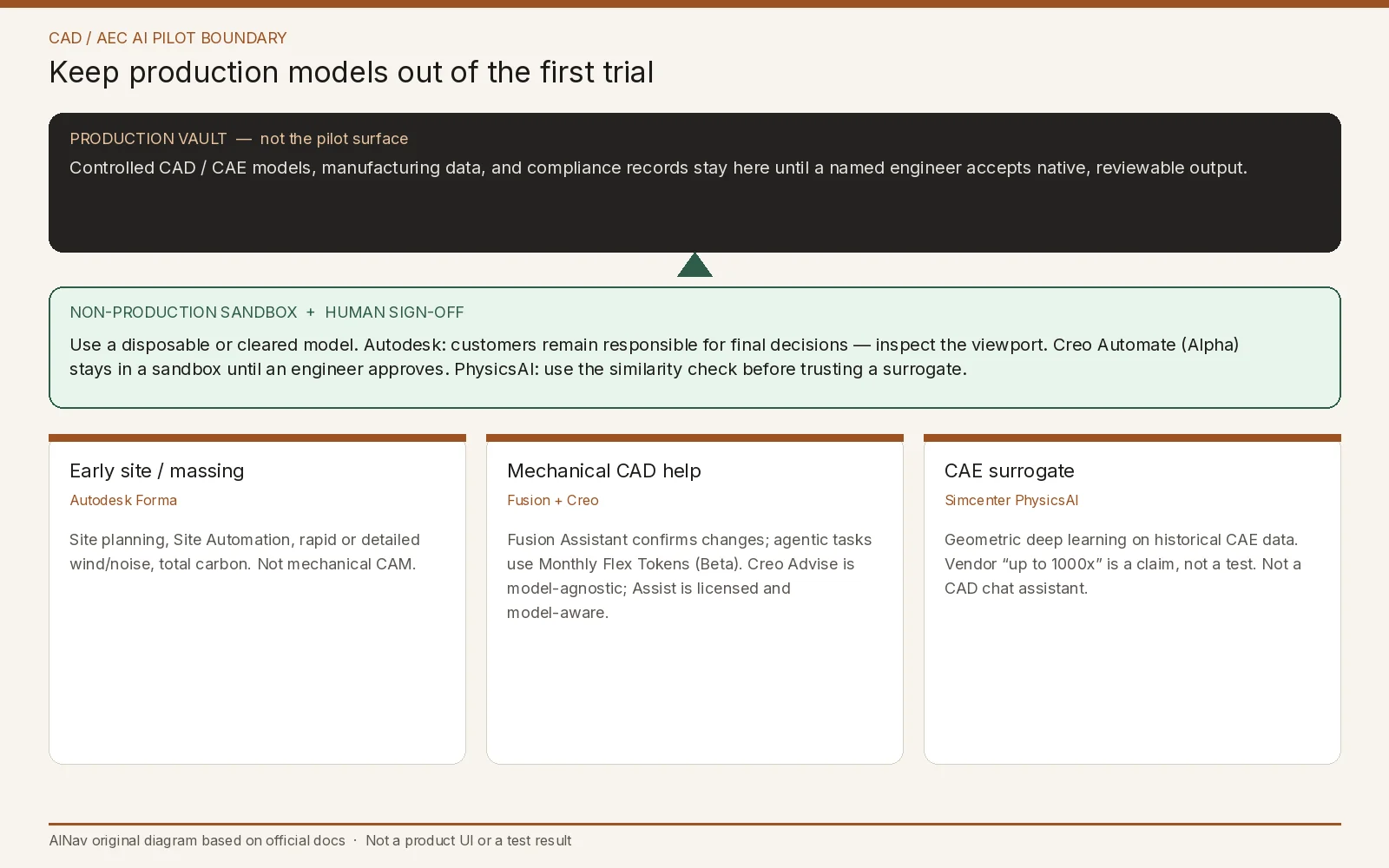
AINav original diagram based on official docs. Sources: Autodesk Forma overview, Autodesk Assistant, Fusion Assistant FAQ, Creo product page, Creo AI Assistant help, Simcenter PhysicsAI. Not an official screenshot or a test result.
Prices, tokens, and claims to leave visible
Forma’s official overview lists standalone subscription prices in its FAQ: $85 monthly, $700 annually, or $2,100 for three years. The same page’s marketing line, “Starting at $59 / month,” is consistent with those annual and three-year totals when they are expressed monthly ($700/12 and $2,100/36 are about $58.33, typically shown as $59). These are different billing terms on one official list, not two conflicting standalone prices. Forma Site Design is also sold through the AEC Collection, a separate bundle with its own official Collection prices ($460 monthly, $3,675 annually, or $11,030 for three years); do not treat Collection figures as Forma standalone rates. Re-check the live page, region, your Autodesk quote, and any free-trial terms. Fusion list prices were not verified from an official Autodesk pricing table in this review; do not treat a third-party directory figure as Autodesk’s price. Creo and Simcenter commercial terms were not listed on the pages opened here.
Do not convert Siemens’ “up to 1000x” language, or any customer-story multiplier, into a guaranteed cycle-time saving. Do not treat Autodesk Assistant as autonomous CAD. And do not treat this article as a guide to generative 3D asset tools; those are a different artifact and a different buyer.
A pilot checklist you can finish without a production model
Use a disposable file, a fictional site, or a historical CAE set you already have permission to process. Then check four things:
- Job match. If the work is early massing, wind, noise, or site carbon, start with Forma’s documented analyses. If the work is editable mechanical geometry, start with Fusion or Creo and confirm that output is native, reviewable geometry. If the work is fast what-if on a known simulation family, PhysicsAI’s surrogate-and-similarity story is the relevant one—and a full-fidelity rerun remains the fallback.
- Entitlement. In Fusion, separate help questions from agentic tasks that consume Monthly Flex Tokens (Beta), and ask how a shared team quota will be governed. In Creo, separate free Advise from licensed Assist and from Automate (Alpha).
- Data path. Read Autodesk’s privacy referral and transparency cards, and PTC’s and Siemens’ current security terms, before any controlled model leaves your environment. If residency, training use, or subprocessors are unclear, keep the pilot offline from production data.
- Sign-off. Require viewport or solver review. Autodesk says customers remain responsible for final decisions; Creo documents a sandbox for Automate; PhysicsAI documents a similarity check. None of those replace a named engineer.
Stop the pilot if the assistant can write to a production vault without an approval step, if token or license costs cannot be forecast, if official pages and a sales quote disagree on what “AI” is included, or if the use case is safety-critical and no documented limitation language has been reviewed.
Who this pilot is for, and who should look elsewhere
This evaluation is for CAD, AEC, and design-engineering leads, and for the IT or PLM partners who will have to place the assistant in a real permission model. It is for teams that will keep conventional CAD or CAE in the loop.
It is not for teams shopping for generative 3D marketing assets, for buyers who want an unsupervised design oracle, or for anyone hoping a chat box will sign a drawing. Human sign-off stays mandatory on every official page reviewed here.
Frequently asked questions
Is Autodesk Assistant the same product in Forma and in Fusion? No. Autodesk’s Assistant page says capabilities vary by product. Fusion’s FAQ is specific about confirmation-before-apply, token use for agentic tasks, and file-operation limits. Confirm Forma’s actual Assistant scope in the current product documentation, not by copying Fusion’s FAQ.
Does Forma cost $59 a month or $85 a month? Official FAQ prices for a standalone subscription are $85 monthly, $700 annually, or $2,100 for three years. The “Starting at $59 / month” line on the same page matches the annual and three-year options expressed monthly, not a second conflicting list price. Confirm the billing term, region, and whether you are buying standalone Forma or the AEC Collection.
Is Creo Advise allowed to read my model? Official help says Advise does not analyze model context. Assist, which requires an Advanced AI license, is the model-aware agent. Automate (Alpha) is described separately and operates in a sandbox pending engineer approval.
Can Simcenter PhysicsAI replace a solver run? Official pages present it as a surrogate built from historical data, with a similarity assessment to flag when a design may be out of distribution. Vendor speed claims were not tested here. For a production or safety-critical decision, treat a full-fidelity simulation as the reference until your own validation says otherwise.