guides
How to Evaluate AI Experience Analytics Tools Before You Buy
A documentation-based guide for digital-experience teams: configure lawful basis, consent, and masking before production capture, then judge Contentsquare AI and Fullstory on whether insights can be reconstructed. No live tags were installed and no conversion lift was measured.
Experience-analytics tools fail in a predictable order. A team enables session replay to “see what users do,” then asks legal to bless the capture after the tag is already live. Official documentation from both vendors in this core set points the other way: decide the lawful basis, configure consent and masking, and only then turn on production collection.
This documentation-based guide was reviewed on November 22, 2026 (Asia/Shanghai). We did not install a tracking tag on a live site, watch real visitor sessions, or measure conversion lift. Descriptions come from official product, help, and developer pages opened that day. No improvement percentage is claimed or tested. This is not legal advice; a privacy or counsel review still has to map the official controls to the law that applies to you.
Configure consent and masking before production capture
Contentsquare AI and Fullstory both sell a picture of automatically captured digital behavior plus AI that summarizes it. The purchase only holds if that capture is lawful and reconstructable.
Contentsquare’s official help article Your responsibilities for personal data collection is blunt about roles. Your organization is the data controller and decides why and how personal data is collected; Contentsquare is the processor. You must define the categories of data you need before collecting them. “You are responsible for determining the legal basis.” And, where consent is required: “a cookie banner should be set up in order to configure the consent management process before activating Contentsquare collection.” The same article tells you to configure masking before enabling a new collection feature, to review URLs, page content, and custom properties, and not to use real personal data when testing. If unexpected personal data appears later, the documented path is to stop further collection, mask or disable the source, and contact Contentsquare and your privacy team—not to keep capturing while you “circle back” on consent.
Fullstory’s official controls are easy to misread as “Private by Default means you can turn capture on first.” That is not what the docs say. Private by Default, available on all plans and configured by an admin, is designed so that “no text is captured or sent outside the user's browser unless it is explicitly allowlisted as safe to capture.” Masking happens on the device; excluded and masked content “never leaves the user's device.” That reduces the risk of sending raw text to Fullstory’s servers. It does not, by itself, create a lawful basis, and it does not mean every element is held until a visitor opts in.
Where Fullstory requires explicit consent for selected elements, the official User Consent developer guide is specific: HTML elements configured to “Capture data with user consent” are captured only after FS('setIdentity', { consent: true }). Setting consent to false stops capture of those elements. Private by Default also documents consent-related CSS classes, including .fs-unmask-with-consent. In other words, consent is a configured capture rule, not a retroactive cover letter. If your market requires a consent or opt-in before this kind of recording, wire your consent interface to those official controls, and do not enable production replay on unconsented traffic while you “tune later.”
The buying sequence this article will stay with is therefore: lawful basis and notices, then consent and masking rules, then production capture that honors those rules, then AI insight, then a human who can open the underlying session or chart and disagree.
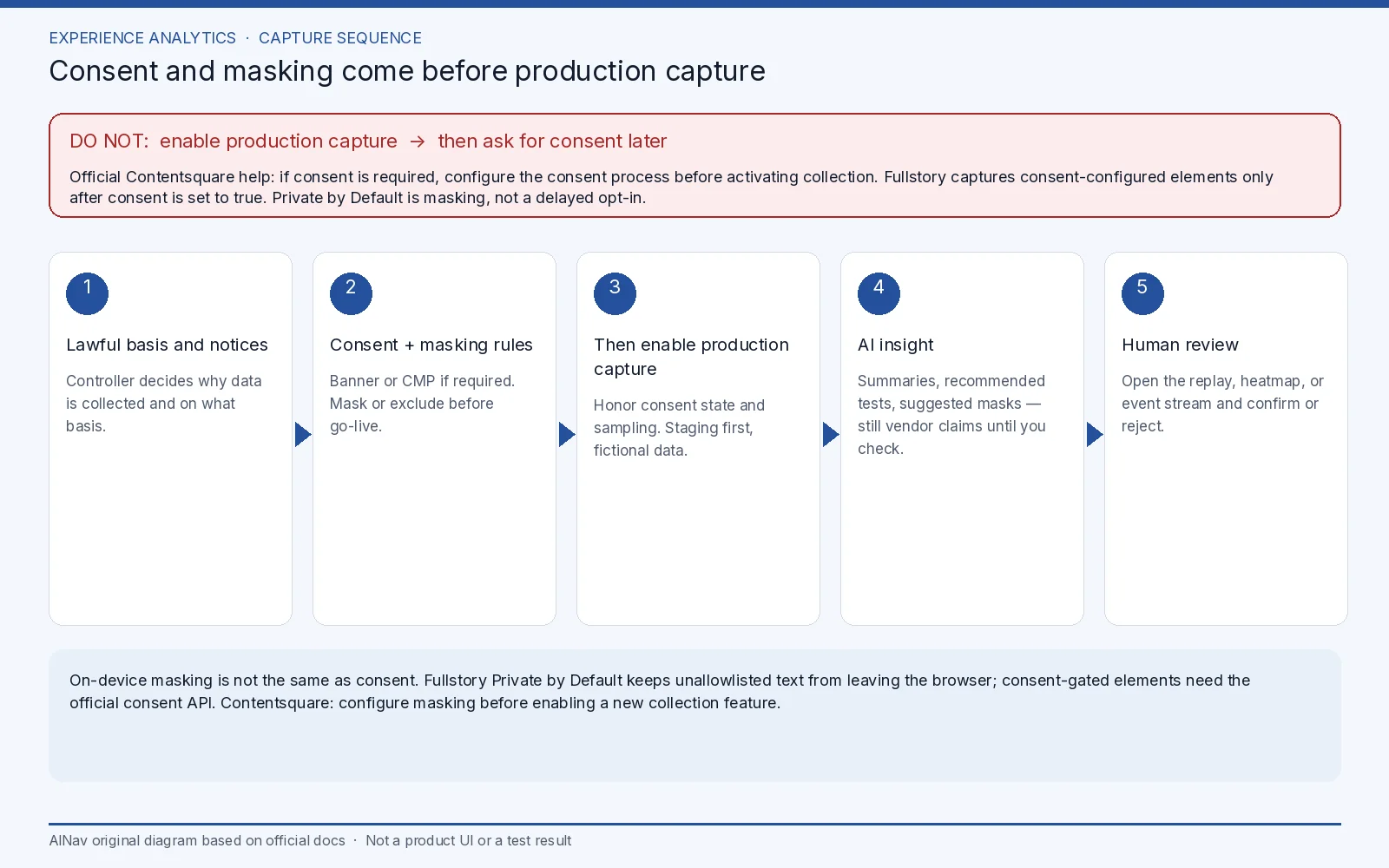
AINav original diagram based on official docs. Sources: Contentsquare customer responsibilities, Contentsquare AI, Fullstory Private by Default, Fullstory user consent. Not an official screenshot or a test result.
What the AI layer actually claims
Contentsquare’s official AI capabilities page describes Sense and Analyst as tools that surface issues, recommend tests, summarize zoning, heatmaps, errors, and journeys, and chat with the platform. A masking capability is described in the same place: Sense can suggest personal data to hide in session replays, and a person approves or rejects the suggestion. Mapping assistance is offered so teams do not have to tag every page by hand. The FAQ on that page states that Contentsquare uses pre-trained third-party models, and that “Your customer data is not used to train these third party models.” That is a vendor statement about third-party training, not a blanket claim that no data is processed, and not a substitute for the controller duties above. Marketing language about recovering conversions or running analysis “without you lifting a finger” is not a measured result in this review.
Fullstory’s official product language, including the capture model documented in Private by Default, is built around reconstructing experience from events that the script is allowed to collect. AI summaries are only as trustworthy as the capture rules underneath them. If form fields, account text, or payment flows are unmasked too broadly, you have a privacy incident, not a better insight. If everything is excluded, you may have a legal design and a product that cannot answer the question you bought it for. The documented three-way choice—Exclude, Mask, or Unmask—is the actual configuration work; Form Privacy, for accounts created on or after November 10, 2021, automatically masks or excludes common form elements. Preview and scoped rules exist so admins can test on themselves before pushing changes to end users.
Neither official set reviewed here published a public, generally applicable list price that this article could rest on. Confirm current packaging, replay sampling, and AI-schedule entitlements in a vendor quote. Do not import conversion-lift numbers from a case study into your business case as if they were yours.
Keep this buy away from neighboring categories
This is not a sales-intelligence purchase and not a general analytics-assistant purchase. If the job is account research or conversation intelligence for a sales team, see How to Evaluate AI Sales Intelligence Tools Before You Buy. If the job is asking questions of warehouses and BI models, see How to Evaluate AI Analytics Assistants Before You Buy. An on-site personalization engine is a different buyer and a different legal footprint; it is not in this core set.
A buying check that starts with a staging tag
Use a staging site and fictional user data. Do not point a trial tag at production traffic until consent, notices, and masking have been reviewed. Then check five things:
- Lawful basis. Write down whether you will rely on consent or another basis, and confirm that the vendor’s official controls can express that choice. For Contentsquare, official help says the consent process should be configured before collection is activated when consent is required. For Fullstory, confirm which elements require the consent API and which are only masked.
- Masking before go-live. Contentsquare tells you to configure masking before enabling a new collection feature. Fullstory tells you that the strictest overlapping rule wins. Test with fictional data.
- Reconstructable insight. Pick three known staging journeys. Ask the AI to summarize them, then open the underlying replay, heatmap, or event stream and see whether a reviewer can confirm or reject the summary.
- Sampling and retention. Official pages describe sampling quotas and product-defined retention in general terms; get the numbers that will apply to your contract. A summary of sessions you never recorded is not a finding.
- Training and subprocessors. Record Contentsquare’s official statement that customer data is not used to train its third-party models, and ask Fullstory for the current equivalent statement and data-processing terms if they are not already in your agreement.
Stop the purchase if the vendor cannot show a pre-capture consent path that matches your legal advice, if masking cannot be proven on a staging page, if AI output cannot be traced to a session or metric a human can inspect, or if a proof-of-concept requires production traffic first.
Who this purchase is for, and who should look elsewhere
This evaluation is for digital-experience, UX research, and product-analytics leads who need journey friction and replay, and who will accept the implementation work that official privacy docs describe.
It is not for teams that want a guaranteed conversion lift, for sales orgs buying contact data, or for organizations that cannot resource a consent and masking review. If you cannot complete that review, staying with your current analytics stack is the conservative decision.
Frequently asked questions
Can we turn on replay now and add a consent banner later? That is the sequence official Contentsquare help tells you not to use when consent is required: configure the consent process before activating collection. Fullstory’s consent API likewise captures consent-configured elements only after consent is set to true. Do not treat “Private by Default” as permission to skip that step.
Does Private by Default mean no data leaves the browser until the user opts in? No. It means text is masked unless allowlisted, and that excluded or masked content is not sent to Fullstory. Capture of allowed or interaction data can still occur under your configured rules. Consent-gated elements are a separate, explicit setting.
Does Contentsquare train foundation models on our session data? The official AI FAQ says Contentsquare uses pre-trained third-party models and does not use customer data to train those third-party models. Confirm the current DPA for any other processing or training questions.
Will AI summaries replace watching sessions? Official pages present summaries as a way to prioritize what to inspect. This review did not test summary accuracy. Keep a human in the loop.