guides
How to Evaluate AI Social Media Scheduling Tools Before You Subscribe
A documentation-based guide to buying an organic scheduler: Buffer and Later for calendars, drafts, and approvals. TikTok Symphony stays on the ads side. Official pricing conflicts are shown, not smoothed over. No accounts were connected and no engagement results were tested.
Teams that already have a posting calendar often buy “AI social” and receive an ads studio, a design suite, or a caption box that is not connected to approvals. The useful purchase is narrower: a scheduler that can hold a draft, route it for review when needed, and publish to the channels you actually use. AI writing tools are optional aids inside that queue, not a substitute for it.
This documentation-based guide was reviewed on November 10, 2026 (Asia/Shanghai). We did not connect social accounts, schedule or publish posts, run ads, or measure engagement. Descriptions come from official product, pricing, and help pages opened that day. Where two official pages disagree, both are shown. No engagement lift, “best time” accuracy, or time-saved result is claimed or tested.
Name the bottleneck before you compare assistants
Three jobs are sold under similar language, and they are not interchangeable.
Organic scheduling is a calendar, drafts, multi-channel posting, and—if you work with a manager or a client—an approval step. Buffer AI Assistant and Later both present themselves as social workflow products that also offer AI writing or planning help. That is the comparison set for this article.
Creative production is layout, short-form editing, or generated visuals. For layout planning inside a design suite, see Canva Craft brings layout planning to AI images.
Paid social is ad creative and delivery inside an ads manager—a different budget and usually a different buyer. See How to Evaluate AI Performance Marketing Creative Tools Before You Buy.
If the failure is “this caption went live without a review,” start with a scheduler that documents drafts and approvals. If the failure is “we need more ad variants,” a caption writer will not close that gap.
Buffer: an optional assistant inside a channel-based publisher
Buffer’s official AI Assistant page describes help for brainstorming ideas, rewriting content, and crafting platform-specific posts. The same page is explicit that the assistant is optional: posts are not automatically generated or changed unless someone opens the assistant in the post composer or the Create space. Core posting, scheduling, and planning are not described as AI-powered.
The same official FAQ answers a direct pricing question: “Is the AI Assistant free to use? Yes! You can use Buffer’s AI Assistant without any limits by signing up for a free Buffer account.” That sentence is not the whole commercial picture. Buffer’s Help Center article on using the AI Assistant warns that “This feature is available on our newest plans.” Buffer’s pricing page, checked the same day, lists channel-based Free, Essentials, and Team plans, and a comparison table includes “Refine and repurpose your content using AI. Unlimited credits.” Those official pages do not fully agree on whether every current or legacy plan includes the assistant. Confirm entitlement on the live plan table and in your account before assuming unlimited AI.
The help article also sets testable limits. A prompt must be at least four words and under 10,000 characters. In the Publishing composer, the assistant is channel-aware; for Instagram, Buffer documents a 2,200-character limit. Those channel-aware options are not shown for ideas in the Create space, because ideas are not assigned to channels. Buffer states that the assistant uses OpenAI GPT-4.0 and tells users to review and fact-check suggestions. Documented limitations include inaccurate facts, hallucinations, knowledge that is not real-time, possible biased output, and the inability to open URLs supplied in a prompt.
On data handling, Buffer’s product FAQ is specific: if you use the assistant to generate ideas or refine a post, “the text you enter into the assistant will be shared with OpenAI.” It also states that account details, media files, and other parts of the post or work in Buffer are not shared. That is a vendor statement from the reviewed page, not a third-party audit.
Approvals are a separate, plan-gated workflow. Buffer’s help article on managing and approving draft posts states that approvals are available only on the Team plan, while drafts exist on all plans. Access is described as Needs Approval versus Full Access or owner. Adding users and setting up permissions states that a Team plan is required to invite users, and that Publish and Community permissions are independent. If a client review queue is the buying reason, those articles matter more than the caption demo. Check Team pricing on the live pricing page.
Later: credit-metered AI inside a visual social workflow
Later’s official AI social media tools page places Caption Writer, an Ideas tab, and Best Time to Post inside the same plan-and-publish workflow. It documents a 14-day free trial with no credit card required. Its FAQ states that Caption Writer and Ideas share a monthly credit pool—one credit per caption, three ideas per credit—and that credits reset on the first of every month. The same FAQ says the AI tools run on paid plans, while every plan includes the trial.
Later’s help center adds constraints the marketing page does not fully spell out. Later’s Caption Writer, updated July 2, 2026, states that the feature is paid-plan only, in beta, English only, and based on a third-party source. Generating or regenerating a caption costs one credit, and Android users cannot change tone or rephrase in the same way. Generate Content Ideas with AI describes Ideas as a beta feature on paid desktop; one credit returns three ideas, and content pillars are free.
Plan allowances are documented in Managing Later Plan Add-ons & Credits, updated December 10, 2025: Starter includes 5 AI credits a month, Growth includes 50, and Scale includes 100, resetting at 00:00 UTC on the first of the month. The same article lists an add-on of 100 credits for $5 a month or $40 a year. When the Later pricing page was opened on November 10, 2026, $3.75 appeared as an add-on on the yearly-billing view (Save 25%). That is the yearly display of the $5 monthly add-on ($5 × 0.75 = $3.75), not a second list price. The remaining residual is $40 a year in the help article versus $45 a year ($3.75 × 12); re-check the live table.
Later’s social media workflow page describes a path of plan, approve, publish, engage, and analyze. Whether a given plan includes the approval workflow you need is not verified here from a complete feature matrix; confirm that on the current pricing comparison and in a trial with a fictional draft.
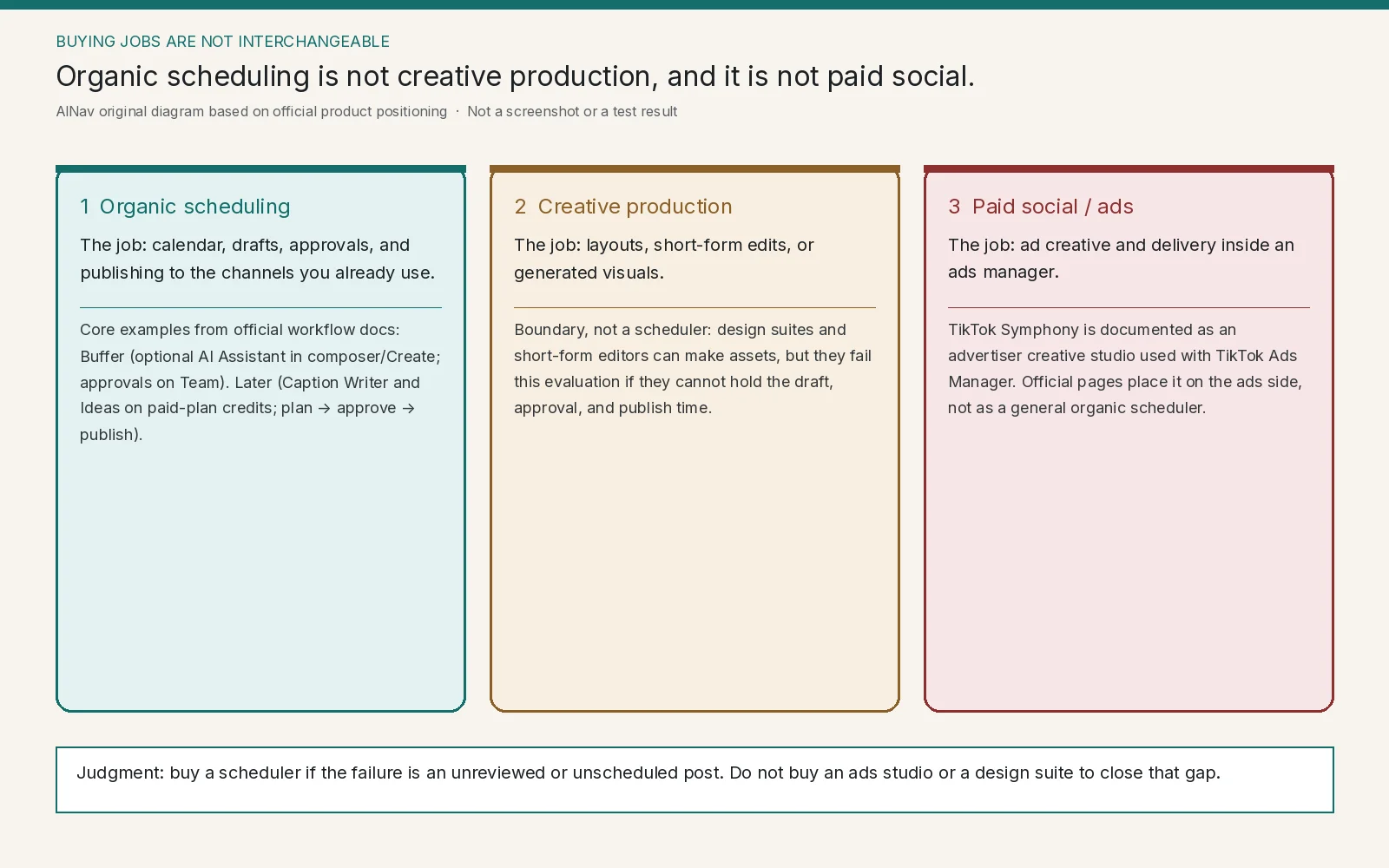
AINav original diagram based on official docs. Sources: Buffer AI Assistant, Buffer approvals help, Later AI tools, Later workflow, TikTok Symphony. Not an official screenshot or a test result.
Do not buy an ads studio when you needed a queue
TikTok Symphony is the clearest category trap here. Official pages place it on the advertiser side of TikTok. The TikTok Symphony get-started page and a TikTok Newsroom update describe a creative studio used with TikTok Ads Manager. That can be the right tool for paid TikTok creative. It is not a substitute for Buffer or Later when the job is an organic calendar or a client approval. Symphony is treated here as a boundary, not as a third scheduler in the same class.
HubSpot assistants, Canva, and short-form editors can appear on the same shortlists because they all touch “social content.” They still fail this evaluation if they cannot hold the draft, the approval, and the publish time you need.
Run a buying check you can actually complete
Use a fictional brand and invented posts. Do not connect a production social account or paste unpublished campaign copy into a trial if your policy forbids it. Write down required channels and who may draft, approve, and publish, then check four things:
- Entitlement. For Buffer, reconcile the marketing FAQ (unlimited assistant use on a free account) with the help-center warning that the feature is on “newest plans.” For Later, confirm Caption Writer and Ideas are paid-plan, credit-metered features, and count how many caption generations a Starter (5), Growth (50), or Scale (100) allowance would cover in a normal month.
- Review path. If more than one person must sign off, verify approvals on the plan you will buy. Buffer documents approvals only on Team. Later markets approvals as part of its workflow; confirm plan inclusion before promising that path to a client.
- Language and device. Later’s Caption Writer help article states English only, with Android tone and rephrase limits. If your team drafts in another language or mostly on a phone, keep Later in a limited trial until that works.
- Fact-checking load. Buffer tells users to review and fact-check output and lists hallucinations and stale knowledge as known limits. Later describes Caption Writer as drawing on a third-party source. A caption that invents a price, date, or product claim should fail, even if it sounds on-brand.
Stop the purchase if the tool cannot publish to a required channel, if approvals are missing on the affordable plan, if credits make routine drafting uneconomic, or if the vendor cannot show where generated text goes. A trial that requires a production account is a reason to pause.
Who this purchase is for, and who should look elsewhere
This evaluation is for social and community managers, agencies, and small marketing teams whose problem is planning, reviewing, and publishing posts they already intend to write—especially when AI is offered as a drafting aid in that queue.
It is not for performance marketers buying paid-social creative, teams whose real gap is design or video editing, or organizations hoping a model will provide a guaranteed factual or legal review. Neither Buffer nor Later, in the pages reviewed here, claims that generated captions are automatically accurate.
Frequently asked questions
Is an AI caption writer a social media scheduler? No. It can sit inside a scheduler, as Later and Buffer both document, but the buying object is still the calendar, permissions, and publish path.
Can I treat TikTok Symphony as the TikTok-native version of Buffer or Later? Not on the official pages reviewed here. Symphony is documented as an advertiser creative studio tied to TikTok ads, not as a general organic scheduler.
Are Buffer’s AI features free and unlimited? The product FAQ says yes for a free account; the help center says the assistant is on the newest plans; the pricing comparison mentions unlimited AI credits. Check those official statements against your actual plan.
Do Later’s AI credits roll over? The credits help article describes a monthly reset at 00:00 UTC on the first of the month. Rollover is not documented there. Confirm the current add-on rate, including the $40/year versus $45/year residual above, before buying credits.