guides
How to Evaluate AI STEM Tutoring Tools Before You Pay
A documentation-based guide for students, parents, and teachers: check the honor code first, then buy a homework helper that shows work (Gauth) or a quiz and lesson generator (Kahoot! AI)—not the same job. No live homework was submitted and no learning-gain figures were tested.
Paying for “an AI tutor” is easy to get wrong in two directions. One is buying a homework helper and then using it as a hidden answer key. The other is buying a quiz generator and expecting it to walk a student through a proof. Those are different jobs, and the official pages for Gauth and Kahoot! AI do not describe the same product.
This documentation-based guide was reviewed on November 10, 2026 (Asia/Shanghai). The Kahoot! help article cited below was re-checked on November 19, 2026 (Asia/Shanghai). We did not submit live homework, create class accounts for minors, or measure learning gains. Descriptions come from official product and help pages opened that day. No honor-code loophole, no “undetectable answer” advice, and no unverified improvement statistic is offered here.
Decide the academic rule before you decide the tool
The useful purchase question is not “which app gets the right answer fastest.” It is whether the tool can show a method you can check, and whether your school, parent, or instructor already allows that kind of help.
A worked-example helper should return steps, not only a final number, and should leave enough of the reasoning visible that a student can redo the problem without the app. An answer-only tool fails that test even if it is accurate. A quiz or flashcard generator can be an excellent study aid and still be the wrong buy if the student needed a step-by-step explanation of one stubborn problem.
Check the honor code, assignment rules, and any exam-device policy first. If the course requires unaided work, do not use a solver on that assignment. If the course allows study aids, prefer a tool that shows “how” and “why,” and keep the student’s own attempt in the record. General chat assistants such as those compared in ChatGPT vs Claude vs Gemini for everyday work can also explain a concept, but they are not specialized homework or quiz products, and they still require the same academic-integrity rule.
This article does not treat Gauth and Kahoot! AI as two tutors in a bake-off. Official positioning puts them on different work.
Gauth: a homework helper that leads with steps
Gauth’s official site, gauthmath.com, presents the product as an AI homework helper “across all subjects.” The features it chooses to lead with are step-by-step solving, detailed explanations that connect the logic of each step with “how” and “why” tips, and fast solutions. A separate tutor service is listed on the same homepage. The homepage also describes an experience “grounded in sources,” with images that trace back to a real source. That is product marketing, not an accuracy audit.
What the homepage, on this review date, does not give you is a public price table, a documented honor-code policy, or a first-hand accuracy claim that AINav tested. Treat directory prices as unverified unless you confirm them in the current app store listing or in a paid-plan screen you actually open. If a parent is buying, open the live plan screen and write down what “unlimited” or “tutor” actually includes.
The evaluation that matters for a homework helper is practical and modest: can a student photograph or paste a problem, receive steps they can follow, and then close the app and redo a similar problem? Official customer quotes on the homepage itself emphasize checking work and understanding concepts rather than only receiving answers. That is the intended use this guide will stay with. It is still the student’s responsibility to follow school rules, and it is still the buyer’s job to reject any workflow that hides the steps or submits generated work as original unaided work.
Kahoot! AI: a quiz and lesson generator, not a STEM tutor
Kahoot!’s official AI tools page describes a different job. The Kahoot! Assistant “instantly transform[s] slide decks, websites, documents, PDFs, and handwritten notes into engaging lessons, presentations, flashcards, quizzes, and more.” Students can scan handwritten notes into kahoots and flashcards. Teachers and professionals can generate kahoots from a topic, a URL, a Wikipedia article, or a PDF, and can generate images for slides. That is content preparation and practice, not a drop-in replacement for a worked-example tutor.
The official How to use Kahoot! AI tools article, whose official API records an update on November 18, 2026 (UTC), adds constraints a buyer should not skip. Availability depends on plan; the marketing FAQ lists Kahoot!+ Gold for family, student, and educator plans, and 360 Pro or 360 Pro Max for professionals and teams—confirm that against the current pricing page for your role. The tools “utilize the latest OpenAI model, GPT-4.” Students under 16 are “not permitted to use Kahoot! AI tools due to privacy regulations.” Authors remain responsible for accuracy and for Kahoot!’s terms, and the help article warns that AI content can be inaccurate or biased, so generated questions should be reviewed against the source. A later support comment on the same article notes that the generator builds questions from key concepts rather than copying a document verbatim, with an “Extract questions” toggle when a PDF already contains quiz items.
On training and sharing, read both official statements. The AI tools FAQ says Kahoot! “doesn’t use any user data to train AI models,” and that Kahoot! “only shares the prompt with Microsoft and other partners,” with no personal data shared and no partner access to kahoots, pictures, or other content. The help article’s FAQ says prompts and uploaded documents are “processed transiently to fulfill your request” and “not stored or used to train or fine-tune our underlying AI models.” Those pages agree that user content is not used to train models; they are slightly different in how they describe what is sent to partners. If that difference matters to a school’s data-protection review, ask Kahoot! to reconcile it in writing rather than flattening the two sentences into one.
Kahoot!’s marketing line that turning resources into a Kahoot! experience is “proven to boost learning and retention” is a vendor claim. It was not verified in this review and is not restated here as a result.
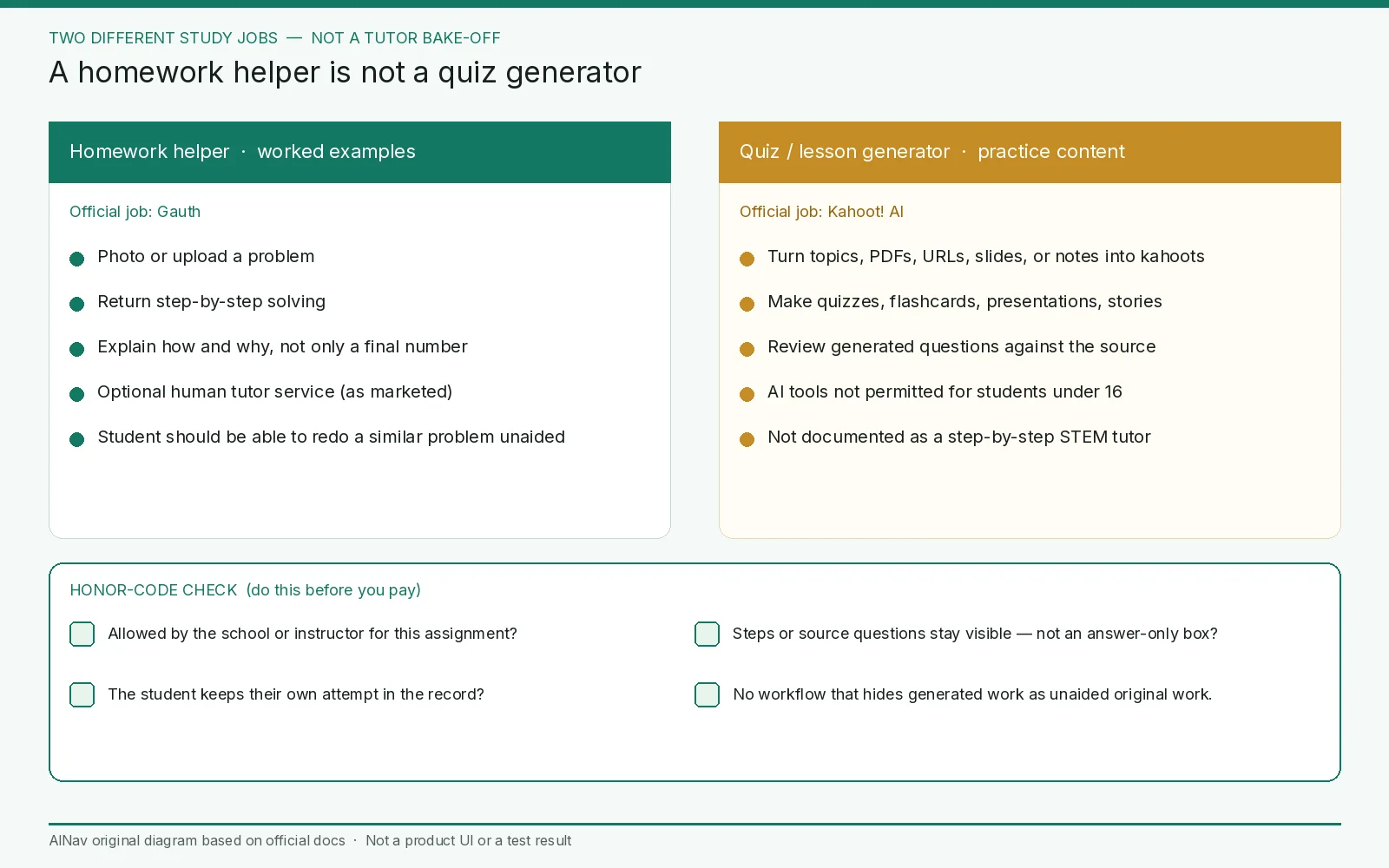
AINav original diagram based on official docs. Sources: Gauth, Kahoot! AI tools, How to use Kahoot! AI tools. Not an official screenshot or a test result.
A buying check that stays inside the honor code
Use problems you already know, or instructor-provided practice sets, not a live graded assignment if that would break the course rules. Then check four things:
- Job fit. If the need is “show me the steps for this problem,” evaluate Gauth’s step-by-step and explanation claims in a short trial. If the need is “turn my notes or this PDF into a practice quiz,” evaluate Kahoot! AI. Do not score Kahoot! as a weak tutor, and do not score Gauth as a weak quiz platform.
- Entitlement and age. Confirm Gauth’s current paid plan on a live screen (not verified from the homepage here). For Kahoot! AI, confirm the plan that includes AI tools, and do not create access for students under 16.
- Review load. Kahoot! tells authors to review generated questions before use. A homework helper’s steps should be checked the same way: a wrong intermediate step is a failed trial, even if the final number looks plausible.
- Data. If a school cannot accept prompts or documents being sent to a model provider, Kahoot!’s official partner language needs a written review. Gauth’s training and retention terms were not fully documented on the homepage opened here; do not invent them. Ask for the current privacy policy before a child account is created.
Stop the purchase if the tool only returns a final answer, if a school policy forbids it, if under-16 access cannot be blocked for Kahoot! AI, or if pricing only appears in an unofficial directory.
Who this purchase is for, and who should look elsewhere
This evaluation is for students, parents, and teachers who want a study aid they can defend under an honor code: either a helper that shows work, or a generator that turns existing materials into practice.
It is not a corporate LMS evaluation, not a guide to hiding answers, and not a reason to replace a course’s own materials. If the real need is a general writing or reasoning assistant, start with the everyday-assistants comparison linked above rather than forcing Gauth or Kahoot! into that role.
Frequently asked questions
Should I pick Gauth or Kahoot! AI as my STEM tutor? That is the wrong comparison. Official pages present Gauth as a homework helper with steps and explanations, and Kahoot! AI as a tool that turns topics, files, and notes into kahoots, quizzes, flashcards, and presentations.
Can I use these tools on graded work? Only if your school or instructor allows it. This guide does not offer a way around an honor code. When study aids are allowed, prefer visible steps or instructor-reviewed practice questions.
Does Kahoot! train models on my quizzes or uploads? Official FAQ and help pages say user data or uploaded content is not used to train or fine-tune the underlying models. Confirm current language in Kahoot!’s Trust Center if you need a school-ready answer, and ask about what is shared with partners if the two public pages are not enough.
Is Gauth’s pricing on its homepage? Not in the first-hand homepage review on this date. Confirm the live plan screen or store listing before you pay.