guides
How to Evaluate AI Whiteboard and Visual Collaboration Tools Before You Enable Them
A documentation-based guide to enabling AI on a shared board or mind map: treat generated clusters as a workshop aid, not a source of record. Official Miro admin switches can limit AI to named teams; official residency help says AI processing may leave the storage region. EdrawMind is collaborative mind mapping, not a drop-in workshop canvas. No workshops were timed.
A workshop board is a place people stand around, even when they are remote. AI that clusters sticky notes or drafts a diagram can be a useful aid in that room. It is a poor source of record for a decision, a requirements document, or a customer commitment, and it is not the same purchase as a team wiki or a slide generator.
This documentation-based guide was reviewed on November 21, 2026 (Asia/Shanghai). We did not run a company workshop, measure time saved, or audit a tenant. Descriptions come from official Miro and EdrawMind product and help pages opened that day. “Unlock productivity” language is vendor marketing, not an AINav result.
Workshop aid, source of record, and two nearby jobs
The core question here is whether to enable AI on a shared visual board. The catalog core is Miro AI, a collaborative canvas, and EdrawMind, a collaborative mind-mapping and brainstorming tool with official real-time co-editing. They are not the same surface: one is a freeform workshop board, the other is a structured map. Do not score them as interchangeable whiteboards.
Two other purchases sit beside both. Team docs and wikis are already covered in Notion AI vs Superhuman Docs (formerly Coda) for Team Docs and Wikis. Pitch decks and slide assistants (Gamma, Plus AI, and similar) are presentation jobs, not workshop boards. Office-suite copilots are covered in how to evaluate workplace AI copilots. Wondershare EdrawMax remains a diagram-maker boundary in this review; official EdrawMind pages were opened for collaboration and AI mind mapping, and EdrawMax was not added as a second board product.
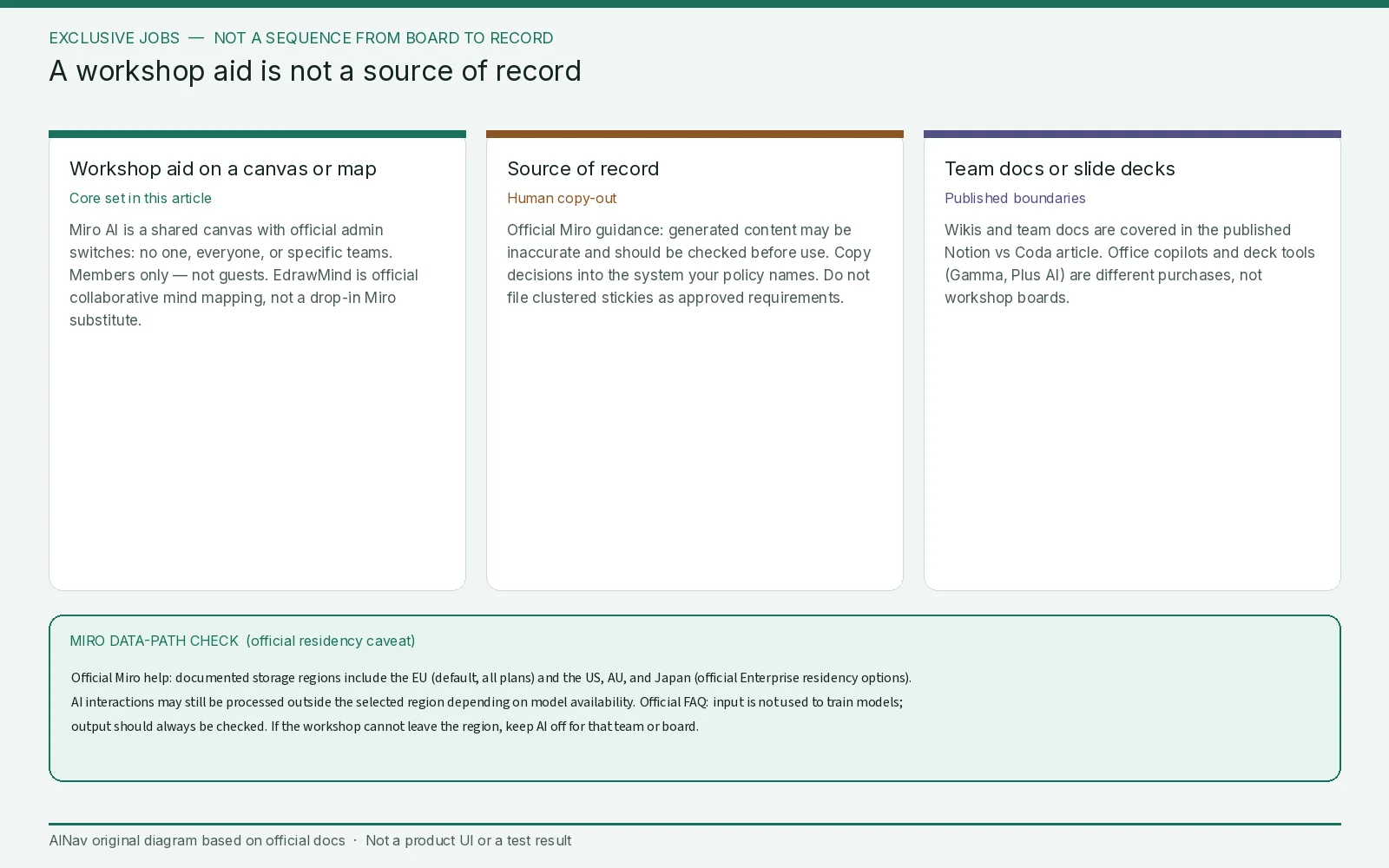
AINav original diagram based on official docs. Sources: Miro AI Admin security, Miro AI Trust Capabilities and FAQ, Miro data residency, EdrawMind MindAgent, EdrawMind for Business. Not an official screenshot or a test result.
Miro AI: who can use it, and where the prompt actually goes
Official Miro help describes Miro AI as generating or modifying board content — mind maps, summaries, sticky notes, and similar — from machine-learning models plus user input. Official admin security documentation, for Enterprise and Education plans, gives Company admins three top-level switches: no one can use Miro AI, everyone can, or only specified teams. Guests and visitors cannot use Miro AI; it is documented as available to Members only. Official trust pages also describe finer feature-level controls and prompt blocking, and an “Intelligent Guardrails” control that can disable all Miro AI on affected boards while leaving ordinary collaboration available. Those are the enablement controls to use for a sensitive workshop, not a verbal request to “please don’t paste this into AI.”
The data path has a residency caveat you should not flatten. Official admin and data-residency articles say Miro stores in-scope content in a documented residency region. The opened residency page lists the EU as the default (available on all plans) and the United States, Australia, and Japan as additional regions; US, AU, and Japan residency are official Enterprise options. Board data at rest follows that program, but interactions with Miro AI “may be processed outside your selected region, depending on model availability in-region.” Official FAQ language says submitted data is used to generate a response, models may be hosted in Miro or in Microsoft Azure AI, and input is not used for model training. Official text also says that if Miro later offers training on customer data, self-serve customers would get an opt-out, and Enterprise customers would be opt-out by default and would need to opt in. Re-read the current AI Features Addendum before you rely on that future-tense sentence.
Failure conditions are documented in plain language. Official FAQ: “not all generated content may be accurate. The output should always be checked before using it.” That is why a clustered board is a workshop aid until a human copies a decision into the system of record. Official help also notes that some AI processing and beta features sit outside in-region guarantees, and that third-party apps may store or process data outside Miro’s residency program. If the workshop includes unpublished strategy or personal data you cannot send to an out-of-region model, keep AI off on that team or board.
AI credits and plan tiers are separate entitlements from the security switches. Exact list prices are omitted here; confirm current official billing and credit allowances for your cycle.
EdrawMind: collaborative maps, with thinner first-hand AI data terms
Official EdrawMind business and AI pages describe real-time collaboration, shared workspaces, role and permission controls, cloud or Dropbox sync, and AI features under the MindAgent name: generate a mind map from a prompt, brainstorm, summarize files into maps, and related extras. Official business language also mentions file encryption, SSL for transfers, access control, and — for some deployments — intranet or private-deployment options. Those collaboration controls are relevant if your team actually works in maps rather than on a freeform canvas.
The official AI data-use statement opened for this review is short: MindAgent “only executes commands based on user inputs and does not access any other private data.” That is not as specific as Miro’s admin, residency, and training pages. AI usage is also metered in official “AI points” or tokens, which are a different SKU from a seat. Hard prices are omitted. If you need a documented training opt-out, in-region processing, or guest-versus-member AI rules, ask for a current DPA and AI addendum before you enable MindAgent on confidential maps. Do not invent those terms from a directory page.
An enablement check that starts with a fictional workshop
Use a made-up product retrospective and fictional sticky notes. Do not paste real employee or customer data into a trial prompt. Then check five things:
- Job fit. Is the deliverable a workshop aid on a canvas or map, or do you actually need a wiki or a deck tool?
- Admin scope. For Miro, confirm whether AI is off, on for everyone, or limited to named teams, and whether guardrails can block AI on classified boards. For EdrawMind, confirm who can edit a shared workspace and whether AI can be limited independently of editing.
- Data path. Where is board content stored, and may AI inference leave that region? Who is a member, and who is only a guest?
- Output handling. Official Miro guidance is to check generated content before use. Decide in advance where a human will copy any decision that must become a source of record.
- Entitlements. Seats, AI credits, and AI points can be billed on different cycles. A surprise credit cap is a failure mode for a company-wide workshop.
Stop the enablement if AI cannot be turned off for a sensitive team, if residency or training terms are still unclear, if guests can invoke AI, or if the team planned to treat generated clusters as approved requirements.
Who this purchase is for, and who should look elsewhere
This evaluation is for design-ops, facilitators, and program managers deciding whether board or mind-map AI should be on in selected workspaces.
It is not a Notion or Coda bake-off, not a Gamma/Plus AI slide review, and not a promise that a generated diagram is ready to file.
Frequently asked questions
If Miro stores data in my chosen region, does AI stay there too? Official residency documentation lists the EU, US, Australia, and Japan, and says AI data is stored in-region, but processing may occur outside the chosen region when a model is not available in-region. Confirm the current help article and plan gates (EU default on all plans; US, AU, and Japan residency are official Enterprise options).
Can guests run Miro AI in a workshop? Official admin security help says Miro AI is available for Members only. Guests and visitors cannot use it.
Is EdrawMind just a lighter Miro? Official EdrawMind pages emphasize mind maps, outlines, and brainstorming, with real-time collaboration. It is a related visual-collaboration job, not a drop-in workshop canvas.
Can we use generated board content as the official decision log? Official Miro language says output should be checked before use. Keep the board as an aid unless your policy names a human and a system of record.