workflows
Prefect: troubleshoot a failed flow run, or migrate a DAG from Airflow
Official Prefect troubleshooting starts by separating flow and task logs from worker logs. If you are migrating from Airflow, the official map is DAG to Flow, Operator to Task, and scheduling into a Deployment — not a one-shot cutover promise.
A failed Prefect flow run is easier to misread than it looks. The UI can show a failed or late run whose flow and task logs are empty, because the process never started. Official troubleshooting starts by separating those logs from worker logs, then checking Cloud authentication if you are on Prefect Cloud. If you are moving an Airflow DAG over, official migration guidance is a concept map, not a promise that the cutover happens in one pass.
Official Prefect documentation How to troubleshoot Prefect Cloud (including its general troubleshooting section) and How to Migrate from Airflow were reviewed on November 29, 2026 (Asia/Shanghai). We did not reproduce a failed run in a customer Cloud workspace, and we did not migrate a production DAG. CLI examples below are from official docs for Prefect 3; they are not the only interface, and self-hosted authentication is not the same as Cloud.
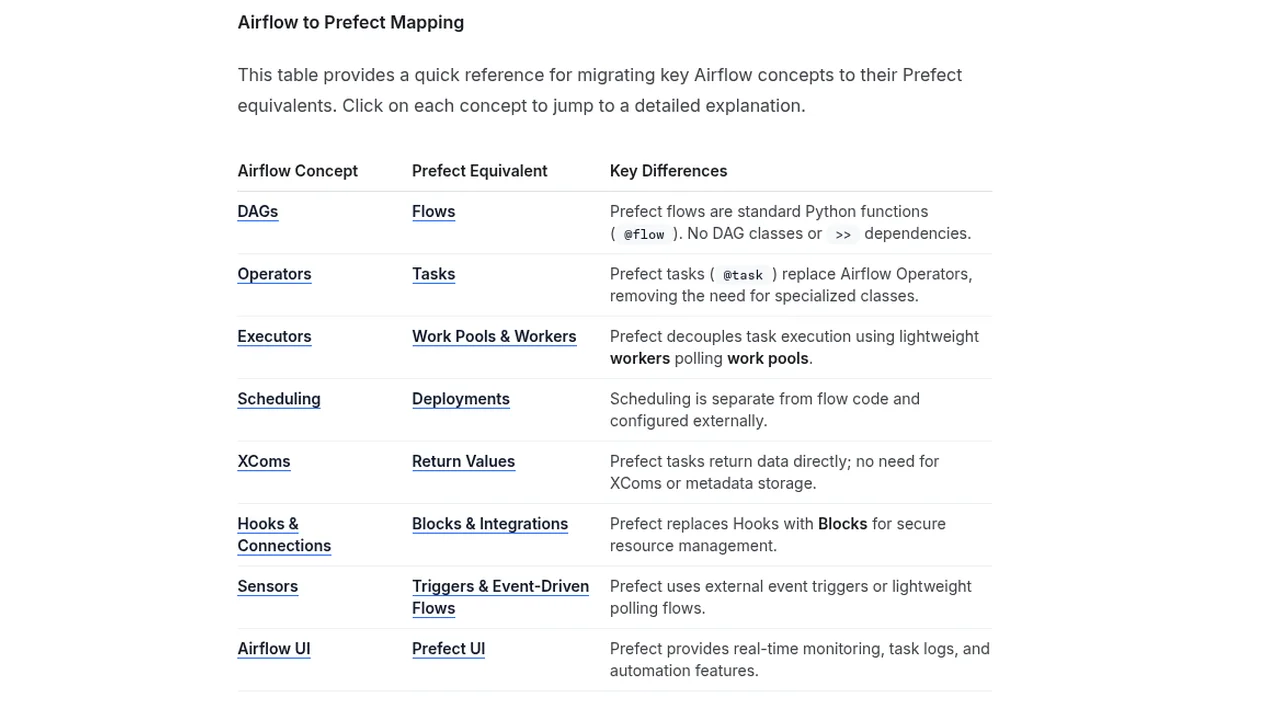
Cover source: Prefect’s official documentation How to Migrate from Airflow, captured November 29, 2026 (Asia/Shanghai). The cover is a screenshot of the official “Airflow to Prefect Mapping” table. It is vendor documentation, not a customer DAG, a failed stack trace, or a workspace we operated. No interface values were rewritten. Underlying vendor copyright is retained; no blanket reuse licence was established.
Start with versions, then the two kinds of logs
Official general troubleshooting says the first step is to confirm you are running a current version of Prefect, then upgrade if you are not, because the issue may already have been fixed. Official docs also note that components can be on different versions: Cloud is generally the newest and is continuously deployed; a self-hosted server is a version you control; workers change versions less often and are usually current as of the time they were created; flows can use a different version than the worker that created them.
After that, official guidance splits the problem into flow code, authentication and Cloud connectivity, or execution.
There are two kinds of logs, and they are not interchangeable:
- Flow and task logs are always scoped to a flow. They are sent to Prefect and are viewable in the UI.
- Worker logs are not scoped to a flow. They may have more information on what happened before the flow started, and they are generally only available where the worker is running.
If flow and task logs are empty, official docs say there may have been an infrastructure issue that prevented the flow from starting. Check worker logs before you assume the flow code is the only place to look.
If the logs you do have are not enough, official docs allow you to raise PREFECT_LOGGING_LEVEL from the default INFO to DEBUG, with prefect config set PREFECT_LOGGING_LEVEL=DEBUG or an environment variable. Settings such as the logging level are propagated from the worker environment to the flow-run environment. DEBUG produces a high volume of logs; official guidance is to set it back to INFO once the issue is resolved. This is a temporary diagnostic step, not a standing production default.
Remote execution is a common reason a run never starts. Official execution notes say flow runs are assigned to a work pool and a work queue; if no worker is subscribed, runs can go from Scheduled to Late. Confirm that the pool and queue you expected actually have a subscribed worker.
On Prefect Cloud, check the key, the URL, and the workspace
The Cloud-specific section is not the same as self-hosted auth. Keep those paths separate.
Official Cloud troubleshooting tells you to run prefect config view and confirm:
PREFECT_API_KEYis a valid key.PREFECT_API_URLusesapi.prefect.cloudwith an/api/path.- The account and workspace IDs in that URL match the workspace you are looking at in the UI.
You can list or inspect the active workspace with prefect cloud workspace ls. Official login troubleshooting also says Prefect Cloud 1, Prefect Cloud 2, and Prefect Cloud 3 use separate accounts. Use the Cloud 3 host app.prefect.cloud if that is the product you intend to sign in to. An invitation, SSO, or social login failure is not diagnosed by treating all Cloud generations as one account.
Official Cloud docs also distinguish user keys (they start with pnu_) from service-account keys (they start with pnb_). A missing, incorrect, or expired key results in a 401 with detail Invalid authentication credentials. An actor that is not a member of the workspace you are targeting can see a 404. A role with insufficient permissions can fail even when the key is valid; official text gives the example that starting a worker with the Viewer role results in errors.
Proxy, certificate, and outbound-allowlist issues are documented separately in the Cloud guide. If your runtime sits behind a proxy, official docs point to HTTPS_PROXY and SSL_CERT_FILE, and list hostnames such as app.prefect.cloud and api.prefect.cloud for outbound access. That is infrastructure context, not a substitute for reading the logs of the failed run.
Official Airflow mapping: DAG to Flow, schedule to Deployment
If the task is to migrate a DAG, official How to Migrate from Airflow starts with a concept table, not a vendor bake-off. This article is that official path. It is not a buyer’s guide to agent platforms, and it is not a no-code comparison. Those are different jobs; see How to Evaluate AI Agent / Automation Platforms Before You Commit, and, if you are comparing no-code builders, n8n vs Zapier Agents vs Coze for No-Code AI Workflows.
The official mapping, as shown on that page today, is:
- DAG → Flow (
@flow): a standard Python function, without DAG classes or>>dependencies. - Operator → Task (
@task): task functions replace specialized operator classes. - Executor → Work Pools & Workers: workers poll work pools.
- Scheduling → Deployments: scheduling is separate from flow code and configured externally.
- XComs → Return Values: tasks return data directly; official text says you do not need XComs or metadata storage for that passing of results.
Official preparatory advice is to audit DAGs, dependencies, and schedules first, then convert one workflow, starting with a simpler DAG where you can compare results. Official “common issues” text for migrants is specific: Airflow schedules may trigger at the end of an interval, while Prefect runs in real time, so align Cron schedules and time zones if needed. Configure work-pool and flow-run concurrency limits to prevent overlapping jobs. If too many tasks run in parallel, official text points to tags and concurrency controls.
The migration guide’s opening also markets simpler orchestration and less overhead. That is official product copy. It is not an AINav review conclusion, and this article does not claim an unverified one-shot migration or an automatic cost guardrail.
What we did not test
We did not attach to a customer Cloud workspace, tail a live worker, or convert a production DAG. The CLI snippets and UI labels above are from official Prefect 3 documentation as of November 29, 2026 (Asia/Shanghai). Self-hosted servers, older Prefect Cloud accounts, and later CLI changes can look different. Recheck the official troubleshooting and migration pages for the version you run, and use the logs you actually have — flow, task, or worker — before you change a schedule or a work pool.