guides
SurveyMonkey AI: review open-ended themes against response IDs
Turn documented Thematic Analysis output into a reviewable evidence ledger. Check eligibility, separate themes from sentiment, and preserve response-level export provenance.
“People want better service” is an easy survey summary to write and a difficult finding to audit. Which answers support it? Does “service” mean waiting time, staff knowledge, or an inaccessible booking form? A theme is useful only if someone can get back to the answers behind it.
SurveyMonkey AI includes documented Thematic Analysis: grouping open-ended responses, providing a summary, and exporting response-level themes. This article follows that route, not survey creation, session replay, or marketing follow-ups. The deliverable is a reviewed theme ledger with traceable references—not a polished AI paragraph presented as research. Documentation was checked on November 25, 2026. We did not enable a feature, send a survey, collect responses, or test an account. All examples below are synthetic.
1. Start with a question and a fixed review scope
Use an existing, appropriately authorized survey and one open-ended question with a clear purpose. “What made it difficult to book an appointment?” is easier to interpret than a question combining booking, pricing, staff behavior, and future product ideas. This is analysis advice, not an instruction to send another survey.
Before opening an AI view, record the survey, question wording, cutoff, intended decision, and included responses. Note both the total survey response count and usable answers to this question. These are not automatically the same denominator: someone may skip an optional question or provide an answer too vague to interpret.
Retain a reference back to each source answer. SurveyMonkey documents a Respondent ID in the export below; keep it in a restricted working file rather than replacing everything with an anonymous-looking list of quotes. An identifier linked to a person is not automatically anonymous. Keep any identity lookup separate and share only access needed for review.
Do not blend questions, languages, or periods and imply that one generated summary represents them all. Our source-first research-notes workflow follows the same discipline: preserve evidence separately from interpretation.
2. Check eligibility and processing before generation
The official Thematic Analysis help page establishes these conditions:
- Available on some paid plans, for English surveys in US and EU data centers; unavailable in the Canadian data center.
- Supports Comment box and Single textbox questions.
- Requires 1–10,000 total survey responses. Filtering a larger survey to a smaller visible subset does not bypass the total-response limit.
These are product boundaries, not statistical endorsement. One response may meet the minimum while being insufficient to generalize about an audience. “Some paid plans” does not mean every paid account. Confirm entitlement and export access before committing; no price is quoted because this help page does not establish an account-specific offer.
The page says the feature combines self-hosted Anthropic models and OpenAI, and these providers do not use your data to train their models. This is a vendor statement about this feature, not our security audit. It does not establish zero retention, no third-party processing, or permission to analyze sensitive answers. Read linked processing details, organizational policy, and applicable usage restrictions first. An available switch is not approval for every purpose.
3. Move from the summary to the answers
For an eligible survey, the documented route is Analyze results → Options → Data Options → Thematic analysis. The help page also describes enabling it from the Summary tab of an eligible question with responses. These are documented instructions, not buttons we clicked in a live account.
After generation, Summary provides the overview; Responses shows themes applied to individual answers. Identify a candidate issue, then inspect its evidence. Answers without enough detail can receive No applied theme. Keep them in scope rather than silently treating them as satisfied customers or removing them from the denominator.
Do not equate themes, tags, and sentiment. The documented export has separate tags and themes fields, plus sentiment when enabled. A manual tag can support team organization without proving the AI generated the same theme. A negative sentiment label does not establish which operational problem caused it.
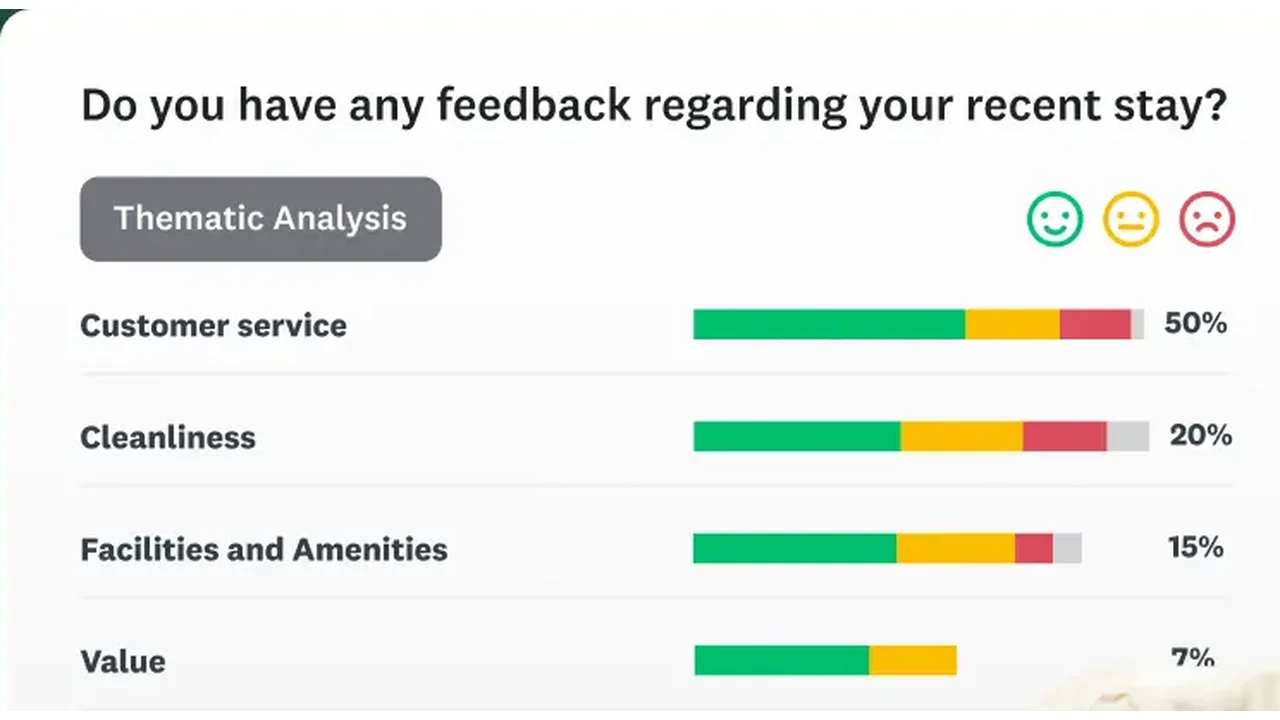
The official cover example shows themes such as customer service and cleanliness with sentiment-colored bars. It illustrates topic and emotional tone as different dimensions. Its percentages are not our survey results; we infer no respondent count, sampling method, or business conclusion from that illustration.
4. Build a ledger that can disagree with the AI
For each important candidate theme, inspect supporting answers, ambiguous answers, and apparent exceptions. For a small set, read every substantive answer. For a larger set, document your sample selection and limitations; there is no universal review threshold established here. A low-volume but high-impact complaint may still deserve action.
This is a synthetic editorial example. The references, quotes, candidate labels, and decisions were invented to explain the method—not generated by SurveyMonkey or collected from customers.
| Reference | Example answer | Candidate theme | Human review |
|---|---|---|---|
| DEMO-01 | “The calendar showed slots, but confirmation never arrived.” | Booking reliability | Check confirmation delivery; this is not evidence of poor staff attitude. |
| DEMO-02 | “The receptionist was helpful; I waited three weeks for a slot.” | Service | Separate helpful staff from appointment availability. |
| DEMO-03 | “It was fine.” | No applied theme | Too vague to support a specific improvement claim. |
For actual work, preserve the original answer and model-assigned field, adding human interpretation separately. Record the reviewer, reasons for splits or rejection, and unresolved questions. This ledger may live in an approved document; we do not claim SurveyMonkey provides these exact custom columns or an in-place editor for generated themes.
Watch multi-issue answers. The second example contains praise and a delay; compressing it into “service” erases the useful distinction. Inspect answers outside the candidate theme too, or you risk reading only supporting evidence and missing systematic omissions. Do not reconstruct missing explanations: if the answer never says why confirmation failed, leave the cause unknown.
5. Export evidence, not just a headline chart
The documented route is Analyze results → Export → + New export → Question summaries, then XLS or CSV, selecting Open-ended responses. The help page also describes exporting an individual question from its tile. Confirm the account exposes the options before depending on them.
The listed fields are:
- Respondent ID.
- Response date.
- Response text.
- Tags applied.
- Themes applied.
- Response sentiment, if Sentiment analysis is on.
Check downloaded fields and row counts against your intended scope. This field list does not guarantee that every filter, reviewer note, question identifier, or custom column is included automatically. Keep question wording, cutoff, selection rules, and review decisions alongside the export. Preserve the untouched export separately from the working copy so someone else can reconstruct your interpretation.
CSV and XLS files may contain identifying text even when the ID looks opaque. Use approved storage and limited access. Redact report excerpts where necessary without overwriting protected source evidence. Do not upload an export into an unrelated chatbot merely because the first product uses AI.
Make the package understandable without privileged background knowledge. Include a short field dictionary: which column came from the product, which was added by the reviewer, and which reference locates the source. If a reader cannot distinguish a model label from a human correction, the handoff has lost a critical piece of provenance.
6. Write a finding another reviewer can challenge
A useful finding names the question, period, eligible answer set, reviewed interpretation, and supporting response references. State uncertainty: unthemed answers, partial review, and labels mixing distinct problems. A topic’s presence, its sentiment, and your recommended action are separate claims.
When counting coded answers yourself, define the denominator and whether an answer can contribute to multiple themes. Do not add theme percentages as though they must total 100% unless coding rules establish that interpretation. Neither a product illustration nor an AI overview establishes those rules for your dataset.
The help page says to use Refresh in the question tile when additional answers arrive, regenerating themes and updating the summary. Preserve the earlier export and review record first. Do not assume labels or assignments remain identical, or compare summaries as a trend without comparable questions, scopes, and coding definitions.
End with a small handoff: the protected source export, reviewed ledger, referenced finding, unresolved cases, and a decision owner. If eligibility, consent, or the path back to evidence cannot be established, stop at manual review instead of publishing an authoritative-sounding AI summary. Traceability is the outcome; speed is secondary.
Cover: cropped from SurveyMonkey’s official Thematic Analysis product illustration, retaining the question, named themes, and sentiment-colored bars. Source: AI survey analysis, acquired November 25, 2026 (Asia/Shanghai). Values are vendor examples, not our survey data or an independently tested account screen. No values or labels were rewritten.