
Acrobat Standard
Essential PDF tools for editing and converting documents. Does not include AI Assistant features.
- Create, edit, convert, export, and organize PDFs
- Collect e-signatures and track responses
- Fill, sign, and password-protect PDFs
AI Knowledge Base Q&A Tools

PRODUCT OVERVIEW
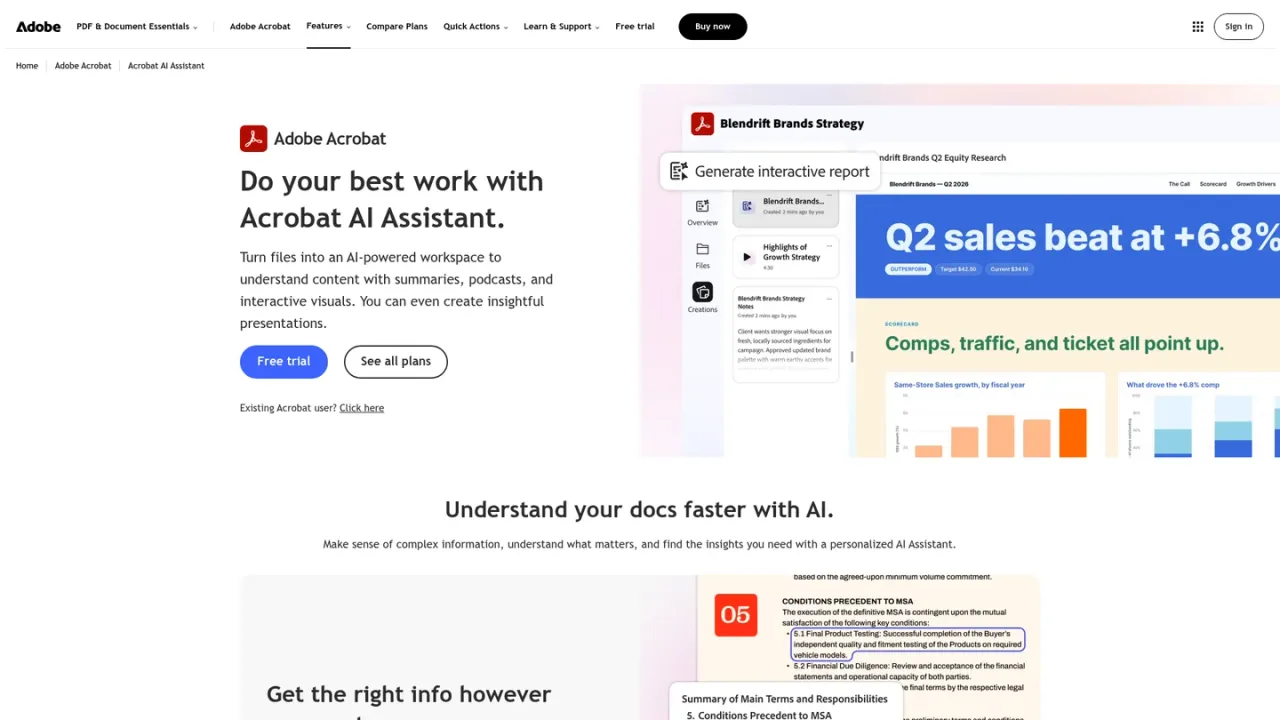
Adobe Acrobat AI Assistant is an AI-powered workspace for PDFs and documents from Adobe. It reads entire files to produce structured summaries with citations linked to source pages, answers plain-language questions about content, and generates podcast-style audio overviews, interactive visual reports, and presentations. Users can also ask it to edit, sign, redact, compress, and convert PDFs, create custom images, and organize multiple files into shared PDF Spaces for collaborative insight discovery. It is designed for professionals, researchers, and teams working with contracts, reports, research papers, and other complex documents. Access is available through Acrobat Studio, Acrobat Express, or the AI Assistant add-on, with a free trial offered.
Summarizing research papers, legal contracts, and financial reports
Extracting key points and action items from long documents
Listening to podcast-style overviews of documents on the go
Collaborating with teams in shared PDF Spaces to uncover insights
Automating PDF tasks like editing, redacting, and compressing
Creating presentations and visual reports from document content
It can summarize long documents, answer questions about PDF content, generate outlines, and extract key points with cited responses. In PDF Spaces, it can surface insights across multiple files and generate podcast-style audio overviews.
It reads the entire PDF and produces a structured summary highlighting main topics, key findings, and action items. You can ask follow-up questions and receive answers with references to specific pages.
It is designed to generate grounded responses with citations so you can verify answers against the original document. Adobe recommends reviewing AI-generated summaries against source material.
It supports English, Japanese, French, German, Italian, Spanish, Portuguese, Korean, Norwegian, Dutch, Finnish, Swedish, and Danish for summarizing, answering questions, rewriting, and translating content.
No, your content is not used to train Adobe's AI models. Documents, chats, and interactions are protected, and AI responses are cited back to source documents.
AI Assistant features are included in Acrobat Studio and Acrobat Express plans. Acrobat Standard and Acrobat Pro do not include AI Assistant features.
Yes, a free trial is available for Acrobat Studio and Acrobat Pro. The trial allows you to explore AI Assistant features before committing to a subscription.
PDF Spaces let you combine multiple files into a shared workspace where you can ask questions, generate insights, and collaborate with others. You can also create summaries, audio overviews, and presentations from a PDF Space.
Prices shown are for individuals in the US, annual billed monthly. A free trial is available for Acrobat Pro and Acrobat Studio.
Essential PDF tools for editing and converting documents. Does not include AI Assistant features.
Advanced PDF toolset with 70+ tools. Does not include AI Assistant features.
All-in-one plan including everything in Acrobat Pro plus AI Assistant. Free trial available.
COMMUNITY REVIEWS
No reviews yet.