guides
How to Evaluate Enterprise iPaaS and Integration AI Before You Commit
A documentation-based guide to committing to enterprise iPaaS with environment promotion. Official Workato docs allow deploys only from Development after testing and approval, and require the deployment privilege in both environments. Official MuleSoft Agent Fabric and IBM watsonx Orchestrate pages describe agent control planes, so they are boundaries rather than padded iPaaS peers.
An enterprise iPaaS purchase is useful when integrations move through governed environments: development, test, and production, with a human approval path and a recorded deployment. It is a different job from an agent control plane that inventories and governs agents across platforms, and from an SMB no-code canvas that lets a team stitch apps together in a single workspace. Those products can sit in the same “automation” conversation. They are not the same commit.
This documentation-based guide was reviewed on November 21, 2026 (Asia/Shanghai). We did not connect production systems of record, promote a live recipe, or attempt to move secrets between environments. Descriptions come from official Workato, MuleSoft, and IBM watsonx Orchestrate pages opened that day. Vendor leadership or “number one iPaaS” claims are left as vendor language, not as an AINav ranking. This is a buying guide, not a playbook for extracting credentials or bypassing access controls.
Enterprise iPaaS, agent control planes, and no-code canvases are different jobs
The catalog core for an enterprise iPaaS evaluation in this review is Workato. Official Workato pages describe a control and execution platform “built on the #1 iPaaS,” with connectors across applications, APIs, data, and MCP servers, plus governance over identity, policy, approvals, security, observability, and cost. Official documentation for Environments is more specific, and that is the buying test: can you develop in one environment, test in another, and deploy to production only after review?
MuleSoft and IBM watsonx Orchestrate are in the same integrations catalog, but official product pages describe a different class. Official MuleSoft language calls Agent Fabric “an enterprise agent control plane” for discovering, governing, orchestrating, and observing agents, APIs, and MCP tools. Official IBM pages call watsonx Orchestrate “an agent management platform” and a control plane to build, deploy, orchestrate, manage, and govern AI agents wherever they are built or run. Those are adjacent purchases if your gap is agent sprawl. They are not padded here as iPaaS peers, and they are not scored as if they replaced environment promotion for system-of-record integrations.
No-code agent canvases are another boundary. The published comparison n8n vs Zapier Agents vs Coze already covers that job. A broader agent-platform commit check is in How to Evaluate AI Agent Automation Platforms Before You Commit. Microsoft Power Automate may appear in an enterprise stack as a flow or desktop-automation boundary; it is mentioned only as that boundary, not as a computer-use guide.
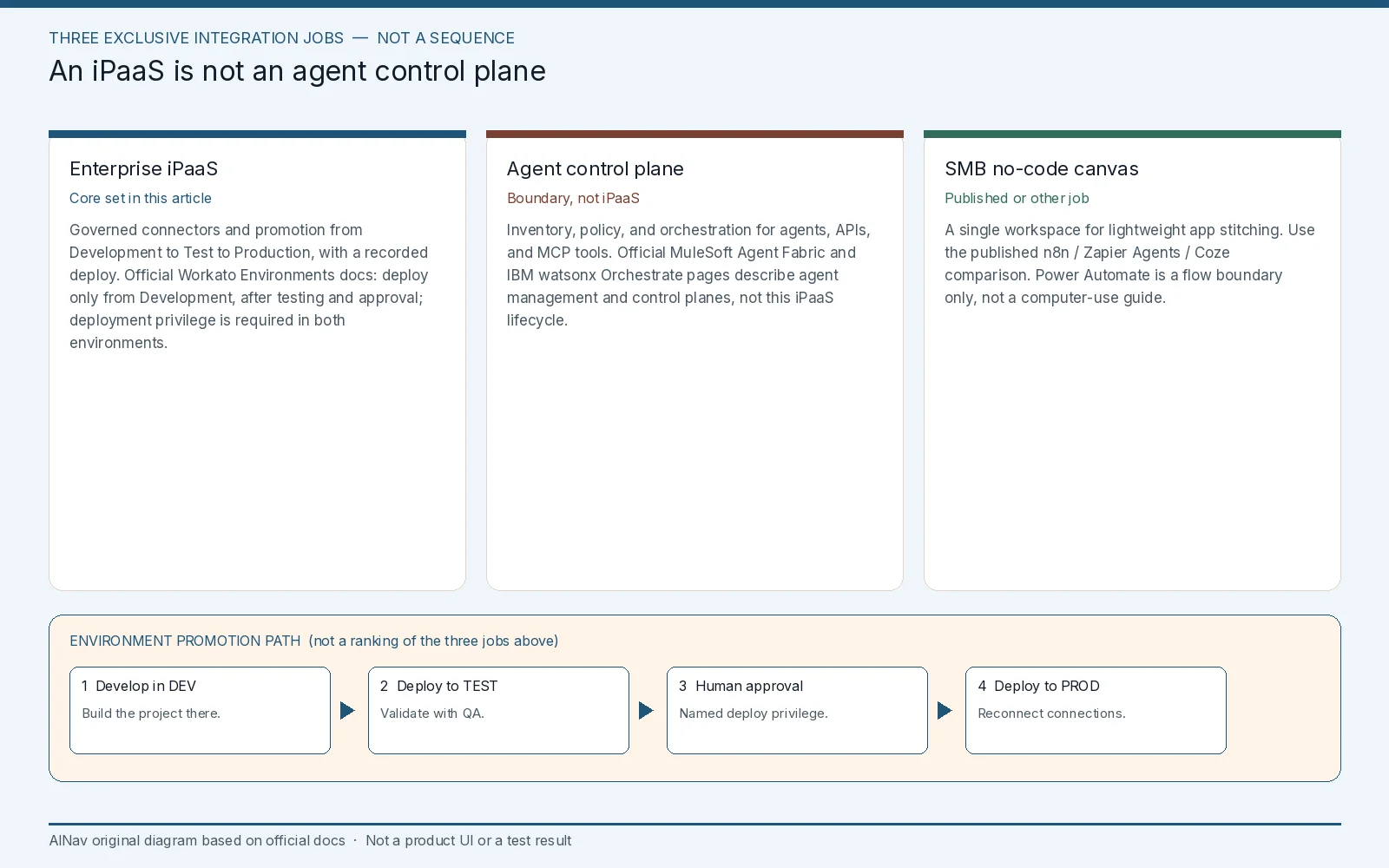
AINav original diagram based on official docs. Sources: Workato Environments, Understanding project deployment with environments, MuleSoft Agent Fabric, IBM watsonx Orchestrate. Not an official screenshot or a test result.
Workato: environment promotion is a plan feature, not a default workspace habit
Official Workato documentation describes Environments as a way to apply a software-development lifecycle to automation. Workspaces with the feature enabled get Development, Test, and Production environments automatically. Official guidance is to build in Development, deploy to Test for validation, and deploy to Production from Development after testing and approval. Official text says you can only deploy projects from the Development environment; Test and Production have specific purposes, and that restriction “ensures consistency, prevents conflicts, and records a complete deployment history.”
Who can deploy is a control, not a courtesy. Official docs say a collaborator needs access to the project, plus the deployment privilege in both the source environment and the target environment. A collaborator with access to only one environment cannot deploy. Access to each environment is granted individually. Official monitoring language also matters for cost: usage is calculated across all environments in the account, even though many dashboard graphs show only the current environment.
Deployment itself has several official caveats you should put in a runbook. Deployment is at the project level. After connections are deployed to an environment for the first time, official docs say you must reconnect them; recipes cannot run until those connections are re-established. If a dependency already exists in the target, references may resolve automatically; if it does not, you must resolve it. Official text says Workato overwrites existing recipes and assets when a project already exists in the target, but it does not delete recipes or assets that were removed from the source. Folder moves can also create a second copy in the target rather than relocating the original. Official docs let you download a project as a ZIP package, and they record deployments in the project’s Deployments tab and in the account activity audit log — but only users with deployment permissions see that tab, and project deployment logs are available in Development.
Environments are not universal. Official documentation states that the feature is available to customers on specific pricing plans, and that you should refer to your plan and contract. Official enablement notes differ for customers after 22 December 2021 and for existing customers with multiple workspaces. Do not assume a trial workspace includes the same lifecycle controls as an enterprise contract. Exact list prices and credit packs are omitted here; official Workato commercial terms use a credit-based model that varies by plan, and Environments are called out as plan-specific.
Failure conditions: a builder deploys from Test or edits Production directly; a collaborator can promote a project without deployment rights in both environments; connections are left disconnected after first promotion; a deleted Development asset is assumed gone from Production; usage in Test is treated as “free” even though official docs count usage across environments; or an agent-control-plane vendor is signed as if it were the iPaaS.
MuleSoft Agent Fabric and watsonx Orchestrate stay control-plane boundaries
Official MuleSoft Agent Fabric pages describe a registry and scanners for agents, APIs, and MCP tools, a unified LLM and MCP gateway, agent identity, an agent kill switch, and cost controls. Official FAQ language is explicit: Agent Fabric is an enterprise agent control plane, including enhancements to existing MuleSoft products. MuleSoft still has an Anypoint integration platform historically, but the live catalog item reviewed here, and the official Agent Fabric page opened for this article, are positioned as agent governance and orchestration. If your gap is “govern agents we already built on several clouds,” evaluate Agent Fabric on those official pages as that product. If your gap is “promote a payroll integration through dev, test, and prod,” do not treat the control plane as a substitute for an iPaaS lifecycle.
Official IBM watsonx Orchestrate pages describe discovering and coordinating native and external agents, applying access and policy, evaluating agent quality, and tracking token usage. Official product marketing lists trial, Essentials, Standard, and a higher plan with data isolation. Confirm current official pricing on IBM’s page for your country; amounts are omitted here because official terms vary by locale and offering. The product is an agent management platform. It is in Related tools only if you were buying that job. This article is not.
A commit check that starts in a non-production environment
Use a Development workspace, non-production connectors, and synthetic or already-approved test data. Do not point a new recipe at a production system of record until environment access, deployment privileges, and connection handling are documented. Then check six things:
- Job fit. Enterprise iPaaS with promotion, agent control plane, or no-code canvas — pick one official job.
- Environment path. Confirm Development to Test to Production, with official constraints on where deploys can start.
- Human approval. Name who may deploy, and require the official dual-environment deployment privilege rather than a shared admin login.
- Connection and dependency handling. Reconnect connections after first deploy, and resolve missing dependencies before go-live.
- Audit. Confirm you can see deployment history on the official Deployments tab (deployment permissions required; project deployment logs are in Development) and in the account activity audit log. Do not assume a rollback control exists unless the current official docs describe one.
- Usage and plan coverage. Confirm whether Environments and related lifecycle features are on the contract, and that usage is counted the way official docs describe.
Stop the evaluation, or stay on the current stack, if production can be edited in place with no promotion record, if the vendor you invited is an agent control plane you mistook for iPaaS, or if secrets and production connectors are required just to see the lifecycle work.
Who this purchase is for, and who should look elsewhere
This evaluation is for integration architects and enterprise platform owners who need governed promotion for systems of record.
It is not an agent-control-plane bake-off, not a no-code canvas comparison, and not a computer-use or desktop-automation guide.
If the actual work is lightweight departmental flows, use the published no-code workflow article. If the actual work is governing a fleet of agents, evaluate MuleSoft Agent Fabric or watsonx Orchestrate on their official control-plane docs, separately.
Frequently asked questions
Why are MuleSoft and watsonx Orchestrate not in Related tools? Official pages describe them as an agent control plane and an agent management platform, not as an enterprise iPaaS with the environment-promotion job reviewed here. They are boundaries, not padded peers.
Can any Workato user deploy a project to Production? Official docs say the collaborator needs project access and the deployment privilege in both Development and the target environment. A user who can see only Production cannot deploy.
Does Workato remove a Production recipe when we delete it in Development and deploy again? Official deployment documentation says Workato does not delete recipes or assets that were removed from the source environment.
Is environment promotion included on every Workato plan? Official documentation says Environments are available on specific pricing plans and that you should refer to your plan and contract.