guides
How to read Superhuman and Copilot in Outlook pricing and email-privacy terms
A documentation-based pricing and privacy guide to two inbox assistants. Official Superhuman suite plans list Mail on Business and Enterprise, not Free or Pro, as of November 23, 2026 (Asia/Shanghai). Official Microsoft pages describe Copilot in Outlook on eligible Microsoft 365 individual plans or a work-or-school Copilot license, including promotional personal prices that renew at the regular rate. No mailbox was connected or tested.
A professional inbox assistant is a commercial contract that can read, draft, and organize email, not a generic writing add-on and not a workplace chat or suite-wide copilot rollout. The useful question, before you pay, is which product you are actually buying, who is licensed, which mailboxes are in scope, and what the official privacy terms say about training and connected accounts.
This documentation-based guide was reviewed on November 23, 2026 (Asia/Shanghai). We did not connect a production mailbox, send or receive mail through either product, or measure draft quality. No time-saved or accuracy figure is claimed. Prices and plan names come from official pages opened that day. They are list or promotional prices in the billing period and market shown on those pages, not a quote for every region, tax, currency, or renewal.
Keep this guide apart from writing tools and workplace copilots
AINav already has How to Evaluate AI Email Writing Tools Before You Buy, which includes Copilot in Outlook among writing tools, and How to Evaluate Workplace AI Copilots Before You Roll Them Out, which is about suite-wide copilots such as Microsoft 365 Copilot. This article does not restage those evaluations. It is a pricing and privacy reading guide for two live AINav tools that sit in the inbox: Superhuman and Copilot in Outlook.
Superhuman’s official site now presents a broader suite (Go, Mail, Docs, and Grammarly). The inbox product to watch on a quote is Superhuman Mail, not every Superhuman logo. Copilot in Outlook is an Outlook feature that official Microsoft pages attach to eligible Microsoft 365 subscriptions or to a work-or-school Copilot license. Those are different contracts. A writing-tool trial in Word, or a chat assistant in Slack, does not answer either one.
Two official commercial pictures, not one seat price
Superhuman’s official plans page, titled “Superhuman Suite | Pricing & Plans” on the day of review, lists four suite tiers. Free is $0 and, in the plan cards reviewed, includes Grammarly, Docs, and Go, not Mail. Pro is $12 per member per month billed annually, or $15 when billed monthly, and still lists Grammarly, Docs, and Go; the Pro card also describes an Email Assistant that can draft replies and clear inbox clutter. Business is $33 per member per month billed annually, or $40 when billed monthly, and the Business card explicitly includes Mail, along with Grammarly, Docs, and Go. Enterprise is custom and also lists Mail, plus items such as SAML single sign-on, custom roles, data loss prevention, and BYOK encryption. On that official page, Mail is not listed on Free or Pro. If a quote or a directory card says “Superhuman” without saying Mail, ask which tier includes the inbox product.
The Superhuman Mail marketing page retrieved the same day describes Mail as an email app but did not, in the public HTML we could read, publish a standalone Mail-only price list. Do not invent a second, cheaper Mail SKU from that page. Use the official suite plan table, or a written quote, until a separate public Mail price is visible.
Microsoft’s official “Copilot Pricing Plans for Individuals” page, reviewed the same day, lists Microsoft 365 Personal at a limited-time offer of $6.99 for the first month, with a regular price shown as $9.99, and at $69.99 for the first year, with a regular price shown as $99.99. The page states that the offer cannot be combined with the one-month trial, and that the subscription renews at the regular price unless canceled. Microsoft 365 Family is listed at $12.99 per month, for one to six people, with AI for the subscription owner only. The same page says Copilot is included with eligible Microsoft 365 subscriptions for deeper integration in apps such as Word, Excel, PowerPoint, and Outlook, and that a limited free version of Copilot also exists, subject to capacity and limits. Official Microsoft Support pages reviewed the same day state that Copilot is available in Microsoft 365 Personal, Family, Premium, and Pro subscriptions, including Outlook desktop apps, and that Copilot in Outlook is available in Outlook apps for Windows, Mac, iOS, Android, and the web if Connected Experiences is not turned off in Outlook privacy settings.
For work or school accounts, the official “Sharing Copilot in Outlook” support article distinguishes a Microsoft account on an eligible personal-family-premium-pro subscription from a work or school account that has a Copilot license. In both cases, it says Copilot features can be available for connected email accounts — including Outlook.com, Hotmail.com, Live.com, MSN.com, work and school accounts, and third-party providers such as Gmail, Yahoo, and iCloud — when those accounts are logged into Outlook on the same device. It also says this sharing behavior is not available in classic Outlook for Windows, and that Microsoft 365 Family Copilot access is only for the person who sets up the subscription. A Microsoft 365 Business or Microsoft 365 Copilot price on a separate business pricing page is a different SKU; do not paste an individual promotional price onto a work tenant, or a work add-on price onto a personal inbox.
Privacy and training terms you can actually point to
Superhuman’s official privacy policy, reviewed today, says Superhuman uses information it collects to train its AI models, and that you can decide whether Superhuman may use your user content for that training by adjusting the training control or controls in account settings. It also says Superhuman restricts its AI service providers from training their models on user content of Superhuman customers. The official plans comparison table shows “Model training” as “Opt out” on Free, Pro, and Business, and “Off by default” on Enterprise. Those are official labels, not a substitute for checking the live control on the account you would use, and not a claim about every Superhuman product in every region.
Microsoft’s official support pages reviewed today emphasize Connected Experiences as a control that can turn Copilot in Outlook off, and they describe license and sharing rules by account type. They are not, on the pages cited here, a complete map of Microsoft’s training or commercial-data-protection terms for every Copilot SKU. For a work tenant, read the current Microsoft 365 Copilot privacy and data-use documentation that applies to that license. For a personal or family Microsoft account, read the consumer terms and the Copilot-in-Microsoft-365 support article that applies to that plan. This review does not invent a single “Microsoft never trains on your email” sentence that covers both.
A practical reading order, without a live mailbox test:
- Name the product on the quote: Superhuman Mail, Copilot in Outlook on a personal Microsoft 365 plan, or Copilot in Outlook on a work or school Copilot license.
- Name the licensee: a person, a family subscription owner, or a tenant admin assigning seats. Family AI features are officially described as owner-only.
- Name the mailboxes: a single Outlook.com inbox, several connected accounts, or a work mailbox plus a personal account in the same Outlook profile. Official sharing rules differ by Outlook version.
- Open the official privacy control: Superhuman’s training control, or Outlook Connected Experiences, plus any admin policy that overrides a user toggle.
- Re-check price, term, and renewal. Individual Microsoft prices reviewed today include limited-time first-month and first-year discounts. Superhuman prices distinguish annual and monthly member rates.
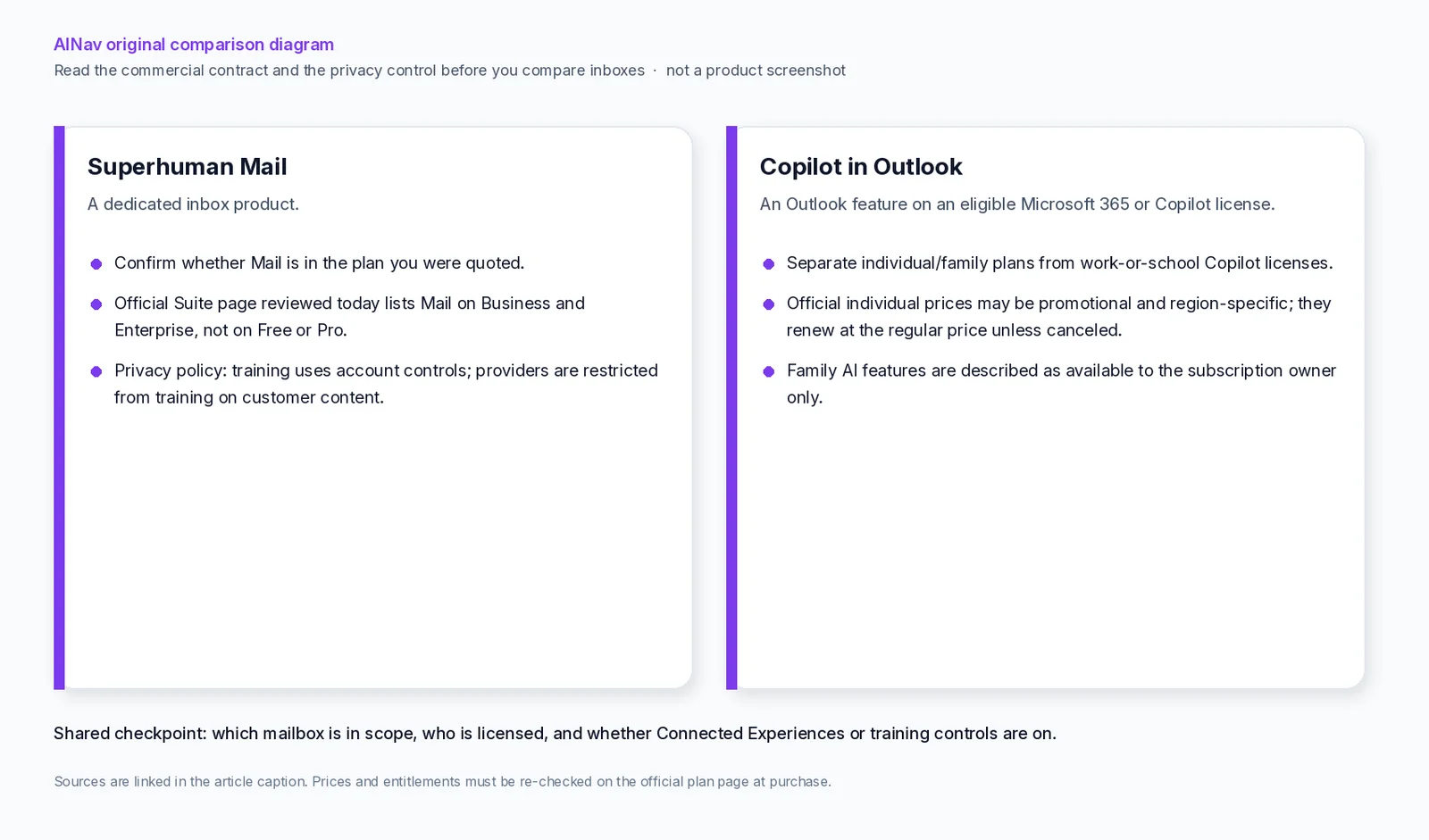
AINav original diagram based on official docs. Sources: Superhuman plans, Superhuman Mail, Superhuman privacy policy, Microsoft Copilot plans for individuals, Copilot in Microsoft 365 Personal, Family, Premium, and Pro, Sharing Copilot in Outlook. Not an official screenshot or a draft-quality test.
Who this reading is for, and who should wait
This guide is for people who were shown Superhuman and Outlook Copilot as interchangeable inbox AIs, and for teams that need a written answer to “which plan includes the inbox product” and “what official training or sharing terms apply.” It is also for readers coming from an email-writing evaluation who need the contract and privacy layer those writing pillars do not settle.
It is not a recommendation to switch a law-firm, healthcare, or government mailbox on the strength of a marketing page. It is not a ranking of draft style. Wait if you cannot name the licensee and the mailbox, cannot accept the official training or Connected Experiences terms, or were quoted a Superhuman price that does not say whether Mail is included.
Frequently asked questions
Does Superhuman Free or Pro include Superhuman Mail? Not on the official suite plan cards reviewed on November 23, 2026. Mail is listed on Business and Enterprise. Pro describes an Email Assistant; that is not the same, on that page, as the Mail product card.
Is Copilot in Outlook free? Official Microsoft pages describe a limited free Copilot, with capacity limits, and Copilot in Outlook as part of eligible Microsoft 365 subscriptions or a work-or-school Copilot license. Do not treat the limited free Copilot as the same entitlement as a Personal, Family, Premium, Pro, or work license.
Can I use one personal Microsoft 365 Family subscription to give Copilot in Outlook to every family member? Official Microsoft pages reviewed today say Copilot features in apps such as Outlook are available only to the subscription owner and cannot be shared with other family members.