✳ainav.

AI Data Visualization Tools

Introduction
Google Cloud's agentic BI platform with a governed semantic layer, Gemini-powered conversational analytics, and embedded data apps.
Added on
11/4/2026
Pricing
Paid
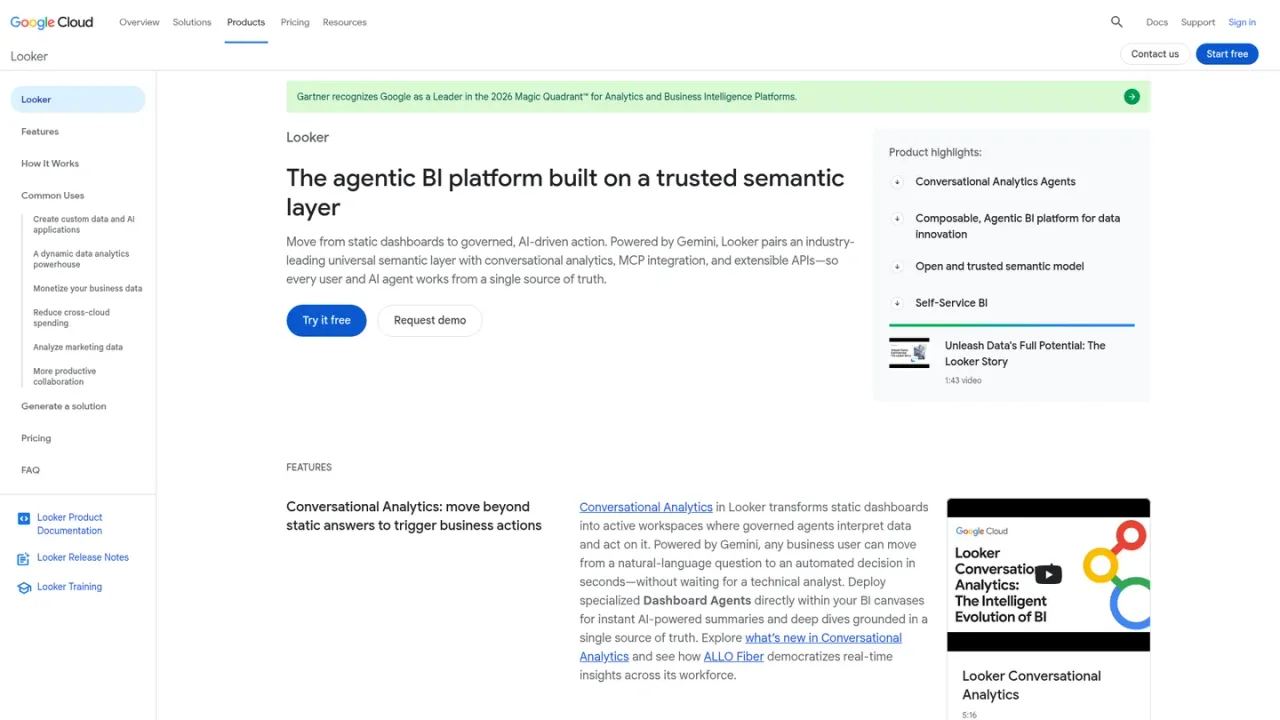
Looker screenshot
Looker website preview

PRODUCT OVERVIEW

What is Looker?

Looker is Google Cloud's enterprise platform for agentic business intelligence, data applications, and embedded analytics. Built on a universal semantic layer defined in LookML, it translates complex SQL into governed business metrics that ground both human analysts and AI agents. Powered by Gemini, Conversational Analytics and Dashboard Agents let business users ask natural-language questions and trigger trusted actions, while self-service tools support visualizations, custom calculations, and blending ad hoc CSVs with governed models. Looker connects in-database to BigQuery and more than 60 SQL dialects, and offers APIs, MCP integration, and embedded analytics for custom applications. It is available through Google Cloud with Standard, Enterprise, and Embed platform editions.

How to use Looker

  1. 1

    Set up and administer Looker

    Follow the official setup documentation to provision a Looker (Google Cloud core) instance and configure administration.

  2. 2

    Model metrics in LookML

    Define dimensions, aggregates, calculations, and data relationships once in a version-controlled semantic layer.

  3. 3

    Ask questions with Conversational Analytics

    Use Gemini-powered natural-language queries to move from a question to governed answers and visualizations.

  4. 4

    Embed analytics in applications

    Use Looker APIs, SDKs, or low-code iframe embedding to add conversational analytics to customer-facing apps.

Looker Features

Conversational Analytics and Dashboard Agents powered by Gemini

Universal semantic layer defined in LookML

Model Context Protocol (MCP) server integration

Looker Embedded analytics with APIs and SDKs

Self-service BI with natural-language visualizations and calculations

In-database connections to BigQuery and 60+ SQL dialects

Looker on Google Cloud with IAM, Private Service Connect, and CMEK

Looker Use Cases

  • Ask governed natural-language questions about business data

  • Build custom data and AI applications with embedded analytics

  • Unify enterprise KPIs with a centralized semantic model

  • Analyze marketing data and monetize business data

  • Blend ad hoc CSVs with governed LookML models

Looker FAQs

Looker is Google Cloud's enterprise platform for agentic business intelligence, data applications, and embedded analytics, combining a governed semantic layer with Conversational Analytics and Dashboard Agents.

LookML is Looker's modeling language for defining dimensions, aggregates, calculations, and data relationships in a reusable, version-controlled semantic layer. Grounding AI agents in LookML prevents metric drift and LLM hallucinations by using governed business logic.

Looker's MCP server and Conversational Analytics APIs let Gemini Enterprise, third-party assistants, and custom agentic workflows query the semantic model, retrieve verified SQL explanations, and generate visualizations with user-level permission enforcement.

Looker connects in-database to BigQuery, AlloyDB, Cloud SQL, Spanner, and more than 60 SQL dialects including Snowflake, Amazon Redshift, Databricks, and Microsoft Azure Synapse Analytics, without data movement or extracts.

Looker is an enterprise agentic BI and embedded analytics platform built on a centralized LookML semantic layer, extensible APIs, and enterprise governance. Data Studio provides fast self-service reporting and ad-hoc visualization.

Looker on Google Cloud is the edition provisioned and managed in the Google Cloud Console, with Google Cloud IAM single sign-on, Private Service Connect, customer-managed encryption keys, Cloud Monitoring, and unified billing.

Looker (Google Cloud core) offers Standard, Enterprise, and Embed editions, each including one production instance, 10 Standard Users, and 2 Developer Users, with differing API call limits and data token quotas.

Usage is measured in input and output data tokens aggregated at the instance level, with monthly quotas per platform tier. Promotional access currently applies without quota limits or overage fees within fair usage limits.

Looker Official Information

Company
Google Cloud
Website
https://cloud.google.com/looker
Documentation
https://cloud.google.com/looker/docs
Contact
https://cloud.google.com/contact

Looker Pricing

Paid

Looker (Google Cloud core) pricing combines platform editions with per-user licensing. Platform edition costs are quoted through sales on annual commitments. Conversational Analytics usage is measured in data tokens with monthly quotas per tier; promotional access currently applies without quota limits or overage fees within fair usage limits.

Standard

/ annual commitment

A Looker (Google Cloud core) platform edition for small organizations or teams with fewer than 50 users. Platform cost is quoted through sales.

  • One production instance
  • 10 Standard Users and 2 Developer Users included
  • Up to 1,000 query-based API calls per month
  • Up to 1,000 administrative API calls per month
  • 60M input and 1.2M output Conversational Analytics data tokens monthly

Enterprise

/ annual commitment

A platform edition with enhanced security features for a wide variety of internal BI and analytics use cases. Platform cost is quoted through sales.

  • One production instance
  • 10 Standard Users and 2 Developer Users included
  • Up to 100,000 query-based API calls per month
  • Up to 10,000 administrative API calls per month
  • 300M input and 6M output Conversational Analytics data tokens monthly

Embed

/ annual commitment

A platform edition for deploying and maintaining external analytics and custom applications at scale. Platform cost is quoted through sales.

  • One production instance
  • 10 Standard Users and 2 Developer Users included
  • Up to 500,000 query-based API calls per month
  • Up to 100,000 administrative API calls per month
  • 1.2B input and 24M output Conversational Analytics data tokens monthly

View official pricing ↗

COMMUNITY REVIEWS

Looker User Reviews

Reader reviews

No reviews yet.

Share your experience with Looker

Sign in to share your experience. Your display name, rating and review will be public after approval. One review per account per tool.

Your rating