AI image generator and editor that turns text prompts or uploaded images into new visuals, with free daily fast creations and slower unlimited standard mode.
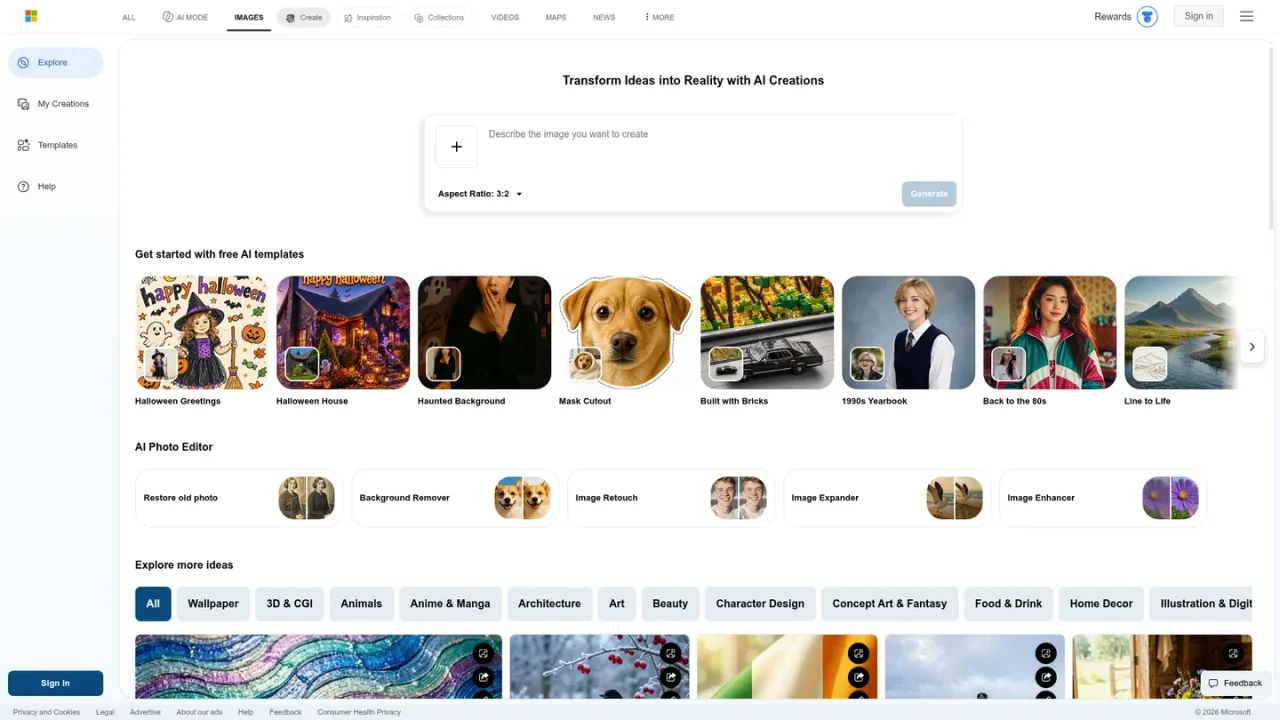
Microsoft Image Creator is a web-based AI image tool from Microsoft, accessible through Bing and the Bing mobile app. You describe a scene in words or upload your own image, then generate new visuals or edit, remix and reimagine existing pictures. It offers model choices such as MAI-Image-2.5-Flash and MAI-Image-2e, selectable aspect ratios, multiple image quantities, prompt suggestions and ready-made templates. A photo editor adds tools for restoring old photos, removing backgrounds, retouching, expanding and enhancing images. It suits casual creators, designers and marketers who need quick concept art, illustrations or edited photos. Sign in with a personal Microsoft account to create; guests face daily limits. Each day brings 15 free fast creations, then standard-speed creation continues, and Microsoft Rewards points can buy extra fast generations.
How to use Microsoft Image Creator
1
Sign in with a Microsoft account
Open the Image Creator page or the Bing mobile app miniapp and sign in with a personal Microsoft Account (MSA). Microsoft Entra ID work or school accounts are not supported.
2
Write a descriptive prompt
Describe the subject, colors, action, setting, style and mood. More specific prompts with adjectives, lighting and camera details tend to produce better results.
3
Choose model, mode and aspect ratio
Pick a model such as MAI-Image-2.5-Flash or MAI-Image-2e, select vivid or natural mode, set the aspect ratio and choose how many images to generate.
4
Upload an image to edit or remix
Use the upload option to enhance, remix or reimagine your own picture. Image editing is handled by MAI-Image-2.5-Flash.
5
Manage speed and Rewards
After the 15 daily fast creations, generation switches to standard speed. You can enable Microsoft Rewards points in settings to keep using fast speed.
Microsoft Image Creator Features
Text-to-image generation from descriptive prompts
Image upload for editing, remixing and reimagining
Model selection including MAI-Image-2.5-Flash and MAI-Image-2e
Vivid and natural generation modes
Multiple aspect ratios including 1:1, 3:2, 2:3, 7:4 and 4:7
AI photo editor with restore, background removal, retouch, expand and enhance
Prompt suggestions and ready-made templates
Optional visible watermark on created images
Support for over 100 languages
Microsoft Image Creator Use Cases
Creating concept art and illustrations from written descriptions
Restoring old photos and removing backgrounds
Retouching, expanding or enhancing existing images
Generating quick visuals for social posts and presentations
Exploring prompt ideas with templates and suggestions
Microsoft Image Creator FAQs
It is an AI-powered tool that turns your words and uploaded images into new visuals, and can also edit or remix images you provide.
Yes. You sign in with a personal Microsoft Account (MSA). Microsoft Entra ID work or school accounts are not supported.
You get 15 free fast image creations per day, which replenish the next day. After that, standard-speed creation continues for free.
Fast creation returns images at the quickest speed. Standard creation is slower but remains available after your daily fast creations are used.
You can input up to 200 prompts per 24-hour period, and each click of Edit image counts toward that limit.
You can select MAI-Image-2.5-Flash or MAI-Image-2e for generation. Image editing always uses MAI-Image-2.5-Flash.
Uploaded images are kept up to 30 days, or up to 18 months if no faces are detected. Generated images are stored for up to 90 days.
Yes. You can enable a visible watermark setting so images you create during your current visit are marked as AI-generated.
Image Creator is free to use with a Microsoft account. Each day includes 15 free fast creations; after that, standard-speed creation continues at no cost. Microsoft Rewards points can be redeemed for additional fast creations. No paid subscription price is listed on the supplied pages.
Free
$0USD / per day
Free access with a personal Microsoft account, including daily fast creations and unlimited standard-speed generation.
15 free fast image creations per day, replenished daily
Standard-speed creation continues after fast credits run out
Up to 200 prompts per 24-hour period
Access to MAI-Image-2.5-Flash and MAI-Image-2e models
Image upload for editing and remixing
Microsoft Rewards fast creations
Optional use of Microsoft Rewards points to keep generating at fast speed after the daily free fast creations are used.
Redeem Rewards points for fast-speed generations
Points deducted per image generated at fast speed
Automatically reverts to standard speed when points run out