guides
How to Evaluate AI Task and Work Management Assistants Before You Roll Them Out
A documentation-based rollout guide for AI inside Asana, Wrike, and Atlassian Rovo. Start with permissions, create-versus-draft rules, and audit. Asana Help Center shells were not used as sources. Request prices and Rovo credit allowances are not verified.
The risk in turning on AI inside a work tracker is not a badly written summary. It is an assistant that can see work across projects, create a task, assign an owner, or answer with content a teammate was never meant to see. Start with permissions, audit, and the difference between a suggested draft and a created item—not with a polished status demo.
This documentation-based guide was reviewed on November 21, 2026 (Asia/Shanghai). We did not enter a customer tenant, create or assign real tasks, connect a third-party workspace, or inspect audit logs. Descriptions come from official product, pricing, and privacy or help pages opened that day. Exact request prices, credit allowances, and tenant behavior are not verified except where a cited page states them. Asana Help Center pages that returned unusable JavaScript shells are not used as first-hand sources.
Decide what the assistant is allowed to do
Write the rule before you compare vendors. Who may enable AI for the organization? Which projects, spaces, or knowledge sources may it read? May it create a task, change an assignee, or only propose a draft that a person accepts? How will a reviewer see the source of an answer? What happens if the answer is wrong after work has moved?
If you cannot answer those questions, do not roll the feature out broadly. A tracker assistant sits closer to your project graph than a general writing tool, which is why casual enablement is a poor idea.
Asana AI, Wrike, and Atlassian Rovo are the core set here because each is documented as AI inside, or tightly bound to, a work-management system. They are not interchangeable with office suites or wiki tools. For workplace copilots in Microsoft 365, Google, or similar office surfaces, see How to Evaluate Workplace AI Copilots Before You Roll Them Out. For team docs and wikis, see Notion AI vs Superhuman Docs (formerly Coda) for Team Docs and Wikis. For finding answers across enterprise systems of record, see How to Evaluate Enterprise AI Knowledge Search Before You Buy. Those articles cover adjacent jobs; they do not replace a decision about task creation and project access inside a tracker.
Asana AI: paid-plan features with a metered request model
Asana’s official AI product page and its FAQ describe AI Teammates, AI Studio, and Asana Dash. The FAQ is the more useful buying document. It states: “Asana AI runs on your existing permissions, so it can only access what a user is already allowed to see.” It also states that Asana’s AI partners “don’t use your data to train their models and are required to delete it after each query.” Asana says the product is powered by models from partners including OpenAI and Anthropic, and that Asana selects the model for each task.
On commercial scope, the same FAQ says “AI Studio Basic, AI Teammates, and Asana Dash are included in all paid plans.” It then describes a usage meter: “AI Teammates and Asana Dash run on AI requests — one simple flat rate per request executed, with administrative tasks included at no extra cost, plus a live usage dashboard and spend limits.” The exact dollar rate per request is not restated here. Check Asana’s pricing page and a written quote for the current rate, included volume, and what counts as an administrative task. “Included in all paid plans” is not the same as “unlimited at no extra cost.”
For a pilot, confirm that a user who cannot see a project still cannot retrieve it through an AI Teammate or Dash answer. Asana’s statement is about existing permissions; it is not a test result from this review. Also turn on spend limits and a usage dashboard before high-volume teammate runs. If no one owns those limits, postpone the rollout.
Wrike: Copilot is plan-gated and owner-controlled
Wrike’s Work Intelligence page presents AI as part of the work-management product, not as a standalone writer. The operational limits sit in help documentation. Wrike Copilot, last updated June 29, 2026, states that Copilot is available on Business, Pinnacle, and Apex, and unavailable on Free and Team. Legacy availability is limited to Legacy Business and Legacy Enterprise, not Legacy Free or Legacy Professional. If you are on Team today, Copilot is not a feature you can simply switch on.
The same article states that Wrike Copilot requires the AI Addendum to be signed, and that if the Copilot button is missing, Generative AI may not be enabled. It also states a scope rule that is easy to miss in a demo: “Copilot only reviews items under the root item you select.” Open Copilot first on a tightly scoped project, not on a parent space that contains confidential work, and confirm that answers stay inside that root.
A Wrike community guide, Guide: Wrike AI Features (September 2, 2025), distinguishes general-availability features for paid accounts from Wrike Labs experiments. It states that Wrike’s AI features are powered by Microsoft Azure OpenAI and that “Your data is not used to train the AI models.” Only account owners can enable or disable Generative AI for the entire account, and enabling it requires accepting the Wrike AI addendum. Re-confirm any Labs-versus-GA label in your tenant, because Labs features can change.
Do not flatten Wrike’s data statements into a slogan. The Copilot article explains that Copilot surfaces information from spaces, projects, or folders in the workspace. Language about storage or access should be read against that help text and the addendum, not quoted in isolation.
Rovo: search and agents on the Atlassian Cloud graph
Atlassian Rovo is not a generic writing add-on. Atlassian’s official Rovo product page describes search, chat, and agents across Atlassian work. Its FAQ states that Rovo is available to customers with a Standard, Premium, or Enterprise Cloud plan of Jira, Confluence, Service Collection, or Teamwork Collection. Credit counts per plan are not verified here; Atlassian points readers to its Rovo usage allowance documentation. Request that allowance in writing before assuming usage is unlimited.
Rovo’s important difference is third-party indexing and permission sync. Official Rovo data privacy and usage guidelines state that Atlassian stores permission settings about indexed third-party files “to ensure that we only show content that users have access to.” When a third-party is disconnected, indexed content is deleted within 30 days, with a documented exception: GitHub content is deleted only if you disconnect GitHub from Rovo and uninstall the GitHub for Jira app. The same page says Rovo indexes the entire connected third-party workspace, such as an entire Google Drive or SharePoint workspace, unless you use a blocklist where that control exists. Chat and agent inputs and outputs are retained for 30 days. Atlassian states that its LLM providers “do not retain your inputs and outputs, or use them to improve their services,” and that Rovo supports data residency and has completed SOC 2 and ISO 27001 assessments.
Those points still require a customer checklist. If you connect a shared drive, confirm the blocklist and who can see search results before indexing starts. If GitHub is in scope, write down the two-step disconnect path. Do not assume an admin setting bypasses synced permissions; read the current privacy page and test with a user who should not see a given project.
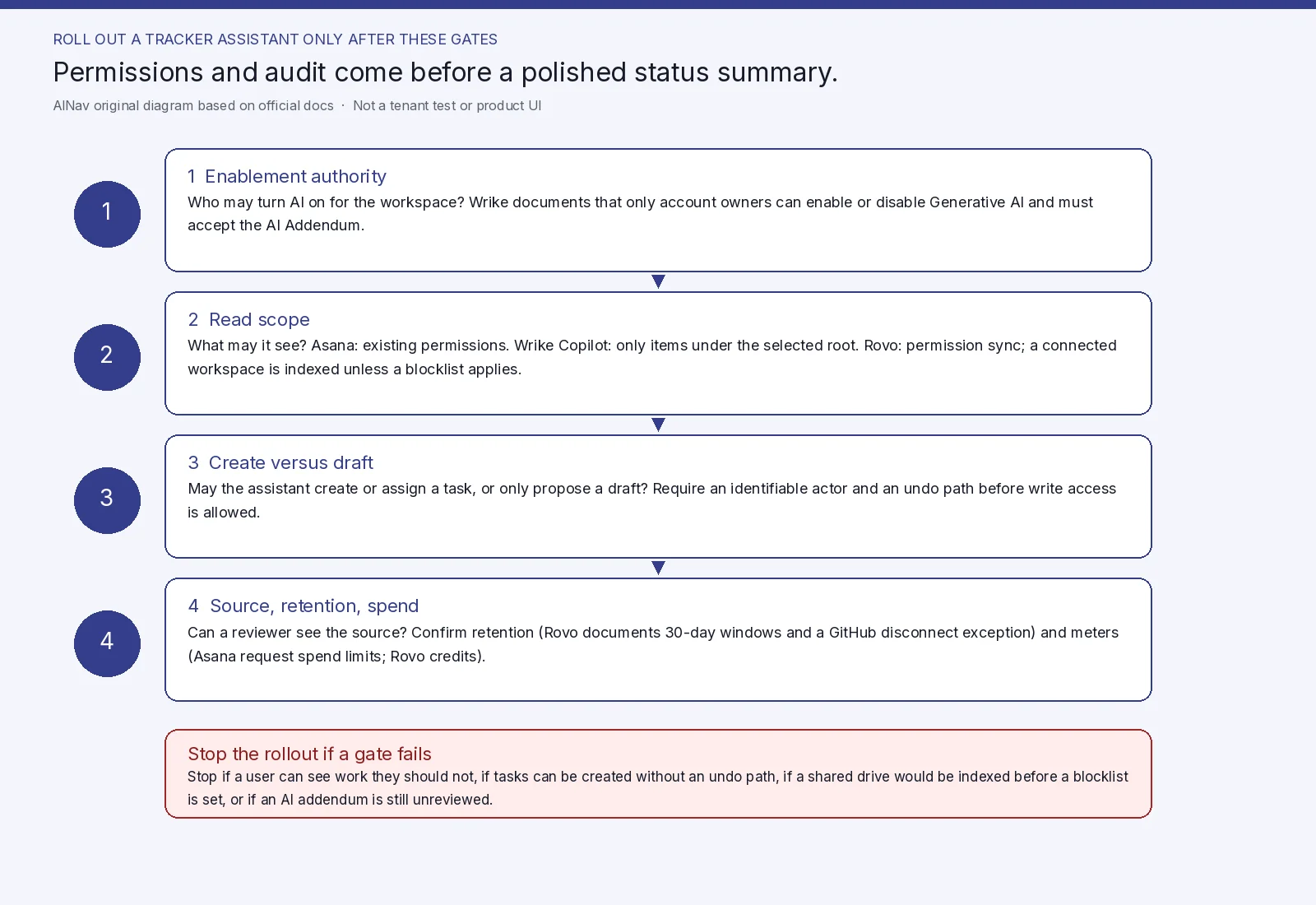
AINav original diagram based on official docs. Sources: Asana AI FAQ, Wrike Copilot help, Rovo data privacy. Not an official screenshot or a tenant test.
A pilot you can fail on purpose
Use a sandbox workspace and fictional projects. Include one project a test user must not see, and one task the assistant should propose but not assign. Do not paste real employee notes, contracts, or production issue data into the trial.
Acceptance checks:
- Permission boundary. A user without access to Project Confidential should not receive its contents in a summary or chat answer. Asana documents reliance on existing permissions; Wrike documents a selected root item; Rovo documents permission sync and, for some connectors, a blocklist. If any of those controls cannot be shown in your tenant, stop.
- Create versus draft. Agree in writing whether the assistant may create a task or only propose one. If it can create or assign, require an identifiable actor in the activity history and a way to undo the change.
- Enablement authority. Wrike documents that only account owners can enable or disable Generative AI. Asana documents spend limits and a usage dashboard for metered requests. Rovo usage is credit-based; get the current allowance. If no admin owns those controls, do not enable the feature org-wide.
- Source and retention. Prefer answers that point back to a task, doc, or file. Confirm the retention periods you need, including Rovo’s documented 30-day windows and the GitHub deletion exception.
Stop the rollout if sources stay opaque, if the assistant can create work the team cannot reliably reverse, if indexing would cover a whole shared drive before a blocklist is set, or if legal review of an AI addendum is still outstanding. A successful status-summary demo is not a passing pilot.
Who should enable this, and who should wait
This evaluation is for operations leads, team leads, and workspace admins already running work in Asana, Wrike, or Atlassian Cloud who are being asked to turn on native AI.
It is not for teams whose real gap is wiki drafting, office-suite generation, or knowledge search outside the tracker, or for organizations that cannot assign an owner for enablement, spend limits, or connectors. It is not a substitute for access-control cleanup: an assistant that “runs on existing permissions” will expose messy project access as it stands.
Frequently asked questions
Can we treat Notion AI or Microsoft 365 Copilot as the same purchase? No. They may be right for docs or office work, but they are not a work-tracker permission model. Use the copilot and docs articles linked above for those jobs.
Is Asana AI free on paid plans? Asana says AI Studio Basic, AI Teammates, and Asana Dash are included in all paid plans, while Teammates and Dash run on metered AI requests with a dashboard and spend limits. The per-request rate is not verified here.
Does Wrike Copilot work on the Team plan? Official help says no: it is listed for Business, Pinnacle, and Apex, not Free or Team, and it requires the AI Addendum.
If we disconnect a Rovo third-party connector, is indexed data gone immediately? Atlassian documents deletion within 30 days, with a different GitHub path that also requires uninstalling the GitHub for Jira app. Immediate deletion is not what the reviewed page states.