guides
From a recorded internal meeting to action items with Fathom or MeetGeek
A documentation-based internal-meeting workflow: capture, draft notes, a human checkpoint, and an assigned action item. Official Fathom and MeetGeek features, prices, and privacy terms reviewed November 23, 2026 (Asia/Shanghai). No meetings were recorded or scored. Fathom’s official site states it is now part of Superhuman; this is not a Superhuman Mail buying guide.
An internal meeting is useful only if a decision or a task survives the call. That job is not the same as choosing a three-product meeting-notes stack, and it is not the same as turning on sales-call intelligence inside a conferencing suite you already pay for. The workflow below is for teams that already meet on Zoom, Google Meet, or Microsoft Teams and need a repeatable path from capture to a human-reviewed action item.
This documentation-based guide was reviewed on November 23, 2026 (Asia/Shanghai). We did not join a live meeting, record colleagues, measure transcript accuracy, or time a summary. No minutes-saved figure or quality score is claimed. Descriptions come from official product and documentation pages opened that day. Consumer and team prices are date-stamped official list prices in the currencies and billing periods shown on those pages; they are not a quote for every region, tax, or invoice.
A different job from a notes bake-off or a sales-call add-on
AINav already has a comparison of Otter, Fireflies, and Descript as meeting-notes stacks, and a workflow for Zoom Revenue Accelerator when sales calls already live in Zoom. This article does not restage those pieces. It follows one internal-meeting workflow: capture, draft notes, human checkpoint, and an action item that can be assigned in a work tool. Fathom and MeetGeek are used because both are live AINav tools whose official pages describe transcription, summaries, and action items across common conferencing products. They are not treated as the only products in the category, and they are not ranked.
If the bottleneck is “we need a task system that can take an approved action,” start with your work-management tool after the note is reviewed, not with a second notetaker. That adjacent job is covered in How to Evaluate AI Task and Work Management Assistants Before You Roll Them Out.
Official product frames, including a corporate change
Fathom’s official site describes an AI notetaker that summarizes meetings so people can stay with the conversation, with capture “bot or no bot,” and it lists Zoom, Google Meet, and Microsoft Teams among conferencing integrations. The homepage reviewed today also states that Fathom is now part of Superhuman, and a dated announcement, “Fathom Is Now Part of Superhuman,” is signed by Fathom CEO Richard White and dated September 14, 2026. This article still treats Fathom as a meeting-notes product. It does not treat that announcement as proof that Fathom meeting capture is bundled into every Superhuman inbox plan.
MeetGeek’s official site describes an AI meeting assistant that records and transcribes meetings on Google Meet, Zoom, and Microsoft Teams, produces notes, summaries, and action items, and supports a meeting library and AI chat over past conversations. The official pricing page also describes bot-free recording and the ability to upload audio or video.
Neither official marketing page is a substitute for consent rules in your jurisdiction, for a customer or employee recording policy, or for a signed data-processing agreement. Read the live terms at sign-in.
The workflow: input, steps, checkpoint, output
Use a fictional internal brief, a meeting you are authorized to record, or a sandbox workspace. Do not upload a confidential customer call or an unreleased product discussion to a vendor if policy forbids it.
- Input. Write down the conferencing product you already use, who must be notified that a meeting may be recorded, where the recording is allowed to be stored (including region), and what “done” means: a summary for attendees, a list of action items with owners, or both. If the vendor offers a bot and a bot-free option, choose one on purpose. Fathom’s official pricing page describes a choice of bot-free (in beta, and the feature table says the beta is for Mac) or bot capture. MeetGeek’s official pricing page lists an AI Meeting Agent and bot-free recording, including on its free Basic plan.
- Capture. Start from a single recurring internal meeting, not a production customer call. Confirm on the official product whether a participant notification or consent control exists for the plan you would actually buy. MeetGeek’s Business plan officially lists recording consent notifications and “private meetings by default.” Do not assume a free plan has the same controls.
- Draft. After the meeting, you should have a transcript or recording plus a vendor-generated summary and, on plans that include them, suggested action items. Fathom’s official individual Free plan lists unlimited recordings and transcriptions and instant AI call summaries; AI-generated action items are listed on Premium and above. MeetGeek’s official Basic plan includes an AI summary for every meeting and AI chat and search; higher plans add automation, CRM sync, and team spaces. These are official feature lists, not measured quality.
- Human checkpoint. A person who was in the meeting, or who owns the work, edits the draft before anything is assigned. Check names, owners, dates, and any item that would change a customer or employee obligation. This step is the point of the workflow. A raw AI list is not an assigned task.
- Output. Move only approved items into the team’s existing task or document tool. If you cannot export or copy an action item into that tool, the workflow has failed, even if the summary looks polished. Then set a retention expectation that matches the official plan, not an informal “we’ll delete it later.”
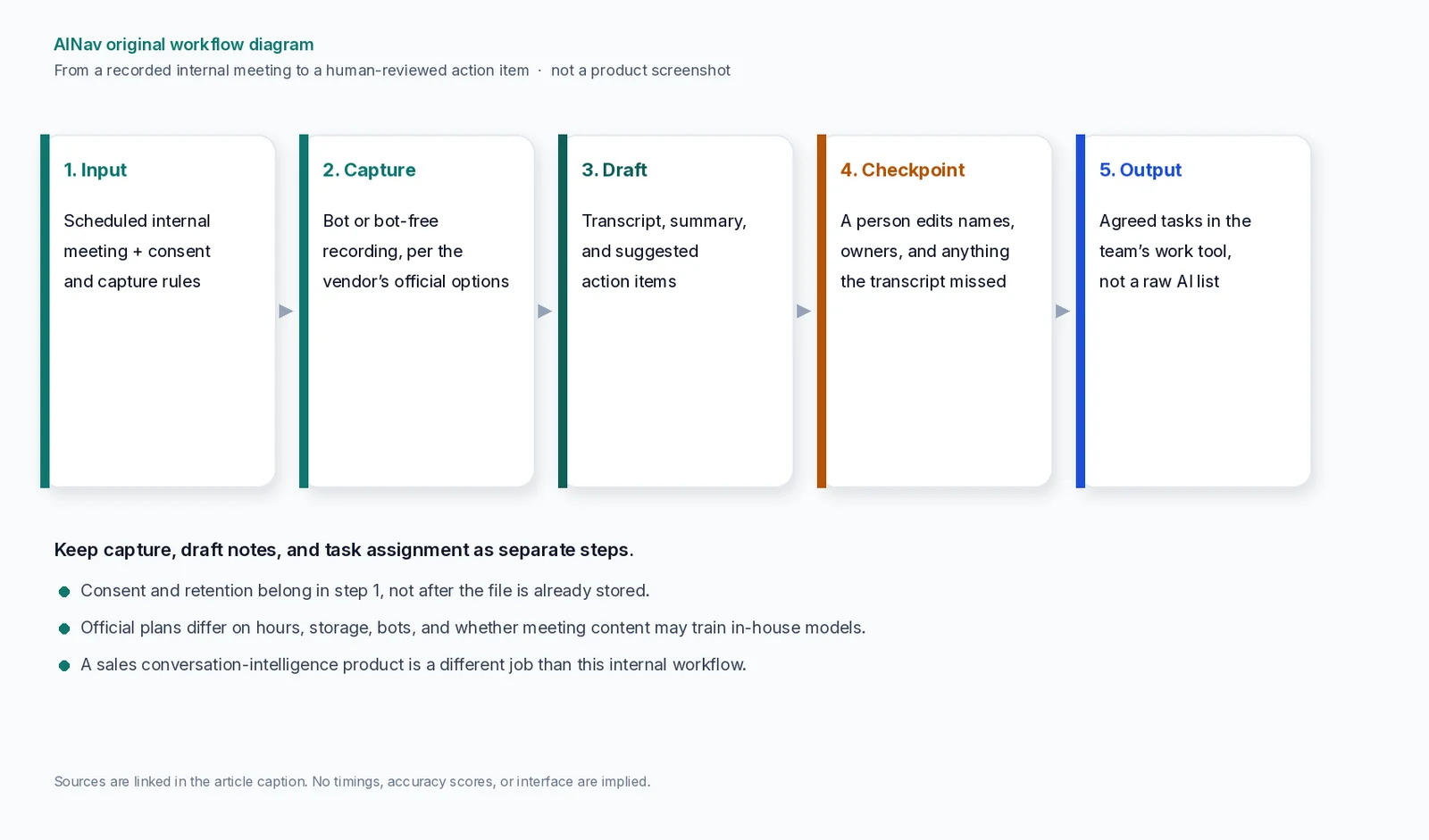
AINav original diagram based on official docs. Sources: Fathom, Fathom pricing, Fathom privacy policy, Fathom is now part of Superhuman, MeetGeek, MeetGeek pricing, MeetGeek privacy. Not an official screenshot or a transcript-quality test.
What official pricing and privacy pages said on November 23, 2026
Fathom’s official pricing page is titled “Fathom Pricing 2026: Free Plan or Plans from $15/mo.” For individuals, Free is listed at $0, “free forever,” with unlimited recordings and transcriptions and instant AI summaries. Premium is listed at $16 per user per month when billed annually, or $20 per user per month, and adds advanced summaries, AI-generated action items, a conversational meeting assistant, and a custom meeting bot. For teams, Team is listed at $15 per user per month on the annual toggle shown, or $19, with a two-user minimum, and includes a shared workspace, AI-generated action items, team security controls, and HIPAA compliance with a standard BAA. Business is listed at $25 per user per month annually, or $34, also with a two-user minimum, and adds CRM field sync, Deal View, and coaching metrics. Enterprise is listed at $35 per user per month, annual only, and adds SSO and SCIM, custom data retention, custom BAA eligibility, and implementation support. The page also describes a 90-day guarantee on several plans. Those figures are official list prices as shown that day, not an invoice.
Fathom’s official privacy policy says that, when you use the service through an organization, Fathom operates as a processor or service provider and the customer is the controller for purposes of laws such as the GDPR. It also says Fathom may use de-identified data generated from meeting content information to train, improve, and customize in-house models, that you can opt out of that use in account settings, and that Fathom does not authorize third parties such as OpenAI, Anthropic, or Google to use personal information or meeting content to train their models. If a no-training stance is a hard requirement, confirm the live control and any signed addendum; do not infer a total ban from the third-party sentence alone.
MeetGeek’s official pricing page lists Basic as free forever, with 3 hours of transcription per month, 3 months of transcript storage, 1 month of audio storage, and recordings of up to 2 hours. Pro is listed at $9.99 per user per month billed yearly, or $15.99 monthly, with 20 hours of transcription per month, one year of transcript storage, six months of audio storage, and $0.50 per extra hour. Business is listed at $17 per user per month billed yearly, or $27 monthly, with unlimited transcription and transcript storage and 12 months of video storage. Enterprise is custom. The same page states that security claims apply on every plan, including Basic: SOC 2 Type II, ISO 9001, GDPR and CCPA, HIPAA with a BAA on annual plans, EU or US data storage, and “Your data is never used to train AI models.” MeetGeek’s official privacy page repeats that meetings are stored in the EU or the US, that meeting content is not used to train AI (its own models or anyone else’s), and that retention follows the plan, with earlier deletion available. Those are official statements, not a legal opinion about your workforce.
If the two privacy postures matter more than the feature list, write that down before a trial: Fathom documents an in-house-training use with an opt-out; MeetGeek documents a “never used to train” statement. Re-read both pages at purchase, because privacy terms change.
Who should run this workflow, and who should wait
This workflow is for internal team meetings where a person can take responsibility for the action list, and where the team can accept a cloud notetaker on a conferencing product they already use. It is also for teams that were shown a meeting-notes comparison and a sales-call add-on in the same meeting and need to keep those jobs apart.
It is not a substitute for a recording-consent policy, and it is not a bake-off of Otter, Fireflies, or Descript. It is not a ranking of transcript beauty or coaching scores. Wait if you cannot notify participants, cannot accept the vendor’s training or retention terms, or have no one who will edit the draft before tasks are assigned.
Frequently asked questions
Is Fathom the same purchase as Superhuman Mail? Not on the official pages reviewed here. Fathom’s official announcement says Fathom is now part of Superhuman. Superhuman’s official suite pricing is a separate contract, and Mail is listed on different plans than a Fathom meeting seat. Confirm both quotes if a vendor presents them together.
Can I treat the free plans as unlimited team memory? No. Fathom’s official individual Free plan lists unlimited recordings and summaries but not the team workspace, action-item, or HIPAA-BAA items listed on Team. MeetGeek’s official Basic plan is capped at 3 transcription hours per month and shorter storage windows. Read the plan you would actually use.
Does a polished summary mean the action items are safe to assign? No. This review did not inspect transcripts. Official pages describe generated summaries and action items; they do not replace a human checkpoint.